
Best Coin Counter App Picks for 2026
Discover the best coin counter app for crypto and physical cash. We compare 12 top apps for iOS, Android, and business to help you count smarter.
Tired of manually counting coins from a piggy bank, tip jar, or cash register? A coin counter app saves time and eliminates human error, whether you're a small business owner closing out or just tallying loose change. But with so many options—camera scanners, weight-based calculators, and manual tallies—choosing the right one is tough.
This guide cuts through the noise. We've compiled a detailed list of the top coin counter apps and platforms, evaluating each one based on its core counting method, accuracy, speed, and ideal use case. You'll find direct links and screenshots for every option, allowing you to see exactly how they work before you download. We will break down the specific features, pros, cons, and pricing for each tool to help you make an informed decision. Forget endless searching and trial-and-error; this resource is your direct path to finding the perfect app for your specific coin-counting needs. Let's find the right tool for you.
1. MyChange Counter (iOS)
MyChange Counter is a dedicated iOS app that focuses on one simple task: quickly tallying physical cash. It’s an ideal tool for anyone who needs a fast, no-frills method to count loose change from a jar, track a tip fund, or manage laundry money without the complexity of a full-fledged budgeting app. The user interface is exceptionally straightforward, allowing you to tap denominations to add them to a running total.
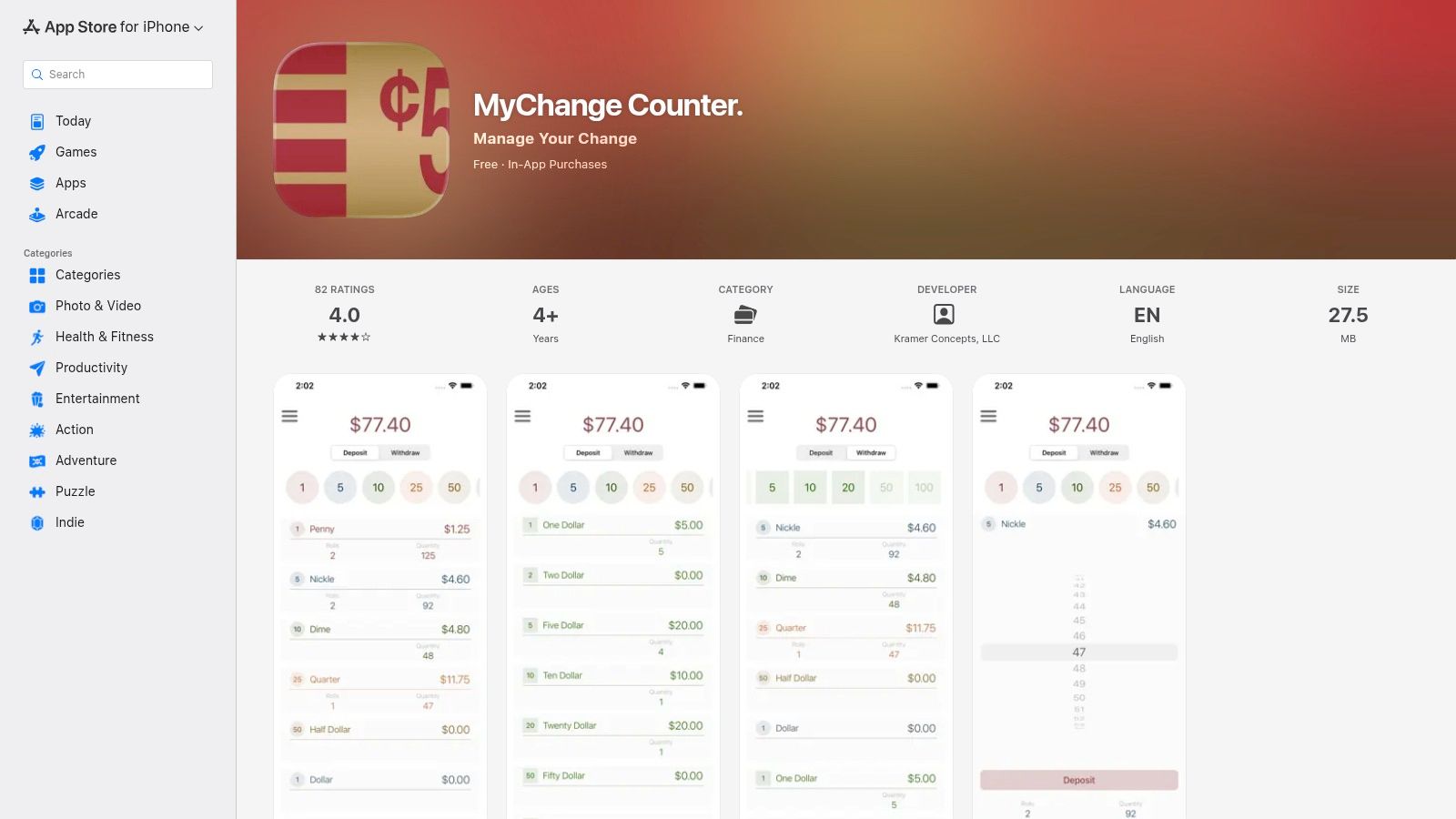
Unlike more advanced tools, this coin counter app does not use your phone's camera. Instead, it relies on manual entry, which makes it incredibly fast for anyone who has already sorted their coins. Its primary strength lies in its simplicity and long-standing reliability, with consistent updates ensuring compatibility and performance on both iPhone and iPad. While it doesn't offer the on-chain analysis seen in crypto-focused tools, it provides a solid foundation for understanding the value of manual asset tracking, a skill also applicable when you need a good coin finder app for digital assets.
Actionable Takeaway
This app is best for personal use cases where you need a digital replacement for pen and paper.
- For Parents: Use it with your kids to tally their piggy bank savings.
- For Service Workers: Quickly count tips at the end of a shift.
- For Home Use: Keep a running total of your coin jar for laundry or coffee funds.
Access it here: MyChange Counter on the App Store
2. Visual Currency Calculator (iOS)
Visual Currency Calculator is an exceptional iOS tool designed for counting physical money, with a strong focus on accessibility and ease of use. It offers two distinct modes: a "Counter" for tapping denominations to add them to a total, and a "Calculator" for combining separate piles of cash. This makes it a great choice for households, educators teaching money management, and anyone needing a clear, reliable method for totaling coins and bills without extra complexity.
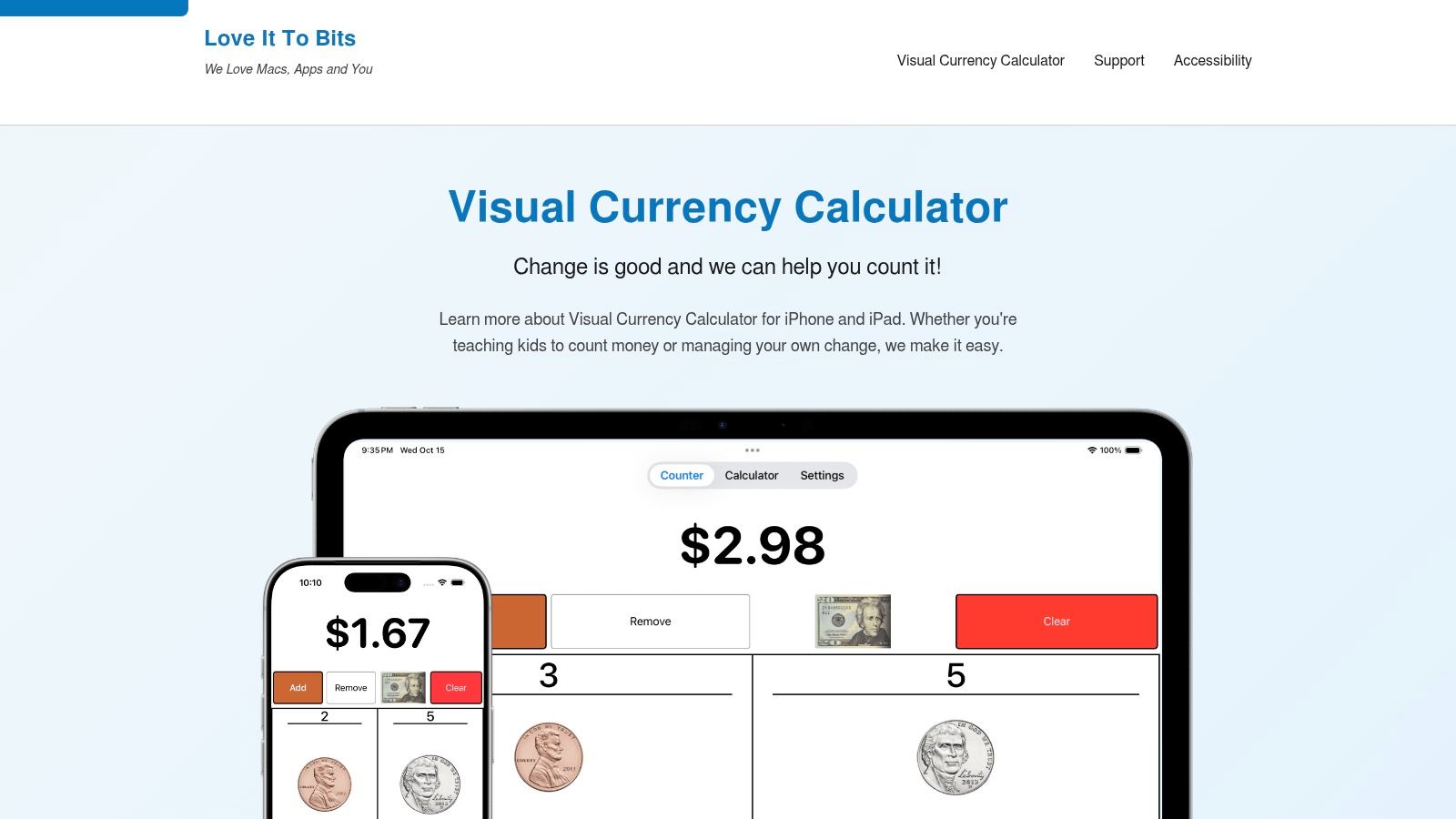
Unlike more technical tools, this coin counter app prioritizes a foolproof visual interface and robust accessibility features, including full support for VoiceOver and Dynamic Type. The manual entry system is fast and dependable, perfect for users who have their coins sorted. While its function is physical cash counting, the principles of accurate manual tallying are also relevant when using a crypto calculator app to track digital assets. The app’s strength is its directness and inclusive design, ensuring anyone on an iPhone or iPad can use it effectively.
Actionable Takeaway
The accessibility features make this app stand out for educational and inclusive environments.
- For Educators: Use the large, visual interface to teach children about money denominations.
- For Visually Impaired Users: Full VoiceOver support allows for independent cash counting.
- For Households: The "Calculator" mode is perfect for combining multiple family members' savings.
Access it here: Visual Currency Calculator Website
3. CoinCounter — Count Coins by Weight (iOS)
CoinCounter offers a unique, physical-to-digital approach for people managing large volumes of physical change. Instead of tapping denominations or using a camera, this app lets you weigh sorted coins on a simple kitchen scale and enter the weight in grams. It then instantly calculates the total value based on official coin weights, making it an incredibly efficient method for bulk counting. This is the perfect tool for small business owners, restaurant managers, or anyone with a massive coin jar.

This coin counter app stands out by turning a common household item-a digital scale-into a powerful counting machine. It supports multiple currencies, including USD, EUR, GBP, and JPY, and works entirely offline. While its method requires the extra step of sorting coins by denomination, the speed gained during the counting phase is significant for large quantities. This weight-based system is a practical alternative to expensive commercial sorting machines and provides a high degree of accuracy.
Actionable Takeaway
To use this app effectively, follow these steps:
- Sort Coins: Separate your coins by denomination (e.g., all pennies in one pile, nickels in another).
- Use a Scale: Place a container on a digital kitchen scale and tare it (zero it out).
- Weigh Each Pile: Add one denomination of coins to the container and note the weight in grams.
- Enter into App: Input the weight for that denomination in the app.
- Repeat: Do this for all your sorted piles to get a rapid, accurate total.
Access it here: CoinCounter on the App Store
4. Tilly Tally — Cash Counter (iOS)
Tilly Tally is a powerful cash management tool for iOS, designed with retail and small business needs in mind. It goes beyond simple coin counting by supporting bills, coin rolls, and multiple currency drawers, making it ideal for end-of-shift reconciliations. Its standout feature is the ability to calculate coin counts by weight; a long press on a denomination allows you to enter the weight in grams, and the app automatically computes the total value. This makes it an incredibly efficient coin counter app for anyone handling large volumes of sorted change.
The app is built on a foundation of practical user feedback, resulting in frequent enhancements that directly address real-world challenges. While it serves a different market than a crypto coin finder app, its focus on meticulous asset tracking and reconciliation provides a valuable lesson in managing physical assets. The ability to export data and switch between multiple tills solidifies its position as a professional-grade counter rather than just a personal savings jar tracker.
Actionable Takeaway
Ideal for small businesses to streamline cash-up.
- Multi-Till Management: Use the multi-drawer feature (premium) to reconcile several cash registers separately.
- End-of-Day Reporting: Enter your starting float, then count the final drawer. The app calculates the difference, which you can export for your records.
- Hybrid Counting: Use manual tapping for bills and the count-by-weight feature for large volumes of coins to save time.
Access it here: Tilly Tally on the App Store
5. Money Counter (iOS)
Money Counter broadens the scope of a typical cash-counting tool, making it exceptionally useful for small retailers, event organizers, or travelers managing multiple currencies. This iOS app supports both coins and banknotes for over 30 global currencies, allowing for detailed denomination-by-denomination entry. Its strength is its flexibility and reporting capability, which sets it apart from single-purpose counters.
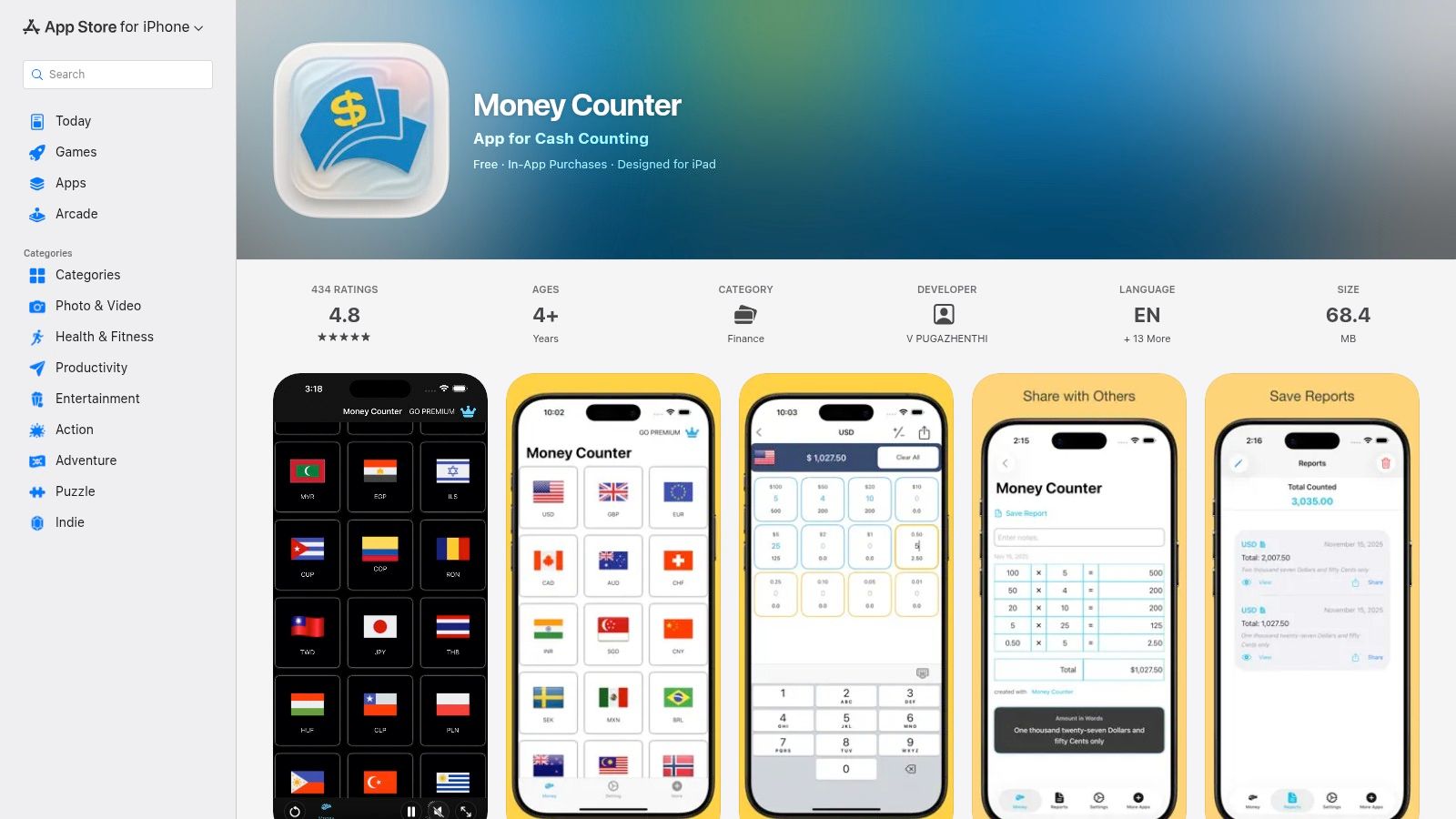
This coin counter app functions as a digital cash register drawer, enabling you to generate and share basic reports of your totals. While it relies on manual input instead of a camera, this approach provides precision for anyone needing to create an accurate paper trail for a small business till or event float. Its regular updates, noted into late 2025, show a commitment to reliability. For crypto users, its multi-asset structure offers a familiar model for tracking diverse physical assets, mirroring the need to manage various tokens, which is a core function of a dedicated coin finder app for digital portfolios.
Actionable Takeaway
This is the go-to app for anyone handling money in more than one currency.
- Travelers: Before a trip, count your foreign currency to ensure you have what you need. Track spending as you go.
- Event Organizers: If you're running a booth at a market or festival, use this app to cash up at the end of the day and create a quick report.
- Small Retailers: Its support for 30+ currencies makes it valuable for businesses in tourist areas or that handle international transactions.
Access it here: Money Counter on the App Store
6. Photo Coin Counter (Photocoin) (iOS)
Photo Coin Counter, also known as Photocoin, takes a different approach to tallying physical currency by using your phone's camera. This app is designed for users who want a quick, automated estimate of their loose change without the need for manual sorting or tapping. The workflow involves taking a snapshot of your coins, after which the app attempts to automatically detect and count them. It’s a novel idea for casual situations, like quickly checking the value of a small pile of coins on a table.
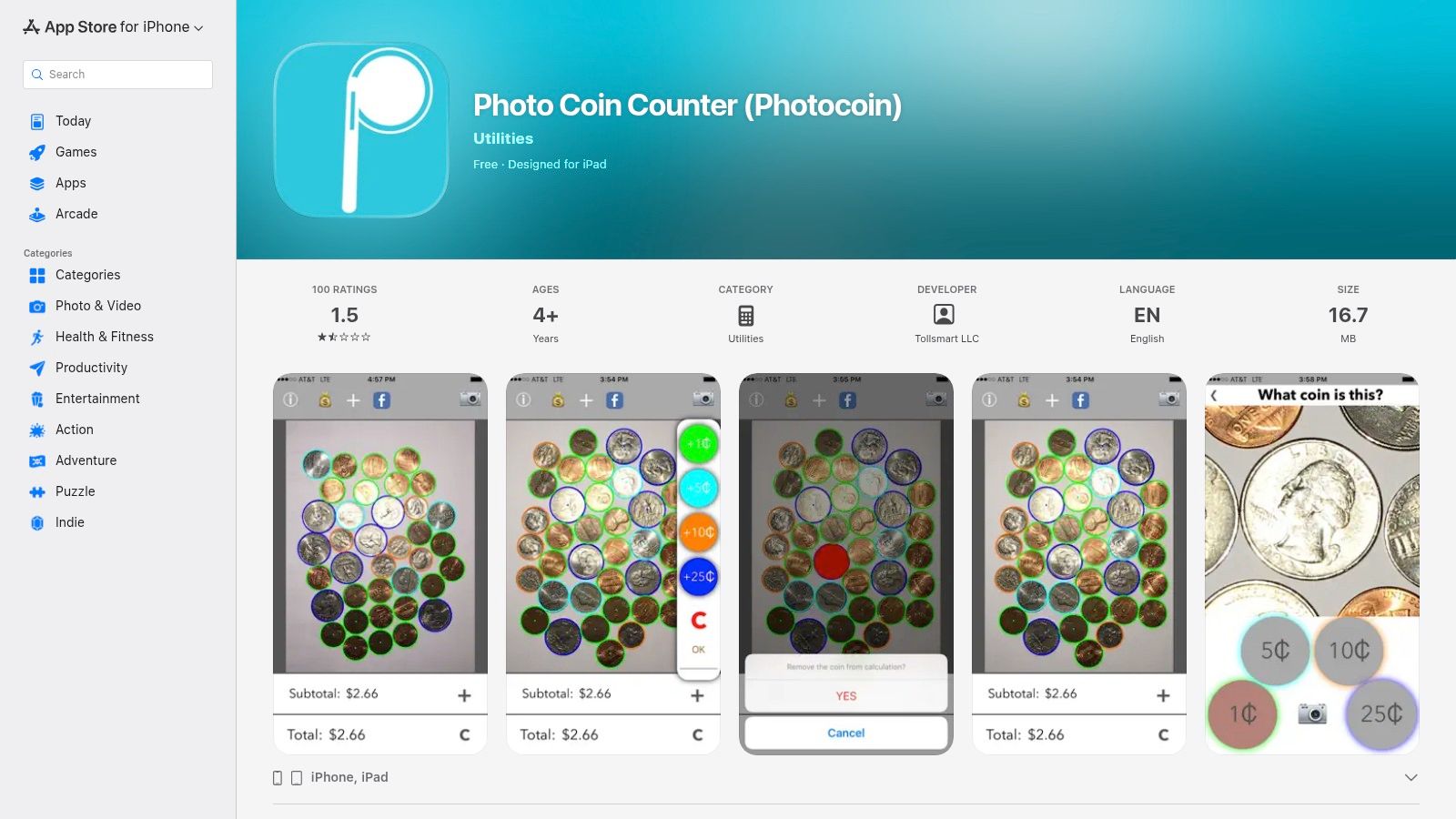
Unlike manual entry tools, the accuracy of this coin counter app is highly dependent on external factors like lighting, camera angle, and how the coins are spread out. The app includes an on-device tilt aid to help improve results, but it remains best suited for rough estimates rather than precise tallies. While it is an older app with limited recent updates, its snapshot-based method offers a fast and convenient way to get a ballpark figure, making it an interesting gadget for quick, non-critical counts.
Actionable Takeaway
For best results with this camera-based app, follow these tips:
- Use a Plain, Contrasting Background: A dark, solid-colored surface works best.
- Spread Coins Out: Avoid overlapping coins as much as possible. The app can't see what's hidden.
- Ensure Good, Even Lighting: Use bright, indirect light to avoid shadows and glare, which confuse the image recognition.
- Use the Tilt Aid: Follow the on-screen guide to get the optimal camera angle.
Access it here: Photo Coin Counter on the App Store
7. iScanner — Count Mode (iOS/Android)
iScanner positions itself as an all-in-one document management tool, but its AI-powered "Count Mode" offers a unique take on a physical coin counter app. Instead of manual entry, this feature uses your phone’s camera to visually identify and tally objects. It includes a specific "Coins" category, allowing you to photograph a pile of change and receive an instant count, which is ideal for quickly auditing a cash drawer or verifying a large coin jar without manual sorting.

The app’s strength lies in its ability to create a visual record. After scanning, it saves an annotated image showing exactly what it counted, which can be exported and shared as proof. You can also interactively correct the count by tapping on missed or incorrectly identified coins directly on the image. While accuracy depends on lighting and coin arrangement, it provides a powerful visual audit trail that manual counters lack, bridging the gap between physical counting and digital record-keeping.
Actionable Takeaway
The visual audit trail is this app's killer feature. Use it when you need proof.
- Expense Reports: Count a pile of change for reimbursement, then export the annotated image as documentation.
- Shared Funds: Tallying a tip jar or donation box? Share the visual count with your team for full transparency.
- Inventory Checks: Use the general object counting for more than just coins, like checking stock in a storeroom.
Access it here: iScanner Official Website
8. CountThings from Photos (CountThings)
CountThings from Photos is an industrial-grade object counting platform that brings professional-level automation to physical asset tallying. While not a casual tool, it offers a dedicated 'Coins' template (ID: 386) designed for high-volume, repeatable, and auditable coin counts. This platform is best suited for businesses, organizations, or individuals who handle large quantities of coins regularly and require documented proof of their counts, such as in retail, vending, or charity operations.

Unlike simple consumer apps, CountThings is a workflow-oriented system. The core function involves taking a picture of your coins and applying a counting template for automated detection. This template-based approach makes it a powerful coin counter app for professional settings where accuracy and an audit trail are non-negotiable. Its cross-platform availability (iOS, Android, Windows) and enterprise support options distinguish it as a serious tool for serious counting needs, far beyond a simple digital piggy bank.
Actionable Takeaway
This is a professional tool for repeatable, high-volume tasks.
- Vending Machine Operators: Use a standardized photo setup to quickly count coins from multiple machines, creating an audit trail for each collection.
- Charity Organizations: During fundraising events, use the app to document and verify cash and coin donations efficiently.
- Workflow Integration: Integrate the results via API into your business's accounting or inventory management software for full automation.
Access it here: CountThings Website
9. Cash Counter: Count Money (iOS)
Cash Counter is a modern iOS app designed for quick, efficient tallying of physical currency. It is a solid choice for end-of-day drawer counts, managing donation buckets, or any basic reconciliation task where speed is essential. The interface is clean and minimal, focusing on rapid denomination entry through intuitive stepper controls, which allows users to add or subtract bills and coins without complicated menus.
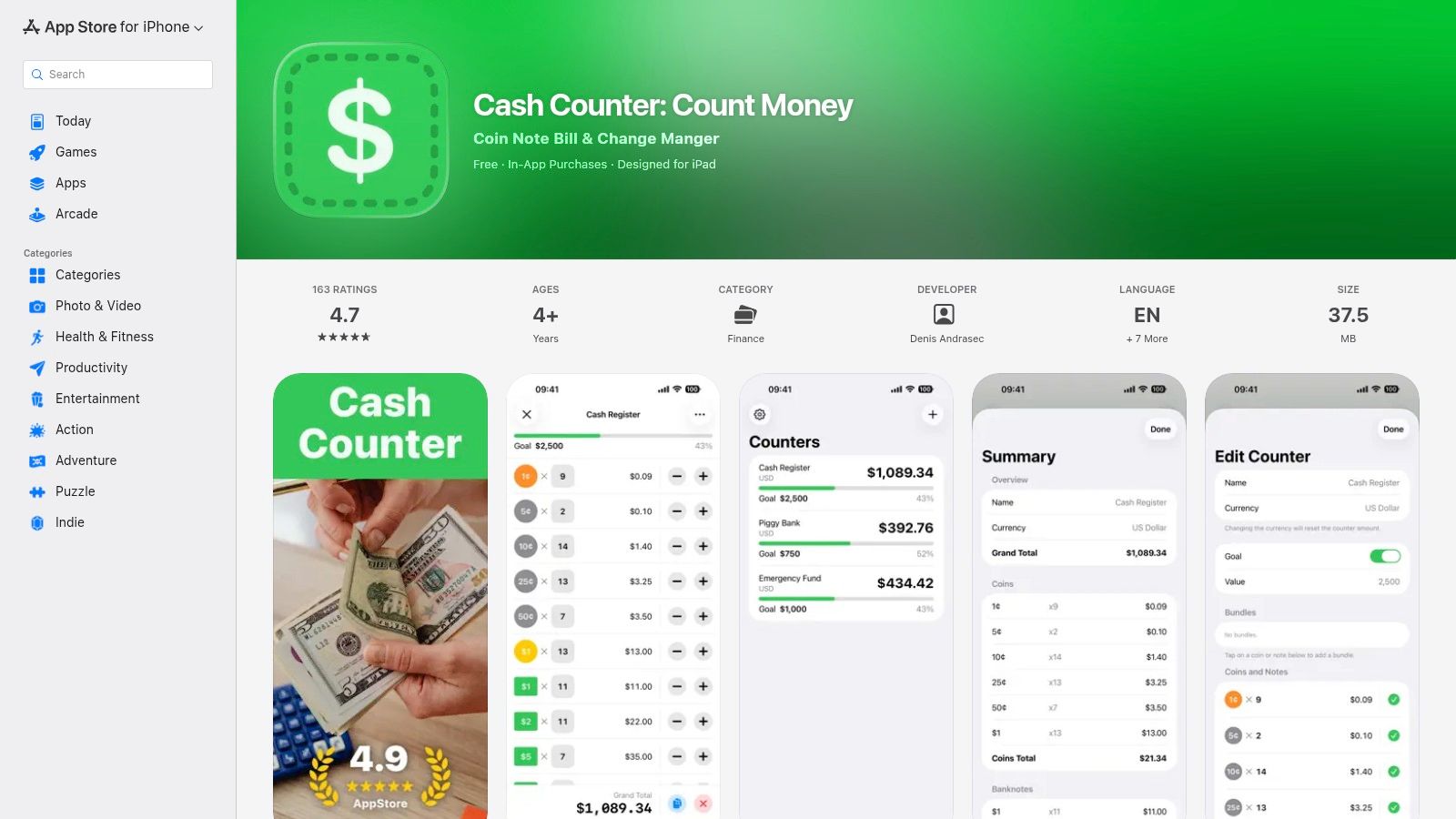
Unlike camera-based tools, this coin counter app depends on manual input, a method that proves faster when currency is already sorted. Its main advantage is its simplicity and modern design, including a dark mode and straightforward export options for creating simple reports. While it doesn't manage complex digital assets, its focused approach to manual counting offers a reliable solution for anyone needing a digital version of a cash register tally sheet. Its feature set is lighter than some competitors, but it excels at its core function.
Actionable Takeaway
This app excels at speed and simplicity for manual counting.
- Daily Cash-Up: The stepper controls (+/- buttons) are faster than typing numbers, making it perfect for quickly counting a cash drawer.
- Quick Reports: After counting, use the share function to send a text, email, or Airdrop of the totals to your manager or for your records.
- Minimalist Choice: If other apps feel bloated with features you don't need, this app's clean, focused design is for you.
Access it here: Cash Counter: Count Money on the App Store
10. CashUp Cash Counter (Shopify POS app)
CashUp Cash Counter serves a niche but critical function for retail businesses using Shopify's Point of Sale (POS) system. It’s a back-office utility designed to streamline the end-of-day cash reconciliation process. Instead of using a separate calculator or a standalone app, merchants can count their cash drawer directly within the familiar Shopify POS interface, reducing errors and saving time. Its tight integration makes it an essential tool for store managers focused on operational accuracy.
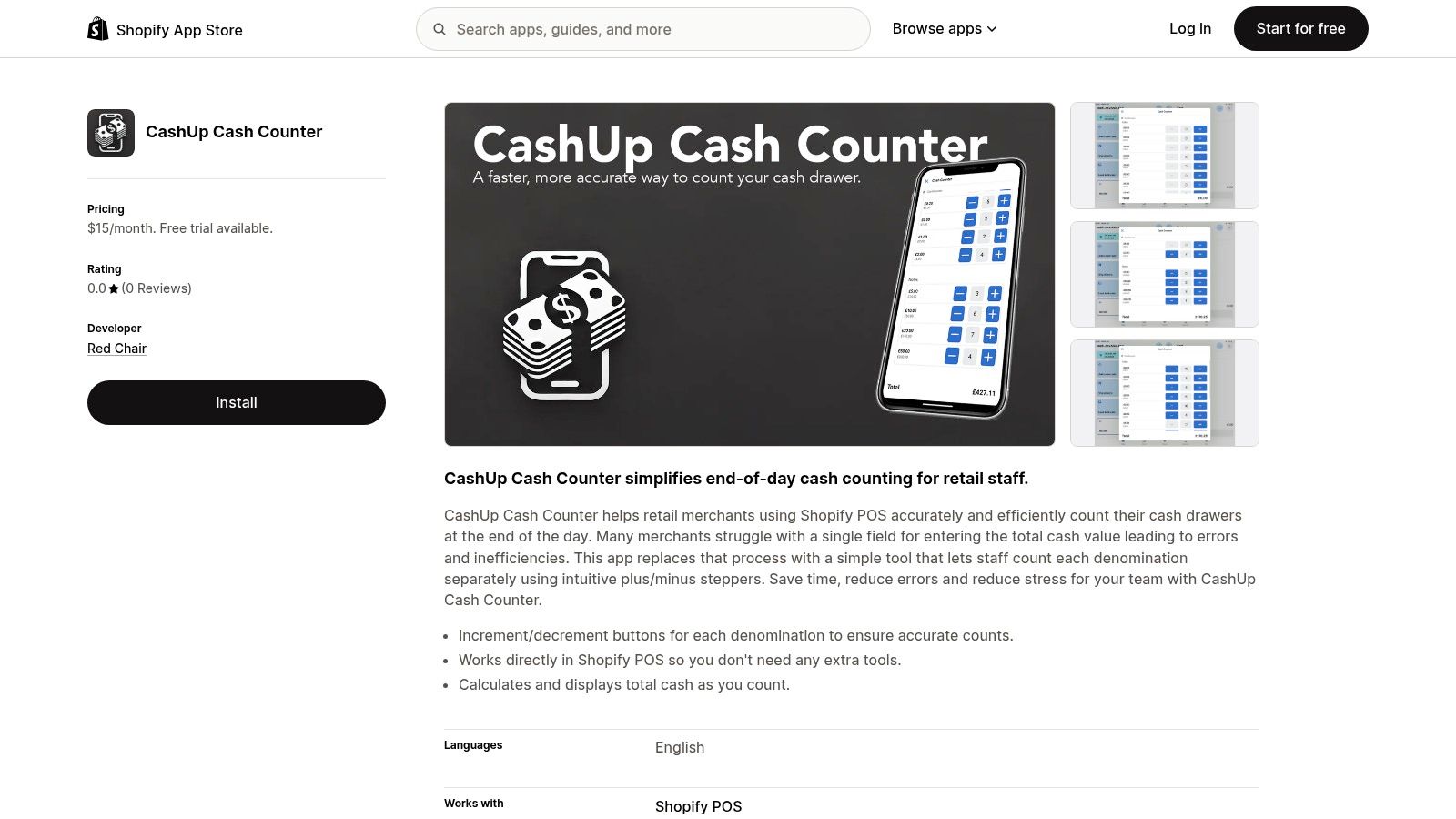
Unlike consumer-focused tools, this coin counter app is built for a commercial environment. It presents a clear, denomination-based input system that updates the total in real time as you count bills and coins. The primary benefit is its ability to embed the counting workflow directly into the platform where sales are managed, eliminating the need to switch between devices or applications. This approach helps maintain data integrity from the cash register to the final daily report, a core principle that even crypto traders can appreciate when tracking multiple digital assets.
Actionable Takeaway
This is a must-have for Shopify POS merchants dealing with cash.
- Streamline Closing: Integrate this into your end-of-day workflow. Staff can count the drawer without leaving the Shopify POS app, reducing training time and potential errors.
- Improve Accuracy: By keeping the counting process within the POS system, you eliminate manual data entry mistakes that can happen when transferring numbers from a calculator to your sales report.
Access it here: CashUp Cash Counter on the Shopify App Store
11. ChangeUp Smart Piggy Bank + App
ChangeUp offers a unique, hardware-based approach to coin counting by pairing a smart piggy bank with a dedicated app. Rather than relying on your phone’s camera or manual entry, this system automatically counts physical coins as they are deposited into the Bluetooth-enabled device. The totals are then synced in real-time to the companion app, providing a hands-off tally. It is designed primarily for families to teach children about saving in an engaging, tangible way.

While this solution isn't for business or high-volume use, it stands out by gamifying the savings process. The app allows users to set savings goals, track progress, and share achievements, making it a powerful motivational tool for kids. For those in the crypto space, this coin counter app serves as a great first step in teaching the principles of asset tracking and goal-setting. The physical action of saving coins and seeing the digital balance grow mirrors the satisfaction of watching a crypto portfolio increase, making it an excellent educational tool for financial literacy.
Actionable Takeaway
Use ChangeUp to make saving fun and educational for kids.
- Set a Goal: Work with your child to set a savings goal in the app, like for a new toy or a day out.
- Automate Savings: Have your child deposit their allowance or found coins into the smart piggy bank. The app automatically tracks their progress toward the goal.
- Celebrate Milestones: Use the app's tracking to celebrate when they reach 25%, 50%, or 100% of their goal to keep them motivated.
Access it here: ChangeUp Website
12. Tellermate Touch (Tellermate)
Tellermate Touch shifts from software-only solutions to a professional-grade hardware and software system designed for commercial environments. This isn't a mobile app but a dedicated count-by-weight machine that reconciles a full cash drawer, including loose coins, rolled coins, and bills, in under a minute. It's built for multi-site retailers, quick-service restaurants, and hospitality operators who require speed, accuracy, and auditable trails for their cash management processes.
While this is a physical coin counter appliance, its cloud connectivity brings modern data management to cash handling. The system provides printable receipts and logs counts to a cloud portal, giving managers visibility across multiple locations. This emphasis on verifiable, high-speed counting is a different discipline than portfolio management, where finding the right app for tracking a crypto portfolio is key to monitoring digital assets. Tellermate excels at securing physical assets with precision, making it a powerful tool for businesses where cash flow is constant.
Actionable Takeaway
This enterprise solution is for businesses looking to optimize cash handling across locations.
- Reduce Count Times: Replace manual counting with this device to cut end-of-shift reconciliation from 10-15 minutes down to under 60 seconds per drawer.
- Centralized Auditing: Use the cloud portal to monitor cash counts from all your locations in real-time, helping to identify discrepancies or training issues quickly.
- Minimize Shrinkage: The accuracy and audit trail produced by the machine help reduce cash losses due to errors or theft.
Access it here: Tellermate Touch on Tellermate.com
Coin Counter App Feature Comparison
To help you decide, here’s a table comparing the key aspects of each app.
| App / Device | Best For | Counting Method | Key Feature | Platform | Price Model |
|---|---|---|---|---|---|
| MyChange Counter | Personal Totals | Manual Tally | Simplicity, speed | iOS | Free with IAP |
| Visual Currency Calc | Education, Accessibility | Manual Tally | VoiceOver support | iOS | Free |
| CoinCounter | High-Volume Coin Jars | Count-by-Weight | Uses kitchen scale | iOS | Freemium |
| Tilly Tally | Retail Cash-Up | Manual & Weight | Multi-drawer support | iOS | Freemium |
| Money Counter | Multi-Currency Needs | Manual Tally | 30+ currencies | iOS | Freemium |
| Photocoin | Quick Estimates | Camera Scan | Snapshot counting | iOS | Free with IAP |
| iScanner | Auditable Counts | Camera Scan | Annotated photo proof | iOS, Android | Subscription |
| CountThings | Business Workflows | Camera Scan | Enterprise templates | Cross-Platform | Subscription |
| Cash Counter | Fast Drawer Counts | Manual Tally | Stepper controls | iOS | Free |
| CashUp | Shopify Merchants | Manual Tally | Native POS integration | Shopify POS | Subscription |
| ChangeUp | Teaching Kids to Save | Hardware Auto-Count | Gamified goals | iOS, Android | Hardware Purchase |
| Tellermate Touch | Multi-Site Businesses | Hardware (Weight) | Cloud audit trail | Hardware | Enterprise |
Start tracking smart money today
Join thousands of traders using WalletFinder.ai to find profitable wallets and copy their trades.
Start Free Trial →

