Mastering DeFi Portfolio Optimization
Master DeFi portfolio optimization. Explore basics, advanced methods, and crypto risks like slippage & tail risk. Build better on-chain portfolios.

June 16, 2026
Wallet Finder

June 4, 2026

Turn On-Chain Noise Into Actionable Signals
In crypto, the edge usually isn't missing. It's fragmented. One signal sits in a DEX feed, another in wallet flows, another in protocol fundamentals, and by the time you've stitched them together manually, the trade is gone.
That's why most traders end up with a messy stack of tabs, screenshots, and half-finished spreadsheets. You can find good free tools, but using them well is the hard part. Some are great for macro context. Some are great for raw chain data. Some are great for watching wallets move in real time. Very few do all three.
The best free analytics setup isn't one tool. It's a small stack where each tool has a clear job. That matters even more now because analytics has moved beyond simple traffic counting into privacy-first measurement and behavior-level insight, as noted in SiteBehaviour's 2024 overview of free web analytics tools. In practice, crypto researchers need the same mindset. Separate broad monitoring, behavioral observation, and decision-ready analysis.
This list gets straight to the tools. Each one solves a different problem in a wallet discovery and copy-trading workflow, and each one pairs well with Wallet Finder.ai when you want to turn raw on-chain data into trades you can act on.
Dune is where a lot of serious on-chain research starts. If you like proving a thesis with data instead of vibes, this is the free tool that gives you the most room to think. It works best when you already know what you're trying to test, such as which wallets accumulated before a token moved, which protocols are pulling users, or how activity changed across chains.
The biggest strength is speed to insight. You can use community dashboards first, then move into your own SQL when the public dashboards stop answering the exact question you care about.
If you're comparing data tools for crypto research, this Wallet Finder.ai breakdown of Nansen vs Dune vs DeBank is a useful read because it frames Dune in the context of actual trading workflows instead of generic feature lists.
Practical rule: Use Dune for hypothesis testing, not for constant monitoring. Build the logic there, then move recurring wallet alerts into Wallet Finder.ai.
For copy traders, Dune is strongest before the trade. Use it to identify patterns. Which wallet cohorts buy early. Which contracts attract repeat winners. Which chains are seeing unusual user migration. Then use Wallet Finder.ai to operationalize that research by tracking the wallets you uncover.
Dune is less useful when you need instant action. It's an analysis bench, not your fastest execution radar.
Use Dune when you want a free analytics tool that rewards curiosity and SQL fluency.
If Dune is your lab, DeFiLlama is your market map. It's one of the fastest ways to understand where money and attention are moving across DeFi without writing a query or cleaning a dataset first.
That matters when you're scanning sectors, not individual wallets. Before you go hunting for traders to follow, you need to know where the opportunity is likely to emerge. DeFiLlama helps narrow that field fast.
Here is the typical dashboard view:
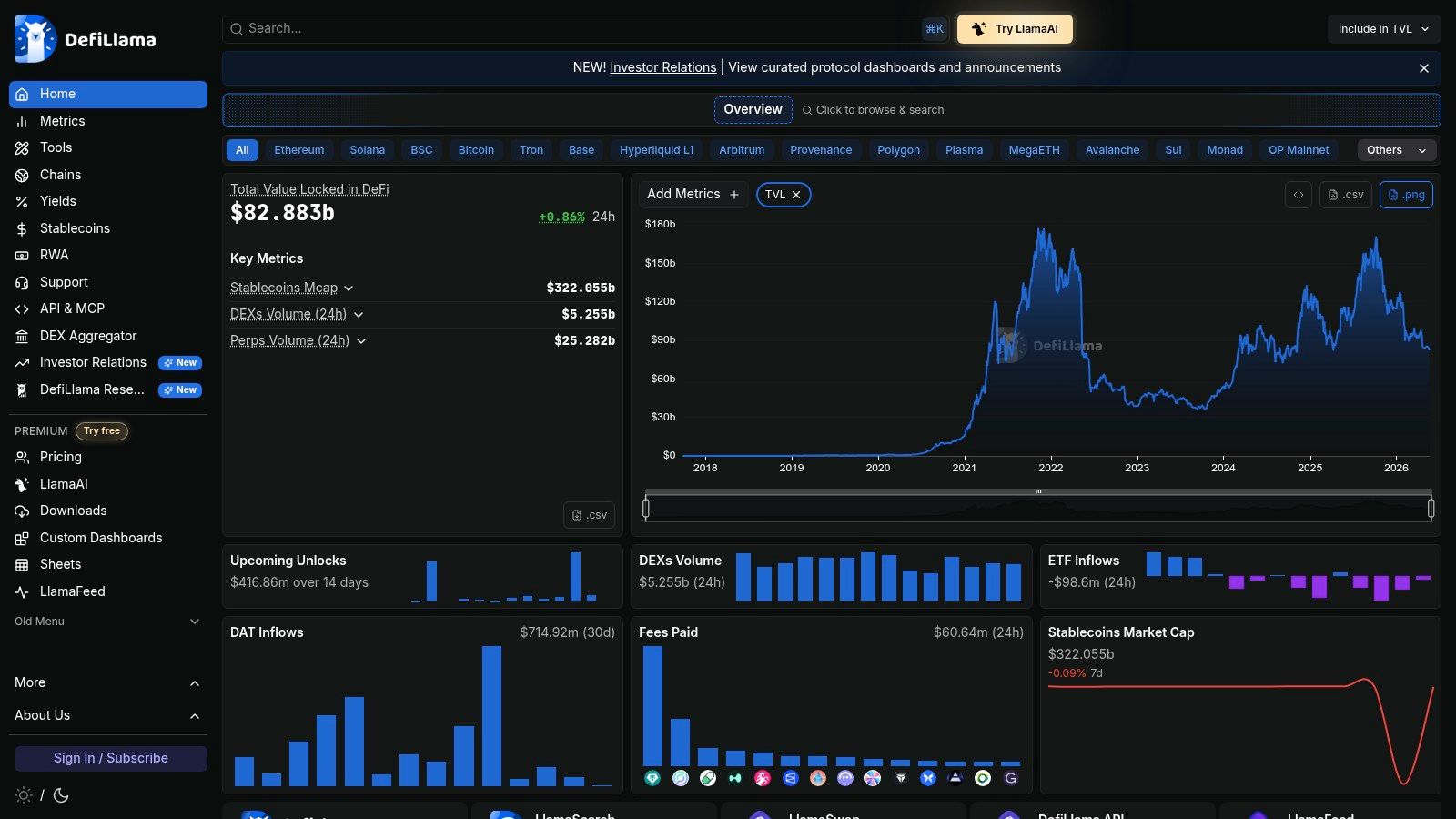
Its free dashboards cover more than 6,000 protocols and 400-plus chains, with views for TVL, yields, token releases, raises, and other market structure data, according to the tool notes provided for this article. That's exactly why it belongs near the top of any best free analytics list for DeFi traders.
The workflow is simple. Start broad, then get selective.
If you want a broader research stack around DeFi, this Wallet Finder.ai guide to DeFi analytics tools complements DeFiLlama well.
The mistake is treating DeFiLlama like a final-answer tool. It's a filtering tool. It tells you where to look next.
DeFiLlama is generous for dashboards and macro scanning. The limits show up when you want more custom exports, higher API limits, or specialized internal dashboards. That's normal. Free is excellent for research direction, less so for production-grade data pipelines.
Use DeFiLlama when you need cross-protocol context before you commit time to wallet hunting.
Some tools help you find trades. Glassnode helps you avoid forcing them.
That's why I like it in a free stack. Before chasing a wallet, token, or narrative, you need market regime context. Are you trading into broad strength, distribution, or chop? Glassnode's free Studio tier is useful for that framing, especially around BTC and ETH.
Here is the interface style you're working with:

Glassnode isn't the tool I'd use to discover small wallets on a new token launch. It is the tool I'd use to decide whether aggressive risk-taking makes sense at all.
Its free version gives you basic on-chain and market metrics at daily resolution. That's enough for high-level cycle work, supply context, and broader market read-through. For many traders, that means using Glassnode in the morning, then using faster tools later in the day.
A lot of free analytics content focuses on pageviews, referrers, and surface metrics. The better question is whether a tool helps explain why behavior changes or whether it only counts activity. That gap is exactly what Simple Analytics emphasizes in its privacy-first framing, and the same distinction matters in crypto research. Glassnode gives interpretive context, not just raw event counts.
The free version is enough for regime awareness, but the deeper metrics, exports, and alerts sit behind paid plans. That's fine. If you're still validating your process, free Glassnode is already useful.
Use Glassnode Studio when you need a calm macro layer above a noisy on-chain workflow.
DEX Screener is for speed. Not debate, not documentation, not polished research. Speed.
When a token starts moving or a new pair gets attention, DEX Screener is usually one of the fastest ways to see the tape. For memecoin rotations, fresh listings, and fast-moving DEX activity, this is often the first live screen traders keep open all day.
You don't need setup. You don't need a query. You usually don't even need a login. Open it, search the pair, and start watching.
That simplicity matters because analytics adoption often stalls when tools add friction. BARC reports average employee adoption of BI and analytics tools at just 25%, while 50% of data and analytics leaders say usage has increased a lot. The same BARC work highlights self-service authoring tools, data preparation tools, and embedded analytics as major adoption drivers in practice, which is why low-friction tools tend to succeed. The point isn't enterprise BI. The point is that BARC's analytics adoption findings support what traders already know: if a tool takes too long to use, it won't stay in your daily stack.
Use DEX Screener after the wallet signal, not instead of the wallet signal.
The weakness is obvious. DEX Screener shows pair action, not deep wallet intelligence. It won't tell you whether the buyers are tourists, insiders, repeat winners, or fresh wallets funded ten minutes ago. That's why it works best beside Wallet Finder.ai, not in place of it.
Use DEX Screener when the question is timing.
Wallet Finder.ai flags a wallet. Before copying anything, the next question is simple. Did that transaction happen the way the dashboard says it did?
That is the job of Etherscan and the rest of the explorer family on EVM chains. They are the verification layer in this stack. I use them to confirm transfers, inspect contract interactions, trace funding, and check whether a wallet is behaving with intent or just touching a token once.
Explorers matter because wallet research breaks down fast when you trust summaries too early. Aggregators are useful, but they compress detail. The explorer shows the raw path. You can inspect the contract, read the transaction input, review internal transactions, scan holder distribution, and see what funded the wallet before the trade. That is often the difference between following a real operator and following noise.
That last point matters. As of this writing, plan notes reportedly indicate free-limit changes could take effect on July 1, 2026. If you are building internal dashboards, treat Etherscan APIs as a supporting feed, not your warehouse. Pull what you need for validation, then store your own records elsewhere.
Wallet Finder.ai handles discovery. It tells you which wallets deserve attention first. Etherscan handles confirmation.
That pairing is strongest when the trade looks good on the surface but the context is unclear. Check whether the wallet was funded from Binance or from another fresh wallet. Check whether the buy hit a verified contract or a brand-new deployer. Check whether the trade was a straightforward swap or part of a more complicated route through multiple contracts. Those details change how much weight a signal deserves.
This is also where explorers beat prettier dashboards. If Wallet Finder.ai shows a wallet accumulating a token across several entries, the explorer lets you inspect each transaction one by one and decide whether the position was built patiently, sprayed across wallets, or tied to contract activity that raises risk.
Use Etherscan when you need evidence before action.
CoinGecko is the enrichment layer. You use it when your wallet data needs prices, categories, market context, or token metadata attached to it.
A lot of research stacks fail here. Traders collect wallet actions but don't normalize them well enough to compare outcomes cleanly. Once you start pulling in prices and token-level labels, your notes become analysis instead of screenshots.
Here's the kind of market-data layer it supports:

This is not your primary wallet discovery engine. It's your support system.
For a free analytics workflow, CoinGecko works well because the entry point is simple. Developers can plug it into a dashboard, and manual researchers can use it to cross-check fast. The trade-off is that the free plan has strict usage limits, so it suits lighter internal tools better than constant polling.
Export wallet-level activity, then enrich it with CoinGecko fields so you can sort not just by who traded, but what they traded and in what market context. That matters when the same wallet performs well in one token category and poorly in another.
The broader analytics market is getting more specialized. Grand View Research's projection for the data analytics market highlights how demand is expanding toward AI-enabled, automated, and domain-specific analytics. In crypto, that means generic dashboards aren't enough. Tools that support export, enrichment, and action tend to be more useful than tools that only visualize.
Use CoinGecko API when you need market data to make wallet data usable.
Flipside is for traders and analysts who are ready to leave dashboard mode and work with raw data more seriously.
If Dune feels like a flexible public workbench, Flipside's Snowflake shares feel closer to infrastructure. You aren't browsing for answers. You're building your own data environment on top of production-ready chain tables.
The appeal is straightforward. You get core on-chain tables, decoded events, token transfers, balances, and labels without building that pipeline from scratch. For anyone who has ever tried to maintain their own chain ETL, that's a huge quality-of-life improvement.
A common impediment is setup. You need a Snowflake account, SQL fluency, and a willingness to think like an analyst instead of just a trader. That's a real barrier, and it's why Flipside isn't for everyone.
Serious edge often comes from data structure, not just better charts.
One more practical point. Flipside provides the data shares, but your compute runs on your Snowflake environment. So while the data access is no-cost from Flipside's side per the plan notes, you still need to manage your own infrastructure economics.
Use Flipside Snowflake Free Data Shares when you want raw power and don't mind a steeper setup curve.
Token Terminal is where protocol fundamentals enter the picture. If wallet tracking tells you who is buying, Token Terminal helps answer whether the thing they're buying has a business case behind it.
That doesn't mean fundamentals always drive price in the short term. They often don't. But they do help separate durable protocol interest from pure reflexive hype.
Here's the style of standardized protocol view it offers:

This tool is strongest when you're comparing protocols across ecosystems. Fees, revenue, active users, and related business-style metrics become much easier to compare when the data is normalized.
That makes Token Terminal useful for a specific kind of trader:
The weak point is access depth. The free web explorer is good for exploration, but exports, warehouse access, and heavier programmatic usage sit behind paid plans. So this is a thinking tool first, not a free extraction engine.
If Wallet Finder.ai shows that strong wallets are repeatedly entering a protocol ecosystem, Token Terminal helps test whether those flows line up with improving fundamentals or if the wallets are trading momentum. That distinction matters a lot when deciding whether to copy a move, fade it, or size it smaller.
Use Token Terminal when wallet behavior alone isn't enough and you want the protocol backdrop too.
Nansen is one of the most natural tools for traders because it starts from the thing traders care about most. Who is doing what with size, and should I care?
That's why it keeps showing up in conversations about the best free analytics options for crypto, even though much of its broader functionality sits behind paid access. The wallet-labeling workflow is the draw.
Here is the interface style many traders associate with that workflow:

The plan notes for this piece indicate that Nansen offers free Solana analytics to all users as of 2026, including wallet profiler views, holder analysis, smart-money labels, and leaderboards. That's meaningful because it lowers the barrier to serious wallet research on one of the most active retail and trader-heavy ecosystems.
If you're a Solana trader, the free layer can already be useful for:
Outside that free access path, the usual limitation applies. Broader multi-chain coverage and deeper smart-money workflows often require a subscription. So Nansen is powerful, but your free experience may depend a lot on chain and feature needs.
For many traders, the best setup is to use Nansen for label-rich context and Wallet Finder.ai for more direct wallet discovery, filtering, trade history review, and alert-driven execution. They solve adjacent problems.
Use Nansen when labels and wallet reputation matter as much as raw transactions.
Zapper is the practical wallet monitor. It doesn't try to be your whole research stack. It gives you a clean way to inspect portfolios, positions, and wallet activity across EVM ecosystems without a lot of overhead.
That makes it useful for watchlists. When you've already identified wallets worth tracking, Zapper helps you keep tabs on exposure, assets, NFTs, LP positions, and general activity in one place.
Here is the style of dashboard that makes it handy:

This isn't your best choice for deep forensic analytics. It is one of the nicer tools for quick wallet inspection and lightweight internal dashboards if you use the developer API.
If portfolio tracking is part of your stack, this Wallet Finder.ai roundup of free portfolio trackers is worth pairing with Zapper because it helps clarify when you want a monitor versus a discovery engine.
Track a wallet in Zapper when you want exposure snapshots. Track it in Wallet Finder.ai when you care about entries, exits, and copy-trading signals.
A good sequence looks like this. Discover strong wallets in Wallet Finder.ai. Validate suspicious activity in an explorer. Monitor broad wallet exposure in Zapper. Then enrich or model the data elsewhere if the wallet keeps performing.
Use Zapper when you want a simple monitoring layer after discovery.
| Product | Core Features | UX & Quality (β ) | Value / Pricing (π°) | Target Audience (π₯) | Unique Edge (β¨/π) |
|---|---|---|---|---|---|
| Dune | SQL workbench, community dashboards, multiβchain queries | β β β β β SQL-first, sharable dashboards | π° Freemium (monthly query credits) | π₯ Analysts, teams prototyping KPIs | β¨ Huge community dashboard library / π codeable discovery |
| DeFiLlama | TVL, yields, unlocks, public API, 6k+ protocols | β β β β β fast macro/sector scans | π° Free dashboards; Pro for exports/API limits | π₯ Market scanners, narrative hunters | β¨ Broad free DeFi coverage / π sector-level signal consolidation |
| Glassnode Studio (Free) | Daily onβchain & market metrics for BTC/ETH | β β β β β clean, credible charts | π° Free Studio tier; paid for deep metrics | π₯ Macro analysts, risk managers | β¨ Institutional-grade metrics / π consistent methodology |
| DEX Screener | Realβtime pair charts, newβpair discovery, alerts | β β β β β lightning-fast, mobile UX | π° Free core features, no login | π₯ Traders timing new launches | β¨ Seconds-level pair discovery / π fastest trade timing |
| Etherscan (family) | Block explorer, tx/contract/holder views, API | β β β β β canonical onβchain reference | π° Free API tier (caps); PRO paid plans | π₯ Devs, auditors, forensic researchers | β¨ Baseline truth for EVM forensics / π ubiquitous tooling |
| CoinGecko API (Demo) | Price, tickers, metadata, historicals | β β β β β reliable docs, wide coverage | π° Free demo/keyless endpoints (rate caps) | π₯ Devs, dashboard builders | β¨ Broad token/exchange coverage for enrichment |
| Flipside Snowflake Shares | Raw decoded blocks/txs/logs, Snowflake shares | β β β β β production-ready schemas | π° Free data shares; pay Snowflake compute | π₯ Quants, data engineers, modelers | β¨ Zero-copy Snowflake shares / π raw decoded tables for quants |
| Token Terminal | Protocol fundamentals: revenue, fees, users, TVL | β β β β β comparable KPI charts | π° Freemium; CSV/API/warehouse paid | π₯ Fundamentals analysts, investors | β¨ Standardized protocol KPIs linking flowβfundamentals |
| Nansen | Wallet labeling, smartβmoney leaderboards, portfolio | β β β β β strong wallet profiling | π° Freemium (free Solana analytics) | π₯ Copyβtraders, wallet researchers | β¨ High-quality wallet labels / π free Solana smartβmoney tools |
| Zapper | Wallet portfolio explorer, API, multi-wallet views | β β β β β simple, fast portfolio UX | π° Free monthly API quota; paid tiers | π₯ Portfolio trackers, builders | β¨ Visual DeFi footprint + dev API for quick dashboards |
You spot a wallet buying size into a new token. Ten minutes later, price runs. The hard part is not finding one data point. The hard part is deciding whether that trade deserves action, or whether it is just noise.
A workable free stack solves that by assigning each tool a job. Macro tools tell you if the market is supportive. On-chain research tools show where capital is moving. Market data tools help with entry and exit. Wallet Finder.ai sits on top of that process and turns scattered signals into a copy-trading workflow you can repeat.
Here is the practical setup. Use Glassnode to check regime before reacting to a single wallet move. Use DeFiLlama to see which chains, sectors, and protocols are gaining traction. Use Dune or Flipside when you need to test a wallet thesis instead of trusting a dashboard headline. Then switch to DEX Screener and Etherscan to verify timing, liquidity, counterparties, and transaction details. CoinGecko and Token Terminal add the context many traders skip, price history, market metadata, fees, revenue, and user trends.
The free tier limits matter. Dune is excellent for custom work, but query complexity and time still cost you attention. Glassnode Free gives enough to frame the market, not enough to replace a full research terminal. DeFiLlama stays generous, which is why it is one of the best starting points in the stack. DEX Screener is fast, but speed alone does not tell you whether a wallet has repeatable edge. Etherscan is the source of truth for many EVM checks, but manual investigation gets slow once you track more than a handful of addresses. CoinGecko API Demo is useful for enrichment and small builds, not heavy production use. Flipside gives serious analysts better raw access, but you need data skills to get the most from it. Token Terminal helps separate speculation from protocols with real business activity, though some deeper exports sit behind paid plans. Nansen and Zapper are strong complements, especially for labels and portfolio visibility, but free access is selective.
That is where Wallet Finder.ai earns its place. It handles the part that free dashboards usually leave fragmented: finding wallets worth tracking, reviewing actual trading history, filtering out one-hit wonders, and monitoring new buys and sells without rebuilding the workflow by hand. In practice, that means you can use DeFiLlama for idea generation, Dune for validation, Token Terminal for fundamentals, and Wallet Finder.ai for the trader decision: whose moves are worth following, and when.
The broader analytics world has trained users to ask for one free tool that does everything. Tools like Google Analytics and Looker Studio made that expectation common, as described in Syracuse University's overview of data analytics tools. Crypto research does not work that way. The better approach is to build a stack by function, then judge each free tool by what job it handles well before its limits get in the way.
Free still works. It works best when the stack is intentional.
If you're building your own workflow, keep it simple for the first week. Pick one macro source, one on-chain research tool, one execution screen, and one wallet discovery layer. Run the same process every day. You will quickly see which tools produce usable signals, which ones only produce charts, and where Wallet Finder.ai saves the most time.
If you want the shortest path from raw on-chain data to actionable copy-trading signals, try Wallet Finder.ai. It helps you discover profitable wallets, inspect full trading histories with PnL and timing context, build custom watchlists, and get alerted the moment tracked wallets buy or sell. That makes it the practical hub for turning this free analytics stack into a repeatable trading workflow.