How to Cash Out of Coinbase: A Practical Guide

Wallet Finder

Blank calendar icon with grid of squares representing days.

January 5, 2026

Let's get your crypto gains into your bank account where you can actually spend them. The whole point of investing, right?

Before you can cash out from Coinbase, you must take one crucial first step: selling your cryptocurrency for a fiat currency like U.S. Dollars or Euros. Once that sale is done, the cash sits in your Coinbase account, ready for withdrawal. From there, you can send it directly to a linked bank account, PayPal, or a debit card.

Your Quick Guide to Cashing Out on Coinbase
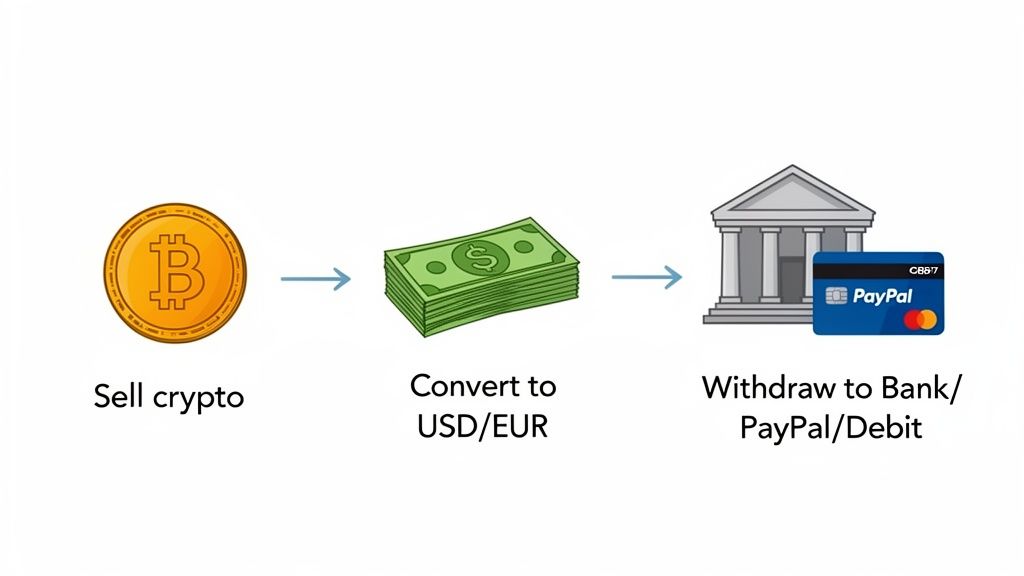
A flowchart illustrating the steps to sell crypto, convert to fiat currency, and withdraw funds.

Turning digital gains into real-world cash is a fundamental part of the crypto journey. While Coinbase makes the process simple, knowing your options ahead of time can save you a headache and money on fees.

You can't just send Bitcoin directly to your bank—it doesn't work that way. The "sell" button on Coinbase is your friend here. It handles the conversion for you, turning your crypto into a cash balance that’s all set for the final step: the withdrawal.

Choosing Your Withdrawal Method

So, how do you actually get the money out? The best way to cash out from Coinbase really boils down to what you need most: speed, low fees, or moving a large amount. Each option strikes a different balance.

For example, a standard ACH bank transfer is usually the cheapest way to go, but you'll be waiting a few business days for the funds to clear. On the flip side, an instant cashout to your debit card gets the money in your hands in minutes, but you'll pay a bit more for that convenience.

A smart move for most people is to have two methods linked: a primary bank account for regular, low-cost ACH transfers and a debit card for those times you need cash right now. This gives you the best of both worlds—cost savings and flexibility.

To make the choice easier, let's break down the most common ways to pull your cash out.

Coinbase Withdrawal Methods at a Glance

This table offers a direct comparison of common ways to cash out, highlighting key differences to help you choose the best option for your needs.

MethodTypical SpeedFee StructureBest For
ACH Bank Transfer3-5 Business DaysGenerally FreeStandard, low-cost withdrawals
Wire Transfer1 Business DayHigher Fee (~$25)Large-volume withdrawals
PayPalWithin a few hoursFree (from Coinbase)Fast and convenient cash outs
Instant Card CashoutWithin 30 minutesPercentage-based feeUrgent, immediate access to funds

Ultimately, the right withdrawal method depends on your specific situation. Weigh the speed against the cost to find the perfect fit for your cash-out strategy.

Preparing Your Account for a Smooth Withdrawal

Before you can cash out your crypto on Coinbase, a little prep work goes a long way in preventing headaches and delays. Think of it like getting your passport ready before an international trip—having everything in order upfront makes for a much smoother journey. The process boils down to verifying who you are and securely linking where you want the money to go.

The first, and most critical, step is completing the Know Your Customer (KYC) verification. This is a non-negotiable regulatory requirement for any legitimate exchange, put in place to stamp out fraud and money laundering. Simply put, without a verified identity, you can't withdraw your funds.

Verifying Your Identity

To get through KYC, you'll need to provide some personal details and documents. The process is straightforward but absolutely essential for unlocking your account's full potential, including higher withdrawal limits.

Actionable Checklist for KYC Verification:

  • Gather Your Documents: Have a government-issued photo ID ready (driver's license, passport).
  • Take Clear Photos: Coinbase will prompt you to use your device’s camera. Ensure the photos are well-lit with no glare.
  • Enter Matching Information: Your full legal name, date of birth, and address must match your ID exactly.
  • Provide Your SSN: For U.S. users, this is a standard requirement.
  • Submit and Wait: Verification is often quick, but do this step well before you plan to cash out.

Once you submit everything, verification is usually pretty quick, often taking just a few minutes. Getting this out of the way early means it won't be a last-minute roadblock when you're ready to move your cash.

Linking Your Payment Methods Securely

After your identity is confirmed, it's time to connect the account where you want your cash to land. Coinbase gives you a few secure options, and it’s a good idea to link at least one primary method right away.

Many people use Plaid to connect their bank account. It’s a popular and secure service that links your accounts using your bank login credentials without ever sharing them directly with Coinbase. You can also link a debit card for instant withdrawals or a PayPal account for quick, convenient transfers. If you’re planning on moving larger sums, setting up your wire transfer details is another solid option.

Security is everything at this stage. You absolutely should have Two-Factor Authentication (2FA) enabled on your Coinbase account, preferably using an authenticator app like Google Authenticator or Authy. While SMS-based 2FA is better than nothing, authenticator apps offer a much stronger defense against someone trying to gain unauthorized access.

Making sure your account is locked down is a foundational step. To get a better handle on the platform's security features, take a look at our full guide on how secure the Coinbase Wallet is.

How to Sell Crypto and Withdraw Your Cash

Alright, your account is verified and a payment method is locked in. Now for the part you’ve been waiting for: moving your funds out of Coinbase and into your pocket.

Cashing out is always a two-step dance. First, you sell your crypto for cash. Then, you withdraw that cash to your bank, PayPal, or debit card. It’s an important distinction because you can’t just send Bitcoin directly to your checking account—you have to convert it into dollars (or your local currency) first.

Let's get into the specifics of how this works on the platform.

A three-step diagram illustrating the account setup process: verify ID, link payment, and secure account.

Before you can make a move, you need a solid foundation. This means getting your identity verified, linking your payment methods, and securing your account—essentials for both compliance and your own peace of mind.

Step 1: Convert Crypto to Fiat Currency

The first move is always to place a sell order. This is where you swap an asset like Ethereum or Solana for a fiat currency like USD, EUR, or GBP. Once you do, the cash sits in your Coinbase fiat wallet, ready for you to withdraw.

To get started, head over to the "Buy & Sell" or "Trade" section of the Coinbase app or website. From there, just hit the "Sell" tab.

Here’s the play-by-play:

  1. Select Asset: Choose which cryptocurrency you’re ready to sell from your portfolio.
  2. Enter Amount: You can either enter the exact crypto amount (like 0.5 ETH) or the exact cash amount you want out (like $1,000 worth of ETH). The platform will do the math for you.
  3. Preview Sale: This is your final check. Coinbase lays out all the details: the current exchange rate, their fee, and the final cash amount you’ll get. Never skip this screen—always give it a quick review.
  4. Confirm Sale: Once you approve, the sale executes almost instantly. The cash is now in your account, and you're halfway done.

Step 2: Initiate Your Withdrawal

With fiat currency now sitting in your wallet, it’s time to send it home. The process is straightforward, but the method you choose has a big impact on speed and cost. You'll navigate to your portfolio, click on your cash balance (e.g., your USD Wallet), and select the "Withdraw" or "Cash out" option.

From there, Coinbase will ask where you want the money to go, pulling up the payment methods you linked earlier.

Here's a breakdown of your options:

  • ACH Transfer to Your Bank Account: This is the old reliable. It's the standard, often free, way to withdraw. The trade-off is speed—it typically takes 3-5 business days for the funds to show up. Perfect for when you're not in a rush.
  • Wire Transfer: If you're moving a larger sum, a wire transfer is your best bet. It’s much faster than an ACH transfer, usually clearing within a single business day. The downside? It costs more, usually around $25 from Coinbase, and your bank might tack on its own fee.
  • PayPal Withdrawal: For a solid mix of speed and low cost, PayPal is a great choice. It’s generally free and significantly faster than a bank transfer. I’ve seen funds arrive in just a few hours.
  • Instant Card Cashout: Need the money right now? Cashing out to a linked Visa or Mastercard debit card is the fastest way. The money usually appears within 30 minutes, but you’ll pay for that convenience with a fee of 1.5% or more.

Quick tip from experience: Always, always double-check the details on that final withdrawal confirmation screen. Make sure you’ve selected the right bank account or card and that you see the fee and estimated arrival time. A simple typo here can lead to frustrating delays.

Understanding Coinbase Fees, Limits, and Timelines

A smart plan to cash out from Coinbase is all about knowing the fine print. The withdrawal method you pick will directly affect how much you pay in fees, how much you can move at once, and how fast you’ll actually see the money in your account. A lot of people overlook these details and end up with surprise delays or higher costs than they expected.

Every cash-out option has its own trade-off between speed, cost, and capacity. For example, an instant debit card withdrawal is incredibly fast, but it comes with a higher fee. On the other hand, a standard bank transfer is cheap (often free) but takes several business days. These aren't just small differences—they should shape your entire withdrawal strategy.

Comparing Your Cash Out Options

The numbers really tell the story here. A wire transfer might look pricey with its flat $25 fee, but if you're pulling out a large amount, that fee is a tiny percentage compared to what you'd pay for an instant cash out. Conversely, paying a 1.5% fee to get $100 immediately is often way more practical than waiting days just to save a couple of bucks.

This is the classic speed-versus-cost dilemma, and it’s especially important when you need to get your funds out of Coinbase efficiently. Market conditions can also force your hand. If the market is pumping and you want to take profits now, a faster, more expensive option is often the smarter move.

Your account's verification level plays a huge role in your withdrawal limits. A brand-new, partially verified account will have much lower daily limits than a fully verified account that's been around for a while. Always check your personal limits in your account settings before you plan a big withdrawal.

To see exactly how these options stack up, let's break them down side-by-side.

Detailed Breakdown of Coinbase Cash Out Options

Thinking through your withdrawal strategy ahead of time can save you from a lot of headaches. This table gives you a clear comparison of the most common cash-out methods on Coinbase, so you can pick the one that best fits your needs.

Withdrawal MethodCoinbase FeeProcessing TimeDaily Limit (Example)Use Case
ACH Bank TransferGenerally Free3-5 Business Days$50,000Best for standard, low-cost withdrawals where speed isn't a priority.
Wire Transfer~$251 Business Day$250,000+Ideal for moving large sums of money quickly and securely.
PayPalFree (from Coinbase)Within a few hours$25,000A great middle-ground for fast, convenient withdrawals without high fees.
Instant Card Cashout1.5% (min fee applies)Within 30 minutes$25,000Perfect for urgent situations when you need immediate access to your funds.

Understanding how and when people pull money off major exchanges gives you some valuable context. Coinbase Exchange, which handles billions in daily volume, always sees a huge spike in cash-out activity during market rallies. For instance, after one major Ethereum price surge, users pulled a net $8.5 billion off the exchange in a single quarter—a clear sign of widespread profit-taking.

This behavior shows just how much market sentiment drives withdrawal volumes. By planning your exit and choosing the right method before you need the cash, you can execute your strategy smoothly, no matter what the market is doing.

Advanced Cashing Out Strategies for Traders

For an active trader, cashing out of Coinbase isn't just about taking profits—it's a calculated move. It's a part of the bigger strategy, and if you know what to look for, a large-scale cash-out event can tell you a lot about where the market is headed.

The key is learning to distinguish between retail panic and smart money strategically taking chips off the table. When markets get choppy, retail traders often dump their entire bags. Experienced investors, on the other hand, might only cash out a small percentage of their gains, rotating the rest into what they see as the next big opportunity. Reading that difference helps you make informed decisions instead of just reacting to the noise.

Using On-Chain Data as Your Guide

One of the sharpest tools in your shed for anticipating major sell-offs is on-chain data. When huge wallets—the "whales"—start moving significant amounts of crypto from their private cold storage to a Coinbase address, it’s a massive red flag. More often than not, they're getting ready to sell.

This flood of new supply hitting the exchange can put serious downward pressure on prices. A number of on-chain analysis tools let you track these whale movements in real-time, giving you a critical heads-up before a potential dip. It really highlights why understanding the difference between holding assets on an exchange versus a private wallet is so crucial; you can dive deeper into that in our guide on crypto exchange vs a wallet.

The data reveals some fascinating habits. Since it launched in 2012, Coinbase has seen over $1.5 trillion in cumulative cash-outs. These moments often line up with market dips. For instance, withdrawals tend to spike on Fridays, often aligning with 15% drops in BTC's price. On-chain analysis from sources like Coinbase data patterns shows that the top 1% of wallets cash out only about 12% of their gains on Coinbase. They redeploy the other 88% back into DeFi, while retail traders make full exits 65% of the time.

Turning Tax Reporting into a Strategic Advantage

Let's be clear: cashing out is a taxable event. Every single time you sell crypto for fiat, you're triggering a capital gain or loss. Blowing this off is a surefire way to get hit with penalties and a massive headache from the IRS later on.

Think of your tax reporting as just another part of your trading strategy. By meticulously tracking your cost basis and sale prices, you can find opportunities for tax-loss harvesting. That means selling some assets at a loss to offset gains from your winners, which can seriously lower your overall tax bill.

Coinbase gives you the raw materials you need to get started. Here's your action plan:

  • Download Your History: Head over to the "Taxes" section in your account settings. You can download a complete history of every transaction you've ever made.
  • Calculate Your Gains and Losses: For every sale, you need the math: the sale price minus your original purchase price (your cost basis). This is your profit or loss.
  • Use Tax Software: Don't try to do this by hand on a massive spreadsheet. Specialized crypto tax software can import your Coinbase reports and automate all these calculations, saving you a ton of time and preventing costly errors.

By staying organized and thinking ahead, you can transform what feels like a chore into a smart financial move that protects more of the profits you worked so hard for.

Troubleshooting Common Coinbase Withdrawal Problems

A troubleshooting guide showing solutions for withdrawal, insufficient funds, and account restriction issues.

So you followed the steps, hit "Withdraw," and... nothing. Or worse, an error message pops up. It’s a frustrating moment, especially when you need access to your money, but don't panic.

Most withdrawal issues on Coinbase are common and have simple fixes. More often than not, the problem isn't a deep technical glitch but a routine security measure or a verification step you might have overlooked. Let's walk through the usual suspects so you can get things moving.

Solving Holds and Restrictions

The most frequent culprit is a withdrawal hold, usually triggered after a recent deposit from an ACH bank transfer. To combat fraud, Coinbase temporarily freezes those funds for 3-7 days to make absolutely sure the deposit clears your bank before letting the cash leave their platform.

If you find your withdrawal is on hold:

  • Check your deposit history. The hold is almost always tied to the clearing time of your last fiat deposit.
  • Wait it out. I know it's not what you want to hear, but patience is the only solution here. Once the clearing period ends, the hold lifts automatically.

Another common blocker is a full-blown account restriction. This is a bit more serious and is typically triggered by security flags or incomplete identity verification. Make sure your KYC information is current and that you have a solid two-factor authentication method enabled to keep your account in good standing.

A sudden surge in withdrawal blocks can even be a macro market signal. During the 2022 'crypto winter,' for instance, Coinbase users pulled out over $10 billion as Bitcoin's price tanked. Daily withdrawal volume hit a record $1.2 billion on a single day, a classic sign of mass retail capitulation that can sometimes signal a market bottom. You can dig into more of this kind of data with Coinbase's institutional market reports.

Insufficient Funds and Payment Method Errors

Seeing an "insufficient funds" error when your balance looks healthy is confusing, to say the least. This almost always means the funds you're trying to withdraw are already spoken for—either locked in an open trade order or still under that pesky deposit hold we just talked about.

To sort this out:

  1. Cancel any open sell orders you don't need anymore.
  2. Double-check the exact "available to withdraw" amount in your fiat wallet. It's often different from your total balance.

Finally, you might run into a payment method error. This just means your linked bank account or card information is out of date or needs to be re-authorized.

  • Re-link your account. The secure connection between your bank and Coinbase (often managed by Plaid) can expire. The quickest fix is to simply remove the payment method and add it back again.
  • Check your bank details. It sounds simple, but a typo in an account or routing number is a surprisingly common cause of failed withdrawals. Give them a quick once-over to be sure.

Frequently Asked Questions About Cashing Out

When it's time to take profits and move your money out of Coinbase, a few common questions always seem to surface, especially when things don't go exactly as planned.

This section cuts through the confusion and tackles the most frequent roadblocks people hit during the withdrawal process. From frustrating fund holds to figuring out the fastest exit route, these answers should clear things up.

Why Can't I Cash Out My Funds Immediately?

The number one reason for a delay is a security hold. If you recently funded your account using an ACH bank transfer, Coinbase will place a temporary hold on those funds, which typically lasts 3-7 days.

This isn't a glitch—it's a standard security measure. Coinbase needs to make sure your deposit fully clears the bank before letting that cash leave the platform. It’s a simple but effective way they prevent fraud.

A key thing to remember is that your "total balance" and your "available to withdraw" balance are two different things. The available balance is the only amount you can actually cash out right now, as it doesn't include funds that are on hold or tied up in open trades.

What Is the Fastest Way to Cash Out From Coinbase?

For pure speed, nothing beats their "Instant Card Cashout." When you withdraw to a linked Visa or Mastercard debit card, the funds usually hit your bank account in less than 30 minutes.

Of course, that convenience comes at a price—a higher fee, usually around 1.5%.

PayPal withdrawals are another solid, speedy option. They are often free on Coinbase's end and can land in your account within a few hours. This makes them a fantastic balance of speed and cost. Withdrawal features are a big deal when picking an exchange, which is something we dig into in our comparison of Kraken or Coinbase.

Can I Withdraw Crypto Directly to My Bank Account?

No, you can't send cryptocurrencies like Bitcoin or Ethereum straight from Coinbase to a traditional bank account. Banks operate in fiat currencies (like USD, EUR, GBP), and they aren't set up to handle digital assets directly.

To cash out, you have to follow this two-step process:

  1. Sell Your Crypto: First, you need to sell your crypto on the Coinbase platform. This converts your digital asset into a fiat currency.
  2. Withdraw the Cash: The proceeds from that sale will then show up in your fiat wallet (e.g., your USD Wallet). From there, you can withdraw that cash to your linked bank account, PayPal, or debit card.

This sell-then-withdraw flow is fundamental to how you get money out of Coinbase and pretty much every other centralized exchange out there.


At Wallet Finder.ai, we turn complex on-chain data into clear, actionable signals. Discover top-performing wallets, get real-time trade alerts, and mirror the strategies of professional traders to stay ahead of the market. Start your free 7-day trial today!