Build a Crypto Discord Bot for Trading

Wallet Finder

Blank calendar icon with grid of squares representing days.

February 24, 2026

A crypto Discord bot can turn your server from a basic chat room into a powerful, automated intelligence hub for your trading. Imagine getting real-time price alerts, on-chain data, and even trading signals piped directly to your community. It’s a serious edge in markets that never sleep.

This guide provides an actionable walkthrough for building one from the ground up, whether you're a coder or just a community manager.

Your Automated On-Chain Intelligence Hub

Turning a Discord server into a live crypto research tool is easier than you might think. You can stop frantically switching between charting platforms, on-chain explorers, and Twitter trying to catch the next big move. A well-configured bot can funnel all that critical information right into a private channel, creating a clean, centralized dashboard for you and your crew.

This kind of automation is quickly becoming a staple in modern trading. By 2026, bots are expected to handle a massive 65% of all cryptocurrency trading volume. They're no longer just niche tools; they're essential platforms for anyone serious about staying competitive.

Choosing Your Bot's Foundation

Your first big decision is whether to use a pre-built, hosted bot or to build your own from scratch. Each path has its own pros and cons, boiling down to your technical skill, budget, and how much customization you really need.

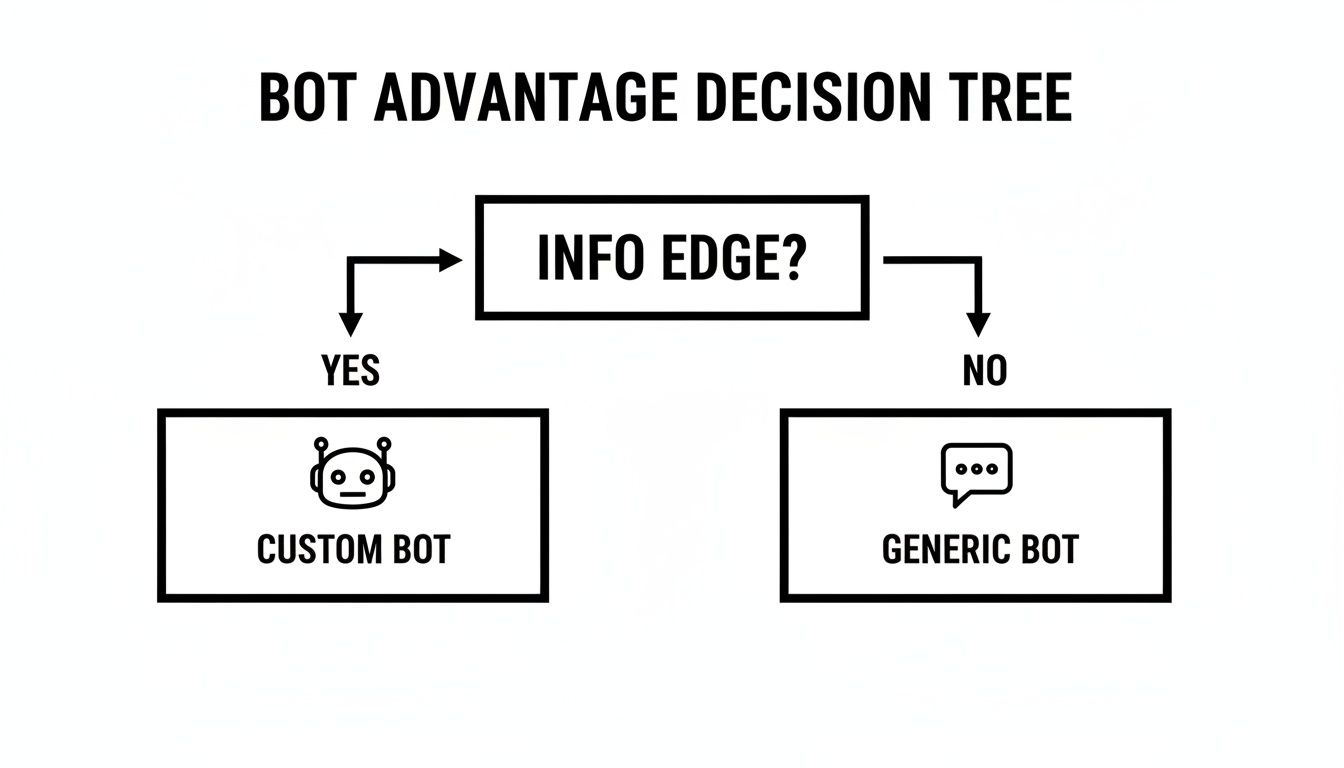
This decision tree helps frame the choice: do you want a quick setup, or do you need full control?

Flowchart illustrating the decision path for choosing a crypto bot based on setup, control, and coding skills.

The flowchart makes it pretty clear. If your goal is a simple, fast setup, a hosted solution is your best bet. But for those who want unique features and total control, going the self-hosted route is the way to go.

To help you weigh the options, here’s a quick breakdown of the two main approaches.

Choosing Your Crypto Discord Bot Approach

A comparison of the two primary methods for implementing a crypto Discord bot, helping you decide which path best suits your technical skills, budget, and trading needs.

FeatureHosted Bot (e.g., MEE6 with plugins)Self-Hosted Custom Bot
Setup & MaintenanceQuick setup, minimal maintenance needed. The provider handles updates and server uptime.Requires coding knowledge, server setup, and ongoing maintenance from your side.
CostTypically a monthly subscription fee, especially for advanced features. Can be more predictable.Higher upfront cost in time and potentially server fees, but no recurring subscription.
CustomizationLimited to the features and plugins offered by the platform. You can't add custom code.Total freedom. You can code any feature, integrate any API, and design commands to your exact needs.
Control & Data PrivacyYou rely on a third-party service, which means less control over your data and bot's uptime.Full control over your data, code, and where the bot is hosted. You own the entire stack.
Best For...Beginners, small communities, or those who need a simple alert system without the hassle.Developers, trading groups with specific needs, and anyone wanting to build a unique, proprietary tool.

Ultimately, the choice depends on what you value more: convenience or control. There’s no wrong answer, just the one that fits your goals.

Key Takeaway: Your bot is only as good as the data it provides. Integrating high-quality sources for on-chain analysis is what separates a basic price ticker from a true alpha-generating machine.

The Power of On-Chain Data

A generic crypto bot might pull prices from a standard API, and that's fine. But a truly valuable bot taps directly into the blockchain. By integrating with platforms that specialize in on-chain data analysis, your bot can deliver insights you just can't get from an exchange.

Actionable Insights You Can Automate:

  • Smart Money Alerts: Get notified when a top-performing wallet makes a new trade.
  • Whale Watching: Track large transactions for specific tokens to spot accumulation or dumping.
  • New Token Sniping: Receive alerts the moment a new token is created or added to a liquidity pool.
  • Exchange Inflows/Outflows: Monitor large movements of crypto to and from exchanges, a key indicator of market pressure.

To make sure the signals your bot is generating are solid, it's wise to use advanced validation methods like Monte Carlo backtesting for trading strategies. This helps you confirm that your bot's automated strategies are statistically sound before you put real money on the line.

Setting Up Your Bot in the Developer Portal

Alright, with your strategy locked in, it's time for the fun part: actually creating your crypto Discord bot. This journey starts at the Discord Developer Portal, which is basically the birthplace for every bot on the platform. Think of it as your mission control for building, tweaking, and managing your bot's identity.

Step-by-Step Bot Creation:

  1. Create a New Application: This acts as the container for your bot. The name you pick here is what everyone will see. Choose something memorable that hints at its purpose, like "ChainLink Sentinel" or "DeFi Pulse Bot."
  2. Add a Bot User: Navigate to the "Bot" tab and click "Add Bot." This gives your application a presence inside Discord.
  3. Configure Settings: Set up your bot's profile picture and public name.

This is where you lay the foundation for your bot's entire existence.

Discord interface showcasing on-chain intelligence, displaying cryptocurrency transaction alerts and token data.

The portal itself is pretty clean, giving you a straightforward way to manage everything from generating tokens to setting the permissions that control what your bot is allowed to do.

Configuring Critical Bot Settings

Once the application is created, find the "Bot" tab in the sidebar. This is where you give your application a soul by adding the bot user. Click it, and you'll see a bunch of settings, but for a self-hosted crypto bot, two are absolutely non-negotiable.

Must-Have Settings:

  • Bot Token: This long string is your bot's private key. Treat it like a crypto wallet seed phrase. Never share it publicly or commit it to a public GitHub repository. Store it securely as an environment variable.
  • Privileged Gateway Intents: These are special permissions that grant your bot access to certain data streams. For a crypto bot that needs to read user commands, enable the Message Content Intent.

A bot's token is its lifeblood. If that token leaks, someone can completely hijack your bot. This could lead to anything from spamming servers to outright server raids or stealing sensitive info. Always use environment variables to keep it locked down.

Inviting Your Bot to a Server

With your bot user officially created and its token safely tucked away, the last step in the portal is to generate an invite link. You'll find this under the "OAuth2" section, specifically the "URL Generator."

This is where you define the bot's permissions, or scopes. For a typical bot, you'll need two main scopes:

  • bot: This tells Discord the URL is for inviting a bot.
  • applications.commands: This lets your bot register and use slash commands, which is how all modern bots interact with users.

From there, you'll pick the specific permissions your bot needs to function. My advice? Start with the absolute minimum. You can always add more later. For a bot that just needs to post alerts and embeds, you’ll want:

  • Read Messages/View Channels
  • Send Messages
  • Embed Links
  • Attach Files

Once you’ve checked the boxes for scopes and permissions, the generator will spit out a unique URL. Anyone with that link who has "Manage Server" permissions can add your bot to their community.

Integrating Real-Time On-Chain Data Alerts

A simple price command is fine, but that's table stakes. The real power of a custom crypto Discord bot comes from delivering actionable, real-time intelligence straight from the blockchain. This is how you transform your bot from a passive tool into a proactive research assistant.

The goal here is to pipe smart money movements and key on-chain events directly into your server using a webhook. Think of a webhook as a direct, one-way phone line. When something important happens on another platform—say, a wallet you're tracking on Wallet Finder.ai makes a huge trade—that platform "calls" a special URL and delivers the message. Your Discord channel instantly catches and displays that alert.

Setting Up Your Discord Webhook

First, you need to create the "phone number" for your alerts to call. You do this right inside the Discord channel where you want the notifications to land.

  1. Head over to your server and open the settings for your target channel (e.g., #on-chain-alerts).
  2. Jump into the "Integrations" tab and click "Create Webhook."
  3. Give your webhook a descriptive name, like "Wallet Finder Alerts," and a relevant avatar.
  4. Copy the Webhook URL. This is the secret key that lets other services post messages to this channel. Guard it carefully—anyone who has it can send messages there.

That's it. Your server is now ready to catch any data that gets thrown its way.

Connecting to an On-Chain Data Source

Platforms like Wallet Finder.ai are built to track on-chain activity and can be set up to fire off alerts when specific events occur. You could, for instance, get a notification every time a wallet on your watchlist executes a swap or buys into a brand-new token.

When you're configuring these alerts, the platform will ask where to send them. Instead of a push notification, you’ll paste in the Discord webhook URL you just copied.

Pro Tip: Many data platforms will send webhook data as a blob of raw JSON. While Discord can display this, it's usually an unreadable mess. The real magic happens when you format that raw data into a clean, professional-looking embedded message.

An embedded message lets you structure the alert with titles, colors, and neatly organized fields. For a wallet transaction, that could look like:

  • Title: New Trade Detected for Wallet 0x123...abc
  • Color: Green for a buy, red for a sell.
  • Fields: Token name, amount purchased, transaction value in USD, and a direct link to the transaction on a block explorer like Etherscan.

This formatting turns a chaotic stream of data into at-a-glance insights. To get a better sense of how services structure their data, it's helpful to understand the basics of using an API for crypto prices and related events. This is what truly makes a custom crypto bot so powerful—it takes complex blockchain events and presents them in a simple format.

Building High-Value Trader Commands

This is where the magic really happens. Building custom commands is how you transform a basic crypto bot into a powerhouse research assistant for your entire DeFi trading community.

Think about commands like /wallet [address], /gas, and /fear. These aren't just shortcuts; they're workflow enhancers that deliver critical metrics in seconds, eliminating the need to constantly switch tabs.

An illustration showing a blockchain with Ethereum icons connected to a Discord application displaying a wallet information.

Let's break down how to build a few of the most impactful ones.

Building a Wallet Lookup Command

One of the most valuable commands you can create is a /wallet lookup. It lets any trader in your server instantly pull performance stats for an address by making a simple REST API call to a platform like Wallet Finder.ai.

Actionable Workflow:

  1. Define the Slash Command: Create the /wallet command with an address parameter.
  2. Parse the Input: Your code takes the wallet address string from the user's interaction.
  3. Make the API Call: It sends a GET request to an endpoint like /v1/wallets/{address}.
  4. Format the Reply: The bot replies with a nicely formatted embedded message highlighting key stats like PnL, win rate, and current holdings.
if (interaction.commandName === 'wallet') {const data = await fetchWallet(address);await interaction.reply({ embeds: [createWalletEmbed(data)] });}

Pro Tip: Use ephemeral responses (ephemeral: true) while you're testing new commands. This keeps your experiments from cluttering up public channels.

Managing Permissions Securely

Not every user needs access to every command. A great way to keep your server organized and secure is by restricting certain commands using Discord's built-in roles. This prevents abuse and keeps your API usage in check.

For example, you could create a "Trader" role for members who need access to data-heavy commands.

RolePermissionsCommands Allowed
@everyoneRead messages/gas, /fear, /price
@TraderSend messages, embed links/wallet, /portfolio, /top_tokens
@AdminAll bot permissionsAll commands, /config

Implementing this is straightforward. You just check if the member has the required role before executing the command logic.

if (!member.roles.cache.has(traderRoleId)) {return interaction.reply({ content: 'Access denied. You need the @Trader role to use this command.', ephemeral: true });}

Integrating Alpha.bot Insights

You can draw inspiration from the best bots out there. Take Alpha.bot, for instance. It's one of the most widely used financial bots on Discord, serving on-demand charts, alerts, and analytics to massive trading communities.

Users lean on its commands for sharp market insights, tracking strategies with win rates above 70% and keeping tabs on max drawdowns around -20%. This real-world success proves just how powerful a combination of robust commands and smart permission controls can be.

Creating a Gas Fee Command

A /gas command is another must-have. It pulls current network fees from a gas oracle, helping traders time their transactions to save money.

Implementation Checklist:

  • Source your data from a reliable API, like Etherscan or EthGasStation.
  • Display the safe, average, and fast fees.
  • Use color-coding (green for low, red for high) to make it instantly scannable.
  • Cache the response for 15-30 seconds to avoid getting rate-limited by the API provider during periods of high usage.

Adding a Fear & Greed Command

The Crypto Fear & Greed Index is a classic sentiment indicator. A /fear command that fetches this data can give your community a quick read on market psychology.

Implementation Checklist:

  • Pull data from the official API: https://api.alternative.me/fng/.
  • Display the current index value, the sentiment (e.g., "Greed"), and the timestamp of the last update.
  • Use an emoji or color in the embed to visually represent the current sentiment.

Advanced Tips for Trader Commands

Once you've got the basics down, you can add some professional polish to your commands.

  • Validate wallet inputs with regex to automatically reject invalid addresses.
  • Log command usage to a private admin channel for auditing and monitoring.
  • Implement cooldowns to prevent spam and help manage your API rate limits.
  • Write concise, helpful error messages that guide users when a command fails, instead of just saying "error."

By starting with these core commands and iterating on them, you can build a crypto Discord bot that becomes an indispensable assistant your traders will rely on daily.

Essential Security and Bot Best Practices

A powerful crypto Discord bot is more than just a tool—it's a gateway to valuable data. That makes security non-negotiable. Building trust is everything.

The single most important rule? Never, ever hardcode your bot token into your script. Pushing that code to a public repository like GitHub is the digital equivalent of mailing your house keys to the world. Always use environment variables to store sensitive info like your bot token and API keys.

Fortifying Your Bot’s Defenses

Protecting your token is just the start. You also need to think about how your bot talks to users and external APIs. If left unchecked, these interactions can lead to abuse, downtime, or even worse.

Actionable Security Checklist:

  • Use Environment Variables: Store all secrets (tokens, API keys) outside of your codebase.
  • Implement Command Rate Limiting: Prevent spam by setting a cooldown (e.g., one command per user every 5 seconds). This also protects you from API rate limits.
  • Sanitize All User Inputs: Clean and validate any text a user provides (like a wallet address) before your bot processes it or sends it to an API. This prevents command injection attacks.
  • Restrict Bot Permissions: In the Developer Portal, only give your bot the permissions it absolutely needs to function.
  • Regularly Update Dependencies: Keep your bot's libraries (like discord.py or discord.js) up to date to patch security vulnerabilities.

A Discord bot interface displays crypto commands like /wallet, /gas, /fear, and result data percentages.

Key Insight: A secure bot isn't just about protecting your own code; it's about protecting your users. Recent security research uncovered a massive crypto scam network that used over 1,200 domains, often spreading through Discord with malicious image links. Robust security and moderation are your community's first line of defense.

Learning from Security Pioneers

Building a reputation for reliability doesn't happen overnight. It takes a real commitment to security. Take a page from pioneers like TsukiBot, one of the original crypto Discord bots founded way back in 2017. It focused on secure, ad-free tools.

Its long history of updates—from basic coin info to advanced protections against malicious files—shows how a dedication to security builds lasting trust. You can even explore TsukiBot’s development journey on GitHub to see these principles in action.

For a deeper dive, read up on web application security best practices, as many rules apply to bots. It's also a great habit to regularly review your bot's code and dependencies, much like you'd perform a security audit for a website.

Frequently Asked Questions

As you start building your crypto bot, you're bound to have questions. Here are quick, straightforward answers to the most common ones.

What Programming Language Is Best for a Discord Bot?

Most developers gravitate toward two main languages:

LanguageLibraryBest For...
Pythondiscord.pyBeginners, rapid prototyping, and data analysis tasks. The syntax is clean and easy to learn.
JavaScriptdiscord.jsWeb developers already familiar with Node.js. Excellent for handling many simultaneous asynchronous tasks.

The "best" choice is the one you or your team can be most productive with.

Can My Bot Execute Trades for Me Directly?

Yes, it's technically possible, but it dramatically increases complexity and risk. You would need to:

  1. Integrate with an exchange's official API, like those from Binance or Coinbase Pro.
  2. Manage API keys with military-grade security.
  3. Build bulletproof error handling for failed transactions or API downtime.

For this guide, we’ve stuck to informational and alert-based bots. This approach gives you 90% of the value—timely, actionable signals—with just a fraction of the security headaches that come with direct trade execution.

How Much Does It Cost to Run a Crypto Discord Bot?

If you self-host your bot, the cost is surprisingly low. Your main expense is the server that keeps your code running 24/7.

  • Free Tiers: Platforms like Oracle Cloud or the free options on AWS and GCP can often run a simple bot at no cost.
  • Basic Servers: A small virtual private server (VPS) from a provider like DigitalOcean or Hetzner can cost as little as $5-10 per month. This is usually more than enough horsepower for a bot serving dozens of communities.

For most small-to-medium-sized servers, running a custom crypto bot is incredibly affordable.


Ready to stop guessing and start tracking smart money? Wallet Finder.ai gives you the on-chain intelligence to discover top-performing wallets and mirror their strategies in real time. Find your next 100x trade by seeing what the pros are buying before anyone else. Start your 7-day trial and turn on-chain data into actionable alpha today.