Trader Joe DEX: A Guide to Trading & Yield Farming
Explore the Trader Joe DEX with our in-depth guide. Learn about JOE tokenomics, Liquidity Book, fees, and how to find profitable trades on Avalanche & Arbitrum.

April 16, 2026
Wallet Finder

April 16, 2026

You’re probably here because you typed fantom s wallet and got a mess of mixed results. Some pages talk about the Fantom blockchain. Others talk about the physical Fantom S card wallet. A few drift into Phantom wallet on Solana, which is a different product entirely.
That confusion matters. If you want to trade on Fantom seriously, you need a crypto wallet configured for the Fantom Opera network. If you’re also considering the physical Fantom S wallet for everyday carry, treat that as a separate purchase decision. It won’t secure your on-chain assets by itself.
Most traders hit the same wall at the start. They know Fantom is attractive for active DeFi, but they don’t want to lose funds during setup, bridge to the wrong chain, or sign something reckless on day one.
The first thing to clear up is the name. In this guide, fantom s wallet refers to building and securing a wallet for the Fantom network. It does not mean a metal cardholder. That product may be useful for carrying cards or even storing a written backup physically, but it isn’t your crypto wallet.
Fantom remains interesting because speed and low fees change how you trade. The Fantom Opera network can theoretically process over 300,000 transactions per second, with sub-second finality and transaction costs under $0.001 according to Knaken’s Fantom overview. For a trader, that means less friction when rotating between positions, testing smaller entries, or managing exits without the fee drag that kills agility on slower, more expensive chains.
The chain has also shown why timing matters. Fantom reached an all-time high of $2.25 in 2021, a 13,237.07% year-over-year increase, while total value locked peaked above $7 billion, according to Coinranking historical Fantom data. Big upside came with brutal downside. That’s why wallet setup isn’t enough. You need process.
Practical rule: A wallet is only step one. The edge comes from security discipline, clean execution, and reading on-chain behavior before the crowd does.
For serious use, the setup that holds up looks like this:
That’s the difference between having a wallet and operating like a trader.
A lot of traders lose time before the first trade. They install the wrong extension, import an old wallet with messy token approvals, or fund the address before checking the network config. Clean setup fixes that.
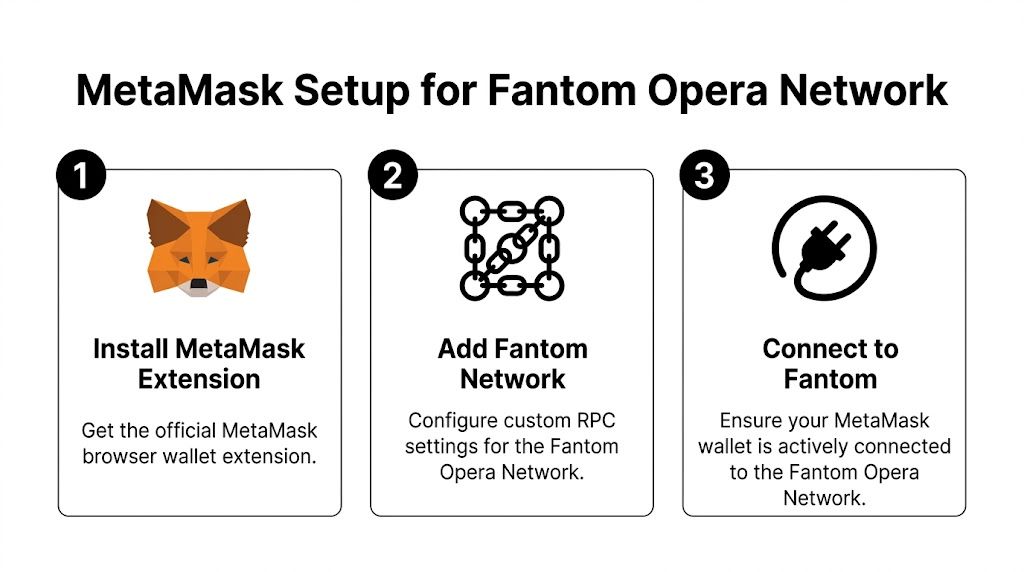
Download MetaMask from the official site or your browser’s verified extension store page. Skip sponsored search ads, Discord links, Telegram DMs, and any popup that asks for a recovery phrase during installation.
If you want to verify the wallet before installing, review this breakdown of whether MetaMask is legit.
Pin the extension in your browser as soon as it’s installed. That reduces the chance of clicking a fake wallet prompt later.
Choose the setup based on how you trade, not convenience alone.
| Option | Best for | Main risk |
|---|---|---|
| Create new wallet | New Fantom activity, separate strategy wallets, cleaner permissions | Losing the recovery phrase |
| Import existing wallet | Traders who want the same EVM address across chains | Bringing old approval risk and seed exposure into the new setup |
For active DeFi, I prefer a fresh wallet for Fantom trading and a separate wallet for storage. That keeps approvals, airdrop farming, and experimental positions away from larger balances.
Import an existing wallet only on a device you trust. If the machine is questionable, stop there and wait until you can connect a hardware wallet instead of typing in a seed phrase.
Never enter a recovery phrase into a website, support chat, form, password manager note, or cloud document. Enter it only inside the wallet app you installed intentionally.
Open MetaMask, click Add network, then enter the network details manually if Fantom is not already listed.
Use these details:
Network Name: Fantom OperaRPC URL: https://rpc.ftm.tools/Chain ID: 250Currency Symbol: FTMBlock Explorer URL: https://ftmscan.com/Save it, then switch the active network to Fantom Opera.
One practical check matters here. After switching networks, confirm MetaMask still shows the same wallet address you expect. The network changes. The address does not.
Do this before funding the account.
Rename the account with a job-based label such as FTM Main, FTM Trading, FTM Burner, or FTM Vault. Traders who run multiple addresses without labels eventually sign from the wrong wallet, bridge to the wrong destination, or approve a contract from the address that should stay clean.
Write down the wallet’s role in your own operating notes. For example:
That small bit of structure matters once you start tracking wallets, copying flows, or testing ideas from tools like Wallet Finder.ai. A clear wallet map keeps execution tight from day one.
Before sending funds, verify these five points:
Then send a small test transfer first.
That extra minute catches most setup errors before they cost real money.
At some point, a browser wallet stops being enough. If your Fantom wallet will hold meaningful capital, hardware wallet integration is the upgrade that matters.
The confusion around the physical Fantom S wallet comes up a lot. Actual protection for FTM assets comes from a dedicated hardware wallet like Ledger or Trezor, not from a slim cardholder. That distinction is the key point raised on the Fantom S product page.
A hot wallet on your browser is convenient, but the signing environment lives on an internet-connected machine. That exposes you to phishing, malicious approvals, fake interfaces, and malware risk.
A hardware wallet isolates the private key. You still use MetaMask as the interface, but the device signs transactions separately. That extra step adds friction. It also blocks a long list of common disasters.
The workflow is straightforward:
Once connected, MetaMask becomes the front end. The hardware wallet stays the signer.
Here’s the practical difference:
| Task | Hot wallet only | Hardware-backed wallet |
|---|---|---|
| Open dApp | Quick | Quick |
| Approve transaction | Click in browser | Confirm in browser, then confirm on device |
| Security against seed theft online | Weak if phrase is exposed | Stronger because seed stays off the computer |
| Best use case | Small trading balances, burner activity | Main trading capital, treasury funds |
The biggest adjustment is pace. Every important transaction needs device confirmation. That slows you down slightly, which is often a benefit.
Use speed for research and entries. Use friction for custody.
A minimalist wallet can carry a written backup card, but that doesn’t make it a crypto security system. If you need a refresher on proper recovery phrase handling, this guide on seed phrase wallet security covers the basics well.
What works in practice is simple:
That split is what most disciplined traders end up using.
You’ve finished setup, connected the right network, and your wallet is ready. The next mistakes usually happen when real money starts moving. On Fantom, that means three actions deserve extra care: receiving funds, sending funds, and bridging assets from another chain.
For active traders, a basic wallet setup evolves into an operating process. The goal is not just getting tokens into MetaMask. The goal is getting the right assets onto Fantom, with enough FTM for gas, in a wallet structure you can trade from without creating avoidable risk.

Your Fantom public address is the address you share to receive assets on Fantom Opera.
In MetaMask:
The part that trips traders up is simple. An EVM address can look the same across Ethereum, BNB Chain, and Fantom, but the transfer route still determines where the funds land. If the sender picks the wrong network, recovery can turn into a support ticket, a manual import job, or a total loss.
Use a tighter process:
That last point matters more than beginners realize. A wallet can display a token balance and still leave you holding the wrong version for the protocol you want to use.
Every outbound transfer gets three checks before you confirm:
| Check | What to verify | Why it matters |
|---|---|---|
| Recipient address | Exact address, copied cleanly | A bad address is usually irreversible |
| Selected network | Fantom Opera | Prevents sending through the wrong route |
| Gas balance | Keep some FTM in wallet | You need FTM to approve, swap, and move funds |
If you’re sending to a centralized exchange, verify that the exchange accepts Fantom deposits for that specific token. An exchange may support FTM on Fantom but not support every Fantom-based token deposit. Traders lose time and sometimes funds by assuming token support matches network support.
Keep a small FTM reserve in the wallet at all times. A wallet loaded with stablecoins but no gas is useless when speed matters.
Many traders fund Fantom by bridging from Ethereum, Arbitrum, Base, or BNB Chain. The flow is straightforward, but the details decide whether you arrive ready to trade or stuck sorting out wrappers, approvals, and missing gas.
A standard bridge flow looks like this:
The main trade-off is convenience versus compatibility. The fastest route is not always the best route if it lands you with a wrapped asset your target DEX, vault, or perp venue does not use. Before you bridge, decide what you need on Fantom. Native FTM for gas, stablecoins for entries, or a specific token for a protocol.
Check these points before you move size:
To see how these steps look in practice before you commit funds, this walkthrough covers the Synapse bridge flow from start to finish.
Bridge first. Verify second. Trade third.
That sequence saves more money than people admit. Funding a wallet while also rushing into a fresh position is how traders skip contract checks, miss token mismatches, and sign approvals they would normally reject.
A cleaner workflow looks like this:
This is also where advanced traders get an edge from tooling. Once the wallet is funded, you can do more than swap manually. You can monitor what strong Fantom wallets are buying, how they size entries, and which protocols they keep returning to. That matters if your goal is serious DeFi trading rather than just holding a wallet balance. The wallet is the base layer. The edge comes from how you fund it, segment it, and use it.
A strong setup won’t save a trader with weak habits. Most losses in DeFi don’t come from someone breaking cryptography. They come from people signing bad approvals, visiting fake sites, or using one wallet for everything.
Questions about RFID blocking on a physical wallet are fair, but crypto risk is mostly digital. The lack of verified third-party metrics around those physical features only reinforces the bigger point from this YouTube review context on Fantom S wallet durability and gaps. Your security lives in behavior.
Use a burner wallet for unknown dApps
Keep your main Fantom account separate from experiments. If a new token launcher, memecoin site, or yield app looks interesting but unproven, use a smaller wallet with limited funds.
Revoke stale token approvals
Token approvals are a silent risk. If you no longer use a protocol, revoke access. Old permissions create unnecessary attack surface.
Bookmark every site you use
Don’t search for your bridge, DEX, or vault every time. Search results and ads are where fake sites thrive.
Read signature prompts carefully
Wallet popups tell you more than most users realize. If the action doesn’t match what you intended, reject it.
Split capital by job
One wallet for storage. One for active trading. One for testing. This keeps a mistake in one area from infecting everything else.
Some habits feel safe but aren’t:
| Bad habit | Why it fails |
|---|---|
| Keeping everything in one wallet | One bad approval can expose the full stack |
| Saving seed phrase in screenshots | Cloud sync and device compromise make that dangerous |
| Signing first, reading later | Attackers count on rush and routine |
| Trusting DMs for support | Fake admins and fake recovery flows are standard scam paths |
Treat every approval like you’re granting someone temporary control over assets. Because that’s what you’re doing.
Don’t aim to be fearless. Aim to be hard to exploit.
Most DeFi security is boring repetition. Check URLs. Separate wallets. Revoke approvals. Ignore urgency.
A wallet becomes useful when it does more than hold assets. On Fantom, the better use is turning wallet activity into trade intelligence.

Fantom’s trading history is a reminder that timing matters. Fast chains and low costs don’t create edge by themselves. Edge comes from seeing who entered early, where they sized up, and how they exited.
Don’t copy a wallet just because it hit one good trade. Look for behavior that repeats.
A useful review process includes:
A wallet that buys everything is noise. A wallet with a repeatable pattern is research material.
Start with any address you’ve seen on-chain, in a DEX pool, or in a token holder list. Then inspect:
| Signal | What it tells you |
|---|---|
| PnL behavior | Whether the wallet realizes gains or just holds volatile bags |
| Win rate pattern | Whether the trader is selective or lucky |
| Entry and exit timing | Whether they lead moves or chase them |
| Top traded tokens | Where they focus attention |
| Trade sizing | Whether they scale in logically |
This matters on Fantom because execution is fast. By the time a trade becomes obvious on social media, good wallets are often already managing exits.
Manual wallet stalking works for research. It doesn’t work for live reaction.
That’s where a proper smart money tracker becomes useful. The point isn’t blind copying. It’s getting immediate visibility into meaningful moves so you can decide whether to mirror, fade, or ignore them.
A disciplined workflow looks like this:
The strongest use of a Fantom wallet isn’t storage. It’s participation plus observation.
You hold capital on-chain so you can move fast. You track other wallets so you don’t have to discover everything from scratch. Done well, that shortens the gap between signal and execution.
Good traders don’t just ask what to buy. They ask who bought, when they bought, how they sized it, and whether that pattern deserves respect.
If you want to turn wallet activity into actionable trade ideas, Wallet Finder.ai is built for that job. It helps you analyze on-chain wallets, inspect entries and exits, monitor profitable traders across major ecosystems, and set alerts so you can react to smart money moves in real time instead of finding them after the move is gone.