Master Crypto with a Coin Profit Calculator
Go beyond basic numbers. This guide shows you how to use a coin profit calculator to track ROI, account for fees, and inform your crypto trading strategy.

December 13, 2025
Wallet Finder

December 14, 2025

Finding your crypto wallet address is simple once you know where to look. In virtually every wallet app, the key is a button labeled 'Receive' or 'Deposit'. Clicking this reveals a long string of letters and numbers—your address—along with a scannable QR code.
This unique alphanumeric string is what you share with others to receive cryptocurrency or any digital asset.
Think of your crypto wallet address like a bank account number for the digital world. It's a public key, meaning you can share it freely so others can send you crypto without giving them any access to your funds.
Learning how to find this address is the first step to managing your crypto. You need it for everything, from receiving a payment from a friend to moving funds from an exchange like Coinbase or connecting to a decentralized app (dApp).
Each address is a unique alphanumeric string. For Bitcoin, they're typically 26 to 35 characters, while Ethereum and EVM-compatible chains use a 42-character format. Because they are long and complex, a single typo can lead to a permanent loss of funds. This is why most wallets provide a QR code to eliminate the risk of manual error.
Before diving into specific wallets, it's helpful to understand the three primary ways to find your address. Each method serves a different purpose, from quick in-person payments to verifying transaction details on the blockchain. Knowing which to use in various situations will make your crypto interactions much smoother.
The summary table below breaks down these core methods, explaining where to find them and their ideal use cases.
This table provides a snapshot of the main ways to locate your address and when each method is most effective.
Mastering these methods will save you time and help you manage your assets with confidence. Now, let’s explore how to find your address in specific wallets and platforms.
When using a self-custody wallet, you are your own bank. This makes knowing how to find your crypto wallet address an essential skill. While the exact steps might vary slightly between a browser wallet like MetaMask, a mobile app like Trust Wallet, or an offline hardware device, the core process is always the same.
You are looking for a button or menu option labeled “Receive,” “Deposit,” or a simple QR code icon. This is the gateway to your public address.
This visual guide breaks down the universal process, from opening your wallet app to double-checking the address on a block explorer.
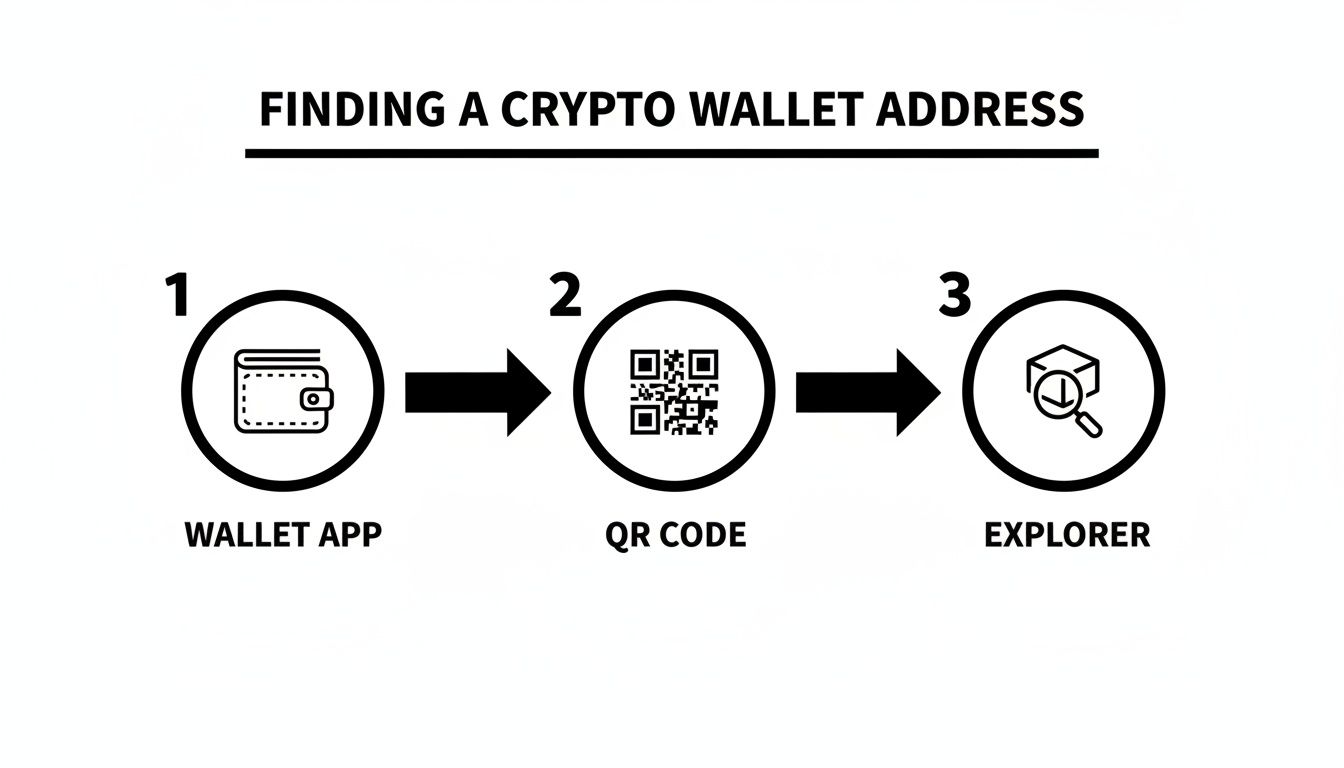
It all starts within your wallet's interface. From there, you can generate a QR code for in-person scanning or copy the alphanumeric string to share digitally.
As a leading gateway to the decentralized web, MetaMask makes finding your address incredibly straightforward on both desktop and mobile.
Actionable Steps:
This address is the default for your currently selected network (e.g., Ethereum Mainnet). To receive funds on another chain like Polygon or Arbitrum, you must first switch to that network using the dropdown menu.
Trust Wallet is a mobile-first app designed to manage a diverse portfolio of cryptocurrencies. Its interface makes finding the correct address for a specific coin simple.
Actionable Steps:
Crucial Tip: Always double-check that you have selected the correct cryptocurrency and network before sharing an address. Sending Bitcoin (BTC) to an Ethereum (ETH) address will result in the permanent loss of those funds.
Hardware wallets like Ledger and Trezor prioritize security by keeping your private keys offline. To find your address, you must use their companion software—Ledger Live or Trezor Suite. The process includes a physical step: connecting your device and confirming the address on its screen.
This physical verification is the core security feature of a hardware wallet, guaranteeing the address you share is genuinely yours. To decide which wallet style fits your needs, explore our comprehensive guide to DeFi crypto wallets.
For many people, centralized exchanges like Coinbase and Binance are the entry point to crypto. These platforms are custodial, meaning they manage the private keys for you, simplifying the user experience. Although they handle security, the process for finding your deposit address is similar to non-custodial wallets.
Actionable Steps:
After you click "Deposit," the exchange will ask two vital questions: which crypto you want to receive and, most importantly, on which network. This is the single most critical decision in the process. Sending a token over the wrong network is a common and costly error that often leads to the permanent loss of funds.
For example, if you want to receive USDT (Tether), you might see a list of networks like:
The sender’s wallet must use the exact same network you select. If you provide a TRC-20 address but your friend sends ERC-20 USDT, the crypto will likely be lost. For more clarity on platform differences, our guide on a crypto exchange vs a wallet is a great resource.
Here’s a quick overview of network options for major cryptocurrencies on top exchanges. Always verify directly on the platform, as these options can change.
Remember This: An exchange deposit address is tied to your specific account but is ultimately managed by the exchange. It functions like any other address on that blockchain and can be viewed on block explorers. This reveals the massive scale of crypto; exchanges like Binance hold hundreds of thousands of BTC in their wallets, as highlighted in 2025 research on top BTC holders.
Once you select the asset and network, the exchange will display your unique deposit address and a QR code, ready for you to copy and share.
While your wallet is the quickest way to find your address, sometimes you need to verify it directly on the blockchain. This provides an immutable public record of your address and its entire transaction history. This is where block explorers become invaluable.
A block explorer is a search engine for a blockchain. It indexes every transaction, address, and block ever recorded. For any given transaction, a block explorer can show you exactly which address sent the funds and which one received them.

This transparency is the foundation of public blockchains. Every transaction is public, allowing anyone to trace an address's history.
Let's walk through a common scenario: confirming a payment you received. You can use the transaction ID (TxHash) from the sender to find and double-check the address.
Actionable Steps using Etherscan (for Ethereum):
The address in the "To" field is your wallet address for that transaction. This is a foolproof way to confirm an address or verify that funds arrived correctly. To learn more, see our guide on leveraging on-chain analysis.
Dealing with long, complex addresses like 0x1A2b... is error-prone. Naming services solve this by replacing cryptic strings with human-readable names. The most popular is the Ethereum Name Service (ENS).
An ENS name, like 'yourname.eth', is a decentralized domain that points to your Ethereum wallet address. Instead of sharing a 42-character string, you can simply tell someone to send funds to 'yourname.eth'.
This works like a website domain name pointing to a numerical IP address, making transactions safer and more intuitive.
Comparison: Standard Address vs. ENS Name
By becoming comfortable with these tools, you can move from simply finding your address to confidently navigating the blockchain.
Once you know how to find your crypto wallet address, the next critical skill is sharing it safely. Your public address is designed to be shared, but a few simple habits can prevent costly mistakes.

Think of your wallet address as an email address for money—it's only for receiving. It is fundamentally different from your private key, which is the secret password that controls your funds.
If you remember only one security rule, let it be this:
If someone obtains your private key, they own your crypto. No legitimate entity will ever ask for it.
Your public address is for receiving assets. Your private key is for sending them. Never, ever mix up the two.
Clipboard-hijacking malware is a sneaky threat that silently replaces a copied crypto address with a scammer's address when you paste it. To combat this, adopt the "triple-check" rule every time.
Actionable Checklist:
This five-second habit can save you from financial loss and a massive headache.
A few extra layers of caution can significantly enhance your security and privacy.
By making these security practices second nature, you can navigate the crypto world with confidence.
Once you master finding your crypto wallet address, other questions often arise. Here are answers to the most common ones.
Yes, absolutely. You must share your public wallet address to receive crypto. It functions like a bank account number—it only allows people to send you funds and gives them zero access or control over your wallet. Your private key is what controls your funds, and it must always be kept secret.
If you notice your Bitcoin wallet providing a new address for each transaction, don't be alarmed. This is a privacy feature of Hierarchical Deterministic (HD) wallets, which are now standard. These wallets generate a new address for every transaction from your single seed phrase.
By using a fresh address each time, HD wallets make it much harder for anyone to link all your transactions together on the blockchain and determine your total holdings. All old addresses remain active forever and will continue to receive funds securely to your wallet.
This is a critical point. The answer is almost always no. Most wallet addresses are blockchain-specific.
Sending crypto to an address on the wrong blockchain, such as sending BTC to an ETH address, will almost certainly result in a permanent loss of funds. Modern multi-chain wallets help manage this complexity, but you must always ensure you are using the correct address for the correct asset. With over 716 million crypto owners globally, getting this right is essential. You can explore more data in these crypto user count statistics on Statista.com.
Ready to turn on-chain data into your trading advantage? Wallet Finder.ai helps you discover the market's top-performing wallets and mirror their strategies in real time. Start your 7-day trial and trade smarter today at https://www.walletfinder.ai.
"I've tried the beta version of Walletfinder.ai extensively and I was blown away by how you can filter through the data, and the massive profitable wallets available in the filter presets, unbelievably valuable for any trader or copy trader. This is unfair advantage."
.avif)
Pablo Massa
Experienced DeFi Trader