Push Notification Alerts: Your DeFi Trading Edge

Wallet Finder

Blank calendar icon with grid of squares representing days.

May 8, 2026

You spot the move too late. A wallet you've been watching rotated into a low-float token, size was obvious, exits were clean, and the chart had already moved by the time you opened X, Telegram, and your dashboard. In DeFi, the edge often isn't finding information. It's getting the right signal quickly enough to act on it.

That's why push notification alerts matter more for traders than for most other users. Marketers use them to bring people back into an app. Traders use them to compress the time between an on-chain event and a decision.

Why Instant Alerts Are a Trader's Superpower

A delayed signal is often the same as no signal.

For a DeFi trader, the job isn't just research. It's research paired with timing. You can identify profitable wallets, understand their sizing, and know which ecosystems they trade, but if your alert arrives after the crowd reacts, your setup has already degraded.

The average US smartphone user gets 46 push notifications per day, which means any trading signal has to compete in a crowded lock screen. Global opt-in rates average 61%, which makes relevance critical from the start. Those figures come from Business of Apps push notification statistics.

That matters because crypto alerts aren't lifestyle reminders. They're event-driven prompts tied to live market conditions. A tracked wallet buys. A wallet exits size into strength. A smart money address rotates from Ethereum to Solana. The alert needs to land when the action is still actionable.

Where speed changes the trade

A lot of traders still run an outdated stack:

  • Telegram for everything
  • Email for summaries
  • Manual dashboard refreshes
  • Social feeds for confirmation

That setup works for commentary. It doesn't work well for execution.

Push notification alerts shrink a simple but expensive delay. Instead of waiting to check a tab, the event comes to you. That changes behavior. You review the wallet, inspect the token, and decide whether to mirror, fade, or ignore. The alert becomes the trigger for a workflow, not a distraction.

Most missed trades don't come from a lack of data. They come from slow routing between data and attention.

What instant alerts actually do

Used correctly, push notification alerts give traders three advantages:

  • Faster awareness: You see wallet activity as it happens, not when you remember to check.
  • Better prioritization: A filtered alert stream forces focus on the wallets and events that matter.
  • Cleaner execution: You stop reacting to chat noise and start responding to predefined signals.

That's the true edge. Not more notifications. Better timing on fewer, more meaningful ones.

How DeFi Trading Alerts Reach Your Phone

A trading alert feels simple on the surface. Your phone lights up, you tap, and you check the move. Underneath, there's a chain of systems working in sequence, and any weak point can slow or drop the alert.

The easiest way to think about it is as a courier route. The blockchain creates the event. A monitoring service recognizes it. A backend packages it. Apple or Google delivers it. Your device decides how prominently to surface it.
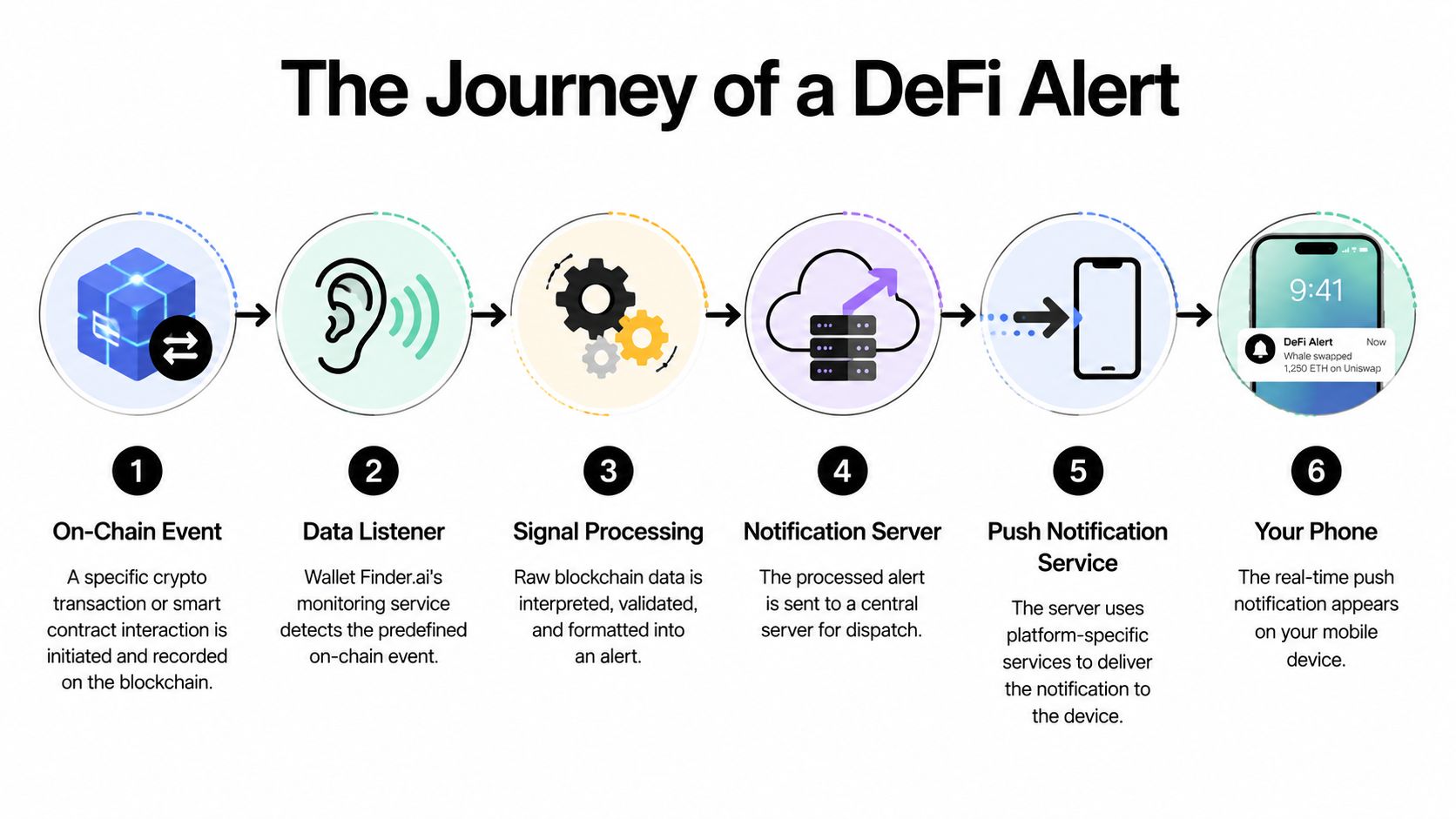
A diagram illustrating the six-step process of a DeFi alert being triggered on a mobile device.

The six-step alert path

  1. An on-chain event happens
    A wallet buys, swaps, sells, or interacts with a contract on Ethereum, Solana, Base, or another chain.

  2. A listener detects the event
    The monitoring layer watches for predefined conditions, such as activity from a tracked wallet or a token movement tied to a watchlist.

  3. The backend turns raw chain data into a signal
    The system interprets the transaction, validates the event type, and formats the information into something readable.

  4. The alert payload gets assembled
    This package usually includes the destination device token, message text, timing instructions, and delivery priority.

  5. The payload goes to a Push Notification Service
    On iPhone, that's Apple Push Notification service. On Android, that's Firebase Cloud Messaging.

  6. Your phone receives and displays it
    The operating system decides how to present the alert based on app permissions, focus mode, battery conditions, and device state.

Why some alerts arrive faster than others

This part matters for anyone relying on time-sensitive copy trading signals. Push systems use a publish-subscribe model where a backend sends a payload to a Push Notification Service. In high-frequency environments, if you don't queue and rate-limit properly, rejection rates can exceed 20%. The same technical guidance notes that using high-priority Android payloads can improve opens by 30% to 50% for time-sensitive trade alerts. That comes from this push delivery guide on Hypersense.

Here's the practical takeaway. If a service blasts alerts in short spikes without queueing, the delivery layer can choke. That usually shows up as late notifications, inconsistent arrival order, or alerts that never appear at all.

Practical rule: In DeFi, reliability beats raw volume. One alert that lands on time is worth more than ten that arrive in a burst after the move.

Terms worth understanding

TermWhat it means for a trader
Device tokenThe address Apple or Google uses to route alerts to your phone
PayloadThe actual notification package, including message content and metadata
PNSThe Push Notification Service that handles delivery
PriorityA delivery instruction that can affect speed and visibility
QueueingStaging alerts so the system doesn't overload during volatile bursts

If you've ever wondered why one app's alerts feel immediate while another's feel random, this is usually the reason. The difference isn't just design. It's infrastructure.

Push vs Email vs Telegram Alerts for Traders

Traders usually don't need one alert channel. They need a stack where each channel has a job.

Push notification alerts are strongest when the signal is immediate and binary. Telegram is useful when context, discussion, or thread history matters. Email is still useful, but mostly for review, recap, and analysis after the market has already moved.

The engagement gap is real. Push notifications can produce up to a 30% CTR uplift, beat email by 50% in open rates, and outperform email by 7x in click-through rates. For time-sensitive web push, average delivery reaches 99%, and contextual pushes see a 14.4% open rate versus 4.19% for generic ones, according to MoEngage push notification statistics.

Alert channel comparison for DeFi traders

CriterionPush NotificationsTelegramEmail
Best use caseImmediate buy, swap, sell, and wallet activity alertsCommunity discussion, threaded commentary, bot feedsDaily recap, trade logs, research summaries
Speed to attentionHighest when configured wellFast, but mixed with chat noiseSlowest for live trading decisions
Signal-to-noise ratioStrong if filtered tightlyOften degraded in busy groupsUsually clean, but not urgent
ActionabilityHigh for quick tap-through into a workflowGood for context, weaker for instant executionBetter for planning than reacting
Reliability during market burstsStrong when backend queueing is handled wellDepends on chat volume and bot formattingFine for summaries, poor for urgent moments
Best role in a trading stackPrimary execution alert channelSecondary context and discussion layerTertiary review layer

What each channel does well

Push works best when the message can be consumed in one glance. “Tracked wallet sold.” “Watchlist wallet opened a new position.” “Token moved from observation to action.” That's exactly the kind of signal that belongs on a lock screen.

Telegram handles nuance better. If you want commentary, links, screenshots, and chat-based follow-up, it's useful. It's also a common complement to push. If you use trading communities or bot streams, it helps to understand how crypto Telegram signals fit into a broader alert stack.

Email still earns a place, but not as a trigger for fast entries. It's where you want portfolio digests, watchlist review, and post-session notes. It helps you think. It usually doesn't help you front-run speed.

The stack that usually works

For most active DeFi traders, the practical structure looks like this:

  • Push for execution: Immediate, filtered, high-priority events.
  • Telegram for context: Discussion, follow-up, market color.
  • Email for review: Recaps, summaries, and strategy refinement.

If you're using one channel for every message type, the problem isn't volume alone. It's poor channel assignment.

Best Practices for Managing Crypto Alerts

Most traders don't have an alert problem. They have a filtering problem.

If your phone buzzes for every tracked wallet, every chain, every swap size, and every speculative token, you'll stop trusting your alert stream. Then one of two things happens. You mute the app, or you start glancing at notifications without acting on them. Both outcomes kill the reason you set up alerts in the first place.

An illustration of a hand holding several shiny gold push notification bell icons amidst floating grey alerts.

The data backs that up. Over-notification drives uninstalls, and opt-out rates spike by 10% for each additional weekly notification a user considers excessive. On the other side, behavior-triggered alerts can lift CTR by 88% compared with generic scheduled blasts, based on Upshot guidance on push notification best practices.

Filter for decisions, not for curiosity

A professional alert setup should answer one question. “Would I realistically act on this?”

If the answer is no, it shouldn't ping you.

Good crypto alert management usually follows these rules:

  • Track wallets with a reason: Don't follow addresses just because they had one hot streak. Follow wallets with a repeatable style you understand.
  • Separate watch mode from action mode: Some wallets deserve passive monitoring. Others justify instant alerts.
  • Limit event types: A wallet's buy might matter to you. Its every partial sell might not.
  • Use chain-specific routing: Solana activity and Ethereum activity often deserve different attention because the execution environment is different.
  • Match alerts to your hours: If you aren't trading a certain session, don't let low-quality overnight pings erode your focus.

Build a tiered notification system

Traders can get a lot better quickly. Don't run a flat alert structure. Use tiers.

Priority tierWhat belongs thereHow to deliver it
Tier 1High-conviction wallet buys, exits, and major watchlist changesPush notification alerts with sound
Tier 2Lower-conviction activity, experimental wallets, supporting signalsSilent push or in-app feed
Tier 3Recaps, trend notes, routine summariesEmail or dashboard review

That one change reduces noise more than most traders expect.

Practical settings that improve alert quality

  • Different sounds for different actions: A sell alert should not sound the same as a buy alert if you trade actively from your phone.
  • Short message bodies: Put the wallet label, event, and token first. The lock screen should carry the important part.
  • Use watchlists aggressively: If a wallet no longer fits your playbook, remove it.
  • Review missed and ignored alerts weekly: If you keep swiping away a category, your setup is wrong.

For traders who want a dedicated crypto workflow, crypto app alerts are most useful when they're tied to wallet behavior rather than generic reminders.

The right alert is one you can trust at a glance. If every notification feels equally urgent, none of them are.

Setup Guide for Real-Time Copy Trading Alerts

A usable setup should take you from discovery to action without forcing constant manual checking. The cleanest workflow is simple. Find a wallet worth tracking, place it into a watch structure, decide which actions deserve interruption, and make sure the alert opens into a page where you can verify the move.

A hand interacting with a tablet screen displaying a three-step crypto alert setup guide interface.

Step 1 choose the wallet carefully

Start in a wallet discovery view, not in alert settings.

Before you subscribe to anything, inspect the wallet's behavior:

  • Trade style: Does it rotate quickly, swing positions, or scale in slowly?
  • Chain preference: Ethereum, Solana, Base, and other ecosystems behave differently.
  • History quality: Look for consistency you can understand, not just one lucky run.
  • Position logic: If sizing is chaotic, copying the wallet will be harder.

This is the step many traders skip. They chase a recent winner, turn on every alert, and then complain that the feed is noisy. The problem started with wallet selection.

Step 2 create a focused watchlist

Once you find a wallet worth tracking, add it to a dedicated watchlist rather than dumping it into a giant default list.

A good watchlist structure often looks like this:

  • Primary copy wallets: Highest trust, alerts on
  • Research wallets: Followed for pattern study, alerts limited
  • Theme wallets: Memecoins, AI, ecosystem rotation, or niche sectors
  • Exit-watch wallets: Traders whose sells you care about more than their entries

If you're comparing notification routes or app-specific workflows, Zap Zap app coverage is a useful reminder that the best alert experience is usually the one with the shortest path from signal to confirmation.

Step 3 configure event-level alerts

Turn on push notification alerts only for events you'll act on. For most copy traders, that means:

  1. New buys
  2. Swaps into a new token
  3. Full or meaningful sells

Partial noise events should be optional. If a wallet trades frequently, every tiny adjustment doesn't belong on your lock screen.

Execution note: Start narrower than you think. It's easier to add one missing event type than to clean up an alert stream you already distrust.

Put the event name first in the notification title. Put the wallet label and token second. Keep the body concise enough that you can decide whether to tap immediately or queue it for later review.

Step 4 test the tap-through path

An alert is only as useful as the screen it opens.

When you tap, you should land in a view that lets you verify the signal quickly. You want wallet history, token context, and recent activity close together. If the app drops you into a generic home screen, the setup is incomplete from a trading perspective.

Here's a walkthrough format to model the process:

Step 5 run a live-fire trial

Don't judge your setup in the first ten minutes. Let it run through actual market conditions.

During the trial, note:

  • Which alerts you acted on
  • Which alerts you ignored
  • Which notifications arrived too late to matter
  • Which wallets generated more noise than edge

After a few sessions, tighten the rules. Remove low-value wallets. Silence nonessential events. Promote only the alerts that repeatedly lead to useful review or execution.

That's when push notification alerts stop being a feature and start functioning like part of your trading system.

Protecting Your Privacy with On-Chain Alerts

More data isn't always better in crypto. More visibility can also mean more exposure.

That trade-off gets ignored in most alert guides. A trading notification seems harmless until you remember what it can reveal. Metadata around push delivery can expose patterns about your behavior, and notification content itself may carry sensitive information you wouldn't want visible on a lock screen, in a device backup, or through forensic extraction.

A smartphone display illustrating blockchain data protection and secure encrypted ledger transactions surrounded by a protective shield.

Recent privacy reporting notes that deleted notification texts may still be recoverable with forensic tools. The same discussion highlights that if users feel exposed, abandonment can be severe, with some estimates suggesting 70% of retail DeFi users disable pushes. That concern is discussed in EFF's article on push notification privacy risks.

Safer ways to use trading alerts

You don't need to stop using push notification alerts. You do need to configure them with operational security in mind.

  • Hide sensitive preview text: Let the alert say an event occurred without showing the full details on the lock screen.
  • Use a separate device or profile for trading: That reduces casual exposure.
  • Keep location-based alerts off unless you have a clear reason: Most traders don't need them.
  • Prefer on-device review for sensitive data: Let the notification prompt action, then inspect the details inside the app.
  • Treat notifications as semi-public: If you wouldn't want someone reading it over your shoulder, don't let it appear in full.

Security in crypto usually breaks at the edges. Notifications are one of those edges.

For on-chain traders, the right standard isn't maximum convenience. It's enough convenience without leaking unnecessary context.

Turning Alerts into Profitable Trading Decisions

A push alert isn't the trade. It's the starting signal.

The profitable move is usually a short sequence. First, verify the event. Second, add context. Third, decide whether the trade fits your plan. Traders get into trouble when they skip from notification to execution without checking what happened.

A fast triage routine

When a meaningful alert lands, use a repeatable routine:

  1. Confirm the wallet event
    Make sure the alert matches the actual transaction and isn't just an attention-grabbing summary.

  2. Check the surrounding context
    Look at recent chart behavior, liquidity conditions, token quality, and whether the wallet is early or late.

  3. Decide the role of the signal
    Is this a copy trade, a research prompt, a warning to exit, or just a datapoint?

What good traders avoid

The biggest mistake isn't moving too slowly. It's reacting mechanically.

Push notification alerts work best when they enhance judgment. They're there to reduce latency, not replace thinking. A skilled trader uses them to route attention faster, then applies the same standards they'd use without the notification.

One clean rule helps here. If an alert doesn't survive even a quick verification pass, it doesn't deserve your capital.


If you want a tighter workflow for tracking profitable wallets, reviewing their history, and getting notified when they buy, swap, or sell, Wallet Finder.ai is built for that use case. It helps traders turn on-chain activity into a structured alert and research process so signals arrive in time to evaluate, not after the opportunity is already gone.