Robinhood Account Restricted? Your Fix-It Guide

Wallet Finder

Blank calendar icon with grid of squares representing days.

January 4, 2026

Seeing the "Robinhood account restricted" message can freeze you in your tracks. It means your ability to trade, deposit, or withdraw funds is on a temporary hold. This can be due to a simple failed bank transfer, a trading violation, or a routine identity check. Pinpointing the why is your first step. After that, you can take targeted action by submitting the right documents or waiting out a required suspension to get your account back.

Why Robinhood Restricts Trading Accounts

There’s nothing worse than seeing a market opportunity slip by because your account is suddenly frozen. It’s frustrating, and it cuts you off from managing your own portfolio. But these restrictions rarely happen out of the blue; they're almost always triggered by specific issues with your account, your funding, or your trading activity.

Getting to the bottom of it is key. If you can figure out the likely cause, you can get a head start on fixing it, often before you even need to talk to customer support.

Common Administrative and Funding Triggers

Most of the time, the culprit behind a Robinhood account restricted notice is a simple administrative hiccup or a funding issue. These are usually the easiest problems to fix, but they can definitely catch you by surprise.

  • Failed Bank Transfers: This is a big one. You make a deposit, start using the instant buying power Robinhood gives you, and then the transfer from your bank bounces due to insufficient funds (NSF). This will lock your account instantly until you clear that negative balance.
  • Outdated Personal Information: Brokers are required by law to keep customer info current. If you've moved or your name has changed and you haven't updated your profile, Robinhood might pause your account until you verify your new details.
  • Suspected Unauthorized Activity: If the platform's security flags weird login attempts or transactions that don't match your usual patterns, they'll often put a temporary freeze on the account to protect you and your money.

Keep in mind, a restriction isn't an accusation. More often than not, it's a security measure or just a response to a simple mistake, like a typo in a bank account number.

Trading Violations That Cause Restrictions

The more serious restrictions come from breaking specific trading rules set by financial regulators. These aren't about your personal details; they’re all about how you trade.

  • Pattern Day Trader (PDT): If your account balance is under $25,000 and you make four or more "day trades" in a five-business-day window, you get flagged as a Pattern Day Trader. That triggers an automatic 90-day restriction on any further day trading.
  • Good Faith Violations (GFV): This happens in cash accounts when you sell a stock you bought with funds that haven't settled yet. For example, you sell Stock A, immediately use that cash to buy Stock B, and then sell Stock B before the money from the Stock A sale has officially cleared (which takes two business days). Too many GFVs will get your trading restricted.

Sometimes, restrictions can stem from bigger issues on Robinhood's end. Between 2018 and 2022, for example, many users got locked out of their crypto accounts. The platform ended up in a $3.9 million settlement because it was preventing users from moving their crypto to their own personal wallets, trapping them in the Robinhood ecosystem. This was a massive headache for traders trying to get out of volatile coins like Dogecoin, which at one point made up over 60% of Robinhood’s Q2 2021 crypto trading volume. You can read more about the crypto company settlement on oag.ca.gov.

Your Immediate Plan to Restore Account Access

That "Robinhood account restricted" notification can definitely make your heart skip a beat. The first instinct for many is to panic, but trust me, a methodical approach will get you back in the game much faster than firing off a dozen frustrated emails.

Here is a step-by-step action plan:

  1. Check Your Notifications: Before anything else, check your email inbox (including spam) and the in-app messages from Robinhood. The platform almost always sends a notification explaining why the restriction was applied. This is your most important clue.
  2. Identify the Reason: The message will likely state the specific cause, such as a Pattern Day Trader (PDT) flag, a Good Faith Violation (GFV), a request for identity verification, or a reversed ACH transfer.
  3. Gather Your Documents: Based on the reason, get your required documents ready for a quick submission.
  4. Contact Support: Reach out with a clear, concise message that includes all relevant details.
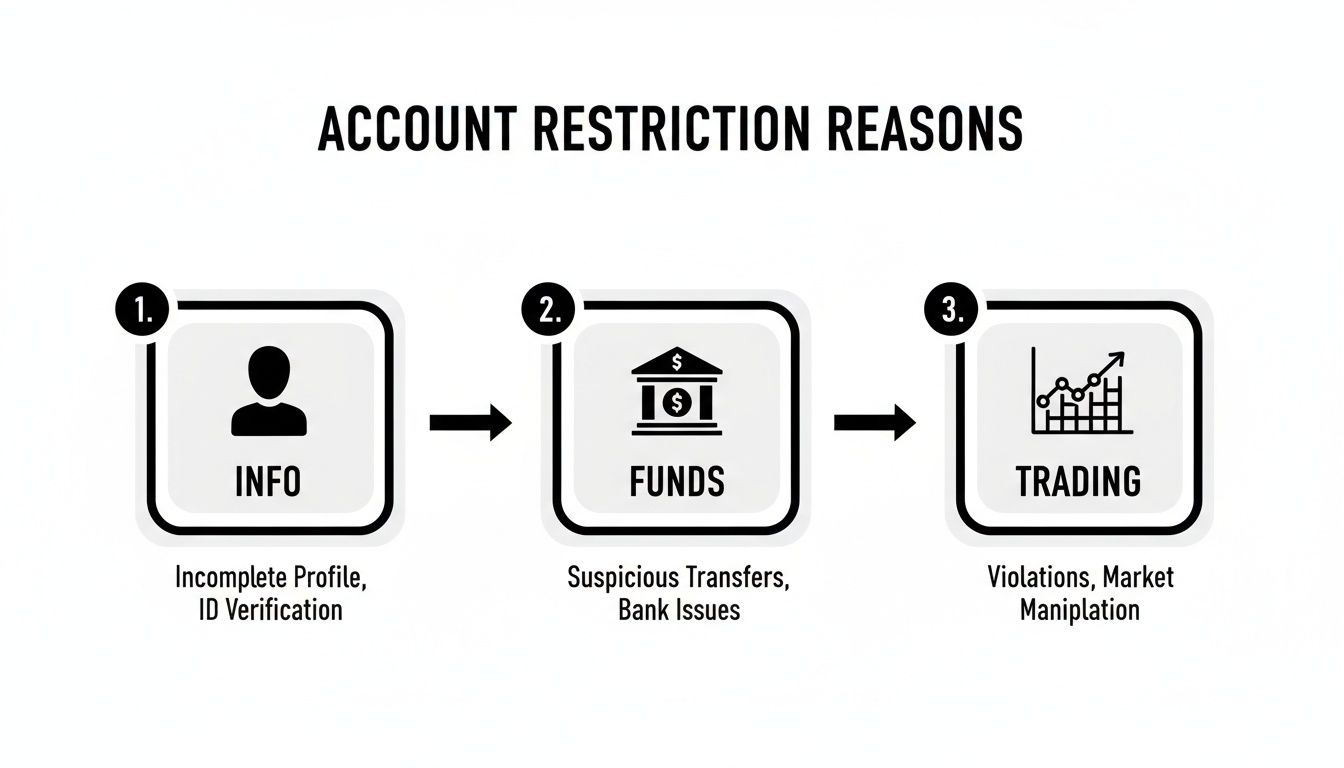
A diagram illustrating three main reasons for account restrictions: incomplete profile, suspicious transfers, and trading violations.

As you can see, the root cause is often something straightforward like a funding issue or an outdated profile detail. This is why it’s so important to keep your personal information and linked bank accounts up to date.

Get Your Documents in Order Now

Once you know the why, you can start on the how. Many restrictions simply require you to prove you are who you say you are. Having these documents ready to go will slash your resolution time.

Here is a checklist of commonly requested documents:

  • [ ] Government-Issued Photo ID: A clear, unexpired driver's license, passport, or state ID. Take a photo where all four corners are clearly visible.
  • [ ] Proof of Address: A recent utility bill or bank statement. It must be less than 90 days old and clearly show your name and current address.
  • [ ] Bank Statements: If a deposit was reversed, they’ll likely need to see a bank statement showing that specific transaction.

Pro Tip: I keep digital copies of these documents in a secure folder on my phone. When a platform asks for verification, I can upload them in seconds instead of digging through a file cabinet.

How to Contact Support the Right Way

When you reach out to Robinhood support, precision is your best friend. A vague message like "my account is locked" just creates more back-and-forth. You want to give them everything they need to solve your problem in the very first message.

Here’s a simple template I've used that gets straight to the point:

  • Subject: Account Restriction Inquiry – [Your Full Name]
  • Body: "Hello, my account was recently restricted. My in-app notification cited [state the specific reason, e.g., 'a Good Faith Violation']. To resolve this, I have attached [list the documents you're providing, e.g., 'a copy of my driver's license and a recent utility bill']. Can you please review my account and let me know the next steps? Thank you."

This approach immediately shows the support agent that you've done your part. It helps them pinpoint your issue and start the review process right away, instead of sending you a canned response asking for more information.

Navigating Complex Regulatory Restrictions

While many account freezes are just simple administrative hiccups, some restrictions come from a much more serious place: financial regulations. When your Robinhood account is restricted for compliance reasons, you've likely bumped up against some complex rules from authorities like the Securities and Exchange Commission (SEC).

These aren't just Robinhood's internal policies. They're federal laws that every brokerage has to enforce. Getting on the wrong side of these can lead to a much longer and more complicated restriction than a simple ID verification issue.

The Landmine of Regulation SHO

One of the sneakiest triggers for an account restriction is a violation of Regulation SHO. This is a dense rulebook governing short selling, including the critical requirement for brokers to locate and deliver shares to close out short positions. When that system fails, it causes headaches for the whole market—and can get individual traders caught in the crossfire.

Robinhood's own business model has created some major compliance issues. Between May 2019 and December 2023, the platform was found to be in violation of Regulation SHO. The SEC found major failures in closing out short positions, marking orders correctly, and locating shares. You can dive into the SEC's findings on Robinhood's violations to see the full picture.

It was a huge deal. The investigation ended with a staggering $45 million SEC penalty in 2025. Robinhood Securities paid $33.5 million and Robinhood Financial paid $11.5 million, which shows you just how seriously regulators take this stuff.

So, why does this matter to you? Because when a brokerage has systemic failures like this, individual accounts can get swept up in the mess. Your account might get frozen during an internal audit or if your trading activity is somehow linked to these bigger compliance problems.

Broader Compliance and Your Account

It's not all about short selling, though. Regulatory rules also cover things like anti-money laundering (AML) and Know Your Customer (KYC) requirements, which are all about preventing financial crime.

A sudden, unusually large deposit or a weird pattern of transactions that doesn't match your history could easily trigger an AML review. That means a temporary account freeze while Robinhood’s team investigates what’s going on. Staying aware of these rules is key, as you can see in our guide on how crypto regulation impacts market reactions; many of the same principles apply. The more you know, the better you can trade without accidentally tripping a compliance wire.

Escalation Strategies When Support Is Unresponsive

Diagram illustrating an escalation process, from chat and calls to official documents, indicating time progression.

There's nothing more frustrating than having your Robinhood account restricted and hearing nothing but crickets from support. You've sent your documents, you've waited, and you're stuck in a loop of automated replies—or worse, total silence. When this happens, it's time to stop waiting and start pushing.

Your first move should be to follow up with more direct language. Ditch the polite, passive "any update?" emails. Instead, send a new message that clearly references your original support ticket number. Give them a quick, clean summary of the problem, the date you first reached out, and everything you've done so far. This builds a clear paper trail.

Ramping Up Your Communication Efforts

If a full week passes with no real response, it’s time to try hitting them from different angles. Robinhood's support is notoriously siloed, and sometimes getting your case in front of a new set of eyes on a different platform is all it takes to get things moving.

Here is a tiered escalation plan:

TierActionPlatformGoal
1Firm Follow-UpEmailReference ticket number, state financial impact.
2Public PostX (Twitter)Tag @AskRobinhood, include ticket number.
3Request CallbackIn-App RequestSpeak to a human agent directly.

Anytime you do make contact, document everything. Note the agent's name, the date and time, and a summary of the conversation. You’ll want this information handy if things don't get resolved.

When to File a Formal Complaint

Let's say you've tried all of that and you're still stuck. Your next step is to go over their heads and contact the regulators. This is a serious move, but it's your right as an investor.

The two main players you'll want to contact are FINRA and the SEC.

  • FINRA (Financial Industry Regulatory Authority): This is usually your best first stop. FINRA directly regulates brokerage firms like Robinhood and has a straightforward complaint process for investors.
  • SEC (Securities and Exchange Commission): As the top federal regulator, the SEC also takes investor complaints, especially if you think there might be a violation of securities laws.

Filing a formal complaint has a way of getting a brokerage's immediate attention. It pulls your case out of the regular customer service queue and lands it on the desk of the compliance department—the people who are legally required to respond.

To make your complaint stick, you need to lay out a clear, factual case. Gather all your documentation: every email, every screenshot, and all your notes from any calls. Build a simple timeline of events, starting from the day your account was restricted to your very last attempt to contact support. A well-organized complaint gives regulators the evidence they need to fight for you.

How to Prevent Future Account Restrictions

A shield representing financial prevention and good practices, surrounded by checkmarks, with banking and data icons.

Dealing with a Robinhood account restricted notice is a massive headache. While getting your access back is the top priority, the real victory is making sure it never happens again. The good news is that prevention usually boils down to just a few core habits: staying on top of your funding, understanding the trading rules, and keeping your account details accurate.

Think of it like basic car maintenance—a little proactive care goes a long way in preventing a major breakdown.

Solidify Your Funding and Profile

More often than not, the most common restrictions are also the easiest to prevent. They typically pop up from simple oversights with a linked bank account or out-of-date personal info.

Here is a quick preventative checklist:

  • Maintain Sufficient Funds: Always double-check that your linked bank account has enough cash to cover a deposit before you hit transfer. A reversed deposit from non-sufficient funds (NSF) is one of the fastest tickets to a locked account.
  • Keep Your Information Current: Did you move recently? Change your legal name? Update your Robinhood profile right away. Financial platforms are required by law to keep accurate customer records.
  • Enable Two-Factor Authentication (2FA): This is non-negotiable. Using 2FA adds a critical security layer that helps block unauthorized access, which could otherwise lead to a protective account freeze.

A good rule of thumb is to peek at your profile and linked accounts every six months. This quick five-minute check can solve problems before Robinhood’s automated systems even have a chance to flag them.

Master the Trading Rules

Beyond the basic account hygiene, your actual trading behavior is the next area that gets scrutinized. Claiming you didn't know the rules won't help much when you're staring down a 90-day trading ban.

Here’s a quick-reference table to keep you on the right side of the rules:

Trading RuleHow to Avoid a Violation
Pattern Day Trader (PDT)If your account value is under $25,000, don't make more than three day trades in a five-business-day window. Keep a simple count in a notes app to be safe.
Good Faith Violation (GFV)Only trade with cash that has fully settled. After you sell a stock, wait the required two business days for the funds to clear before using that money to buy and then sell another security.
Margin CallsBe extremely careful when trading on margin. You have to keep a close watch on your portfolio's value to ensure it doesn’t dip below the required maintenance level.

Getting comfortable with different order types can also be a lifesaver. For instance, knowing how to properly set up certain orders can prevent you from accidentally using unsettled funds or taking on too much leverage. You can learn more about Robinhood limit orders to see how they give you more control over your trades.

Common Questions About Robinhood Restrictions

When that Robinhood account restricted notice pops up, it’s natural for your mind to start racing. The uncertainty is the worst part, especially with your money tied up. Let's cut through the noise and get direct answers to the questions I hear most often from traders in this exact spot.

How Long Does Unrestricting an Account Take?

Honestly, the timeline is all over the map. For something simple, like a request to re-verify your ID, you could be back up and running within 24-48 hours once you’ve sent them what they need.

But more tangled issues will take longer. Things like reversed bank transfers, potential fraud flags, or trading violations (hello, Pattern Day Trader rule) trigger a much deeper review. That can stretch the process out to several business days, and in some cases, even weeks. Your best move is to jump on any request for information from Robinhood immediately. The faster and more accurately you reply, the less time you'll spend on the sidelines.

Can I Sell Stocks with a Restricted Account?

This is the big one, and the answer truly depends on why you were restricted. For many of the more common, minor issues, Robinhood will put your account into a "liquidate-only" status. This is a silver lining. It means you can still close out your existing positions and pull out any cash that has settled. That gives you a crucial bit of control to manage your risk even if you can't open any new trades.

However, if the restriction is for something more serious—like suspected unauthorized activity on your account or a major compliance breach—they might freeze everything. And I mean everything. Selling stocks, withdrawing funds, all of it gets put on ice until their investigation is wrapped up.

Will Robinhood Warn Me Before a Restriction?

Almost never. Don't expect a heads-up. Most restrictions are triggered by automated systems that react instantly to specific events. The second your account registers that fourth day trade in a five-day window, the Pattern Day Trader restriction is applied automatically. There's no warning shot.

It’s the same with a failed bank transfer—that triggers an immediate hold. You usually find out you're restricted when you go to place a trade or an alert flashes in the app. An email or in-app message explaining the reason typically follows pretty quickly after the fact.


Ready to stop guessing and start learning from the best? Wallet Finder.ai gives you the tools to track the trades of top-performing crypto wallets, see their strategies in real time, and act on proven signals. Start your 7-day trial today and turn on-chain data into your competitive advantage.