Wallet Protection From Scanning: A Guide

Wallet Finder

Blank calendar icon with grid of squares representing days.

January 19, 2026

Effective wallet protection from scanning isn't about paranoia—it's about being prepared. The idea is to use RFID-blocking technology, like specially designed wallets or simple card sleeves, to create a protective shield around your credit cards and passports. This barrier stops criminals from using portable scanners to wirelessly lift your personal and financial info right out of your pocket.

The Unseen Risks in Your Pocket
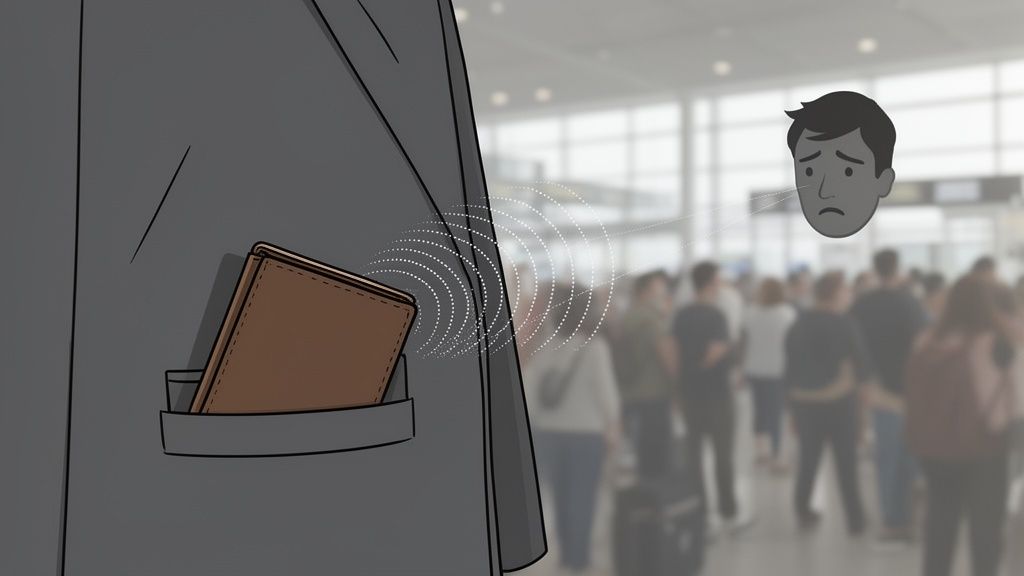
Illustration of a wallet in a pocket being scanned, causing a sad face in a crowd.

The "tap-to-pay" feature we all love for its convenience has a hidden dark side: digital pickpocketing. The very cards that make checkout a breeze are constantly broadcasting signals that can be snatched out of the air. This isn't some complex, Hollywood-style heist; it's a silent and invisible threat that can happen anywhere, anytime.

Think about the last time you were in a crowded airport terminal or waiting in line for coffee. Someone standing nearby could be holding a small, cheap scanner. By just walking past you, they can try to skim the data from the RFID and NFC cards in your wallet. You wouldn't feel a thing.

How Digital Skimming Actually Works

This type of theft, often called RFID skimming or electronic pickpocketing, works by exploiting the radio waves your contactless cards emit. While they're only designed to be read from a few inches away for a legitimate payment, criminals can use powerful boosters to read card data from several feet away.

With a simple scan, a thief can capture:

  • Your Full Name: The name printed on the card.
  • Card Number: The full 16-digit number.
  • Expiration Date: The month and year the card expires.

With just these three pieces of information, a thief has everything they need to start making fraudulent online purchases or even create a cloned card. The whole process takes seconds, and you might not have a clue until you spot strange charges on your statement days later.

For a deeper look into identifying these kinds of threats, you can check out our detailed checklist for assessing wallet risks.

The really scary part isn't the technology itself, but how easy it is to get. Basic RFID readers can be bought online for less than $100, making this a low-cost, high-reward crime for anyone looking to make a quick buck.

Just understanding this vulnerability is the first step toward real wallet protection from scanning. It’s not about ditching your cards; it’s about taking control. Once you accept that your cards are always "on," you can take simple but powerful steps to decide who gets to listen in.

So, What Exactly Are RFID and NFC Threats?

To really bulletproof your wallet, you have to get inside the head of a digital pickpocket and understand their playbook. The magic behind "tap-to-pay" convenience relies on two key pieces of tech: Radio-Frequency Identification (RFID) and Near Field Communication (NFC). These are the very same technologies that open the door for bad actors.

People throw these terms around interchangeably, but the differences are what matter when it comes to keeping your money safe.

Think of RFID as the broader, simpler technology. It's mostly a one-way street where a passive tag—like in a building access card or a passport—broadcasts its info to any reader that wakes it up. It’s like a tiny radio station that just blurts out its ID to anyone listening.

NFC, on the other hand, is a smarter, two-way version of RFID. It’s designed for a much shorter range, usually just a few inches. This close-range handshake is what allows for secure, interactive stuff, like when you tap your phone or credit card to buy a coffee.

How Scammers Turn Convenience Against You

The real threat boils down to one thing: unauthorized scanning. Your contactless cards are packed with tiny chips and antennas that are built to respond to radio waves from a reader. In a perfect world, that only happens at a checkout terminal. But a thief with a portable, high-powered scanner can create that same energy field from a distance.

Sure, NFC is supposed to work only when things are cozy and close. But criminals don't play by the rules. They use booster antennas to stretch that range from a few inches to several feet.

This lets them pull off a "skimming" attack in any crowded space—a busy subway car, a packed concert, you name it. They just have to walk by you. Their scanner, hidden in a bag, wakes up your cards and snatches your name, card number, and expiration date. You won't feel a thing.

The weak link here isn't a flaw in your card's chip. It's the unshielded signal. Your card is designed to be helpful and respond to any valid reader, but it has no way of knowing if that reader is a legit payment terminal or a scammer's tool in a backpack.

This is where wallet protection from scanning comes in. The goal is simple: block those radio waves completely and create a silent bubble around your cards.

RFID vs NFC: What's In Your Wallet?

Knowing what's in your wallet helps you figure out your biggest risks. Both RFID and NFC use radio waves, but their different ranges and data capabilities mean they have different vulnerabilities. Most of your tap-to-pay credit cards will be NFC, while things like work ID badges or older transit passes might be RFID.

Here’s a quick breakdown to help you see what’s what.

FeatureRFID (Radio-Frequency Identification)NFC (Near Field Communication)
CommunicationTypically one-way; a tag broadcasts data to a reader.Two-way communication; devices can both send and receive data.
Typical RangeCan be several feet, depending on the frequency and reader power.Extremely short-range, usually less than 4 inches (10 cm).
Common UsesBuilding access cards, inventory tracking, passports, some older cards.Contactless credit/debit cards, mobile payments (Apple Pay/Google Pay).
Main VulnerabilitySusceptible to long-range skimming due to its broader broadcast range.Can be skimmed with boosted readers from a few feet away.

Ultimately, whether it's RFID or NFC, the solution is the same: you need to create a barrier. By shielding your cards, you cut off the signal before a digital thief can ever get their hands on it.

Your Practical Defense Against Digital Theft

Alright, now that you know the risks, let's talk about building your defense. Protecting your wallet from digital skimming is really about a combination of smart tools and even smarter habits. The good news? Securing your data doesn't have to be a huge, expensive headache. There are practical options for just about any budget.

The most straightforward way to protect yourself is by using products designed specifically to block RFID and NFC signals. Think of them as creating a protective shield, or a "silent bubble," around your cards. This makes them completely invisible to any nearby scanners trying to sneak a peek.

Choosing Your Shielding Solution

There are a few main types of blocking gear on the market, each with its own trade-offs between convenience, cost, and how much protection it offers. Your best bet depends on your lifestyle, what you carry every day, and your personal comfort level with risk.

  • RFID-Blocking Card Sleeves: These are the simplest and cheapest route. A sleeve is just a thin envelope made from signal-blocking material that you slip a single card into. They're perfect if you only need to protect one or two main cards and don't want to buy a whole new wallet.
  • RFID-Blocking Wallets: These wallets have the shielding material built right into the lining. They protect every card inside without you having to think about it and look just like any other wallet, so you get security without sacrificing style.
  • Faraday Bags or Pouches: If you're looking for maximum security, a Faraday bag is the gold standard. These pouches are lined with a special metallic fabric that blocks a huge range of electromagnetic signals—not just RFID and NFC, but also Wi-Fi and cellular. They're great for travel or when you need to carry several sensitive items at once.

To help you figure out what to protect, this flowchart can guide your decision on which items might need shielding and which you could probably leave at home.

A wallet item decision tree flowchart illustrating choices for carrying items like passport and access cards.

As you can see, things like passports and credit cards are high-priority items for protection, while something like a simple office keycard might not need the same level of security.

Comparing Your Options

Picking the right tool means weighing the pros and cons against what you actually do day-to-day.

Protection MethodProsConsAverage Cost
RFID Card SleeveVery affordable, slim, fits in any wallet.Protects only one card per sleeve, can wear out.$5 - $15 (for a pack)
RFID-Blocking WalletProtects all cards, convenient, looks normal.More expensive, requires replacing your wallet.$20 - $100+
Faraday BagHighest level of protection, blocks multiple signals.Bulky, less convenient for daily use.$15 - $50

Smart Habits Cost Nothing

Beyond buying new gear, a few simple habits can make a big difference. How you arrange cards in your wallet can sometimes create a natural shield. For instance, placing a less-sensitive card (like a grocery store loyalty card) on top of a credit card can sometimes be enough to disrupt a weak scanner's signal.

More than anything, though, situational awareness is your best free tool. Pay attention to your surroundings in crowded places—think public transit, busy city streets, or tourist hotspots. These are prime hunting grounds for digital pickpockets.

The goal isn't just about blocking signals; it's about reducing your attack surface. The less opportunity a criminal has, the safer you'll be.

This same principle applies in the digital world, especially for anyone involved in DeFi. A staggering $12.5 billion was lost to crypto scams and fraud, according to TRM Labs' 2023 Illicit Crypto Economy Report. Scammers are getting creative with QR code traps and phony wallet apps to drain funds.

For users of platforms like Wallet Finder.ai who copy trade, these numbers are a stark reminder of why security is paramount. Physical protection like a Faraday bag, which blocks the NFC signals used by some crypto hardware wallets, adds a critical layer of defense against these increasingly sophisticated threats. You can dive deeper into the data in their detailed crypto economy report.

Ultimately, the best defense is a mix of a reliable blocking product and conscious, security-minded habits.

How to Test Your RFID Blocking Gear

Two illustrations show methods for protecting credit cards from unauthorized scanning: a protective sleeve and a self-check blocker.

So, you've picked up an RFID-blocking wallet or a few card sleeves. Great first step. But how can you be sure they’re actually doing their job? Trusting the claims on the packaging is one thing, but verifying it yourself is what really brings peace of mind.

The good news is you don't need any fancy gadgets to run a quick, effective test. The very same NFC technology that makes your cards so convenient is the perfect tool for checking your defenses.

Use Your Smartphone as a Scanner

Your phone is the easiest testing device you have. Most modern smartphones have a built-in NFC reader—it’s the tech that powers things like Apple Pay and Google Pay. You can use this to see if your gear is up to snuff.

Here’s a quick step-by-step guide:

  1. Enable NFC: Go to your phone’s settings (usually under "Connections" or a similar menu) and turn on the NFC function.
  2. Establish a Baseline: Take a contactless card and tap it to the back of your phone, near the top where the antenna is. Your phone should buzz or launch a payment app. This confirms both your card and phone's NFC are working.
  3. Test Your Shield: Slide that same card into your RFID-blocking wallet or sleeve. Close it and hold it against the exact same spot on your phone.
  4. Check the Result: If the protection is working, nothing should happen. Your phone will remain silent, with no reaction at all.

It's that simple. If the phone stays silent, you've confirmed the shielding material is successfully blocking the signal.

If your phone still recognizes the card while it’s inside the wallet, then the product isn't working as advertised. It could be a dud or simply damaged, but either way, it’s a clear sign you need to find a better solution.

The Real-World Checkout Test

While the phone trick is a great at-home test, nothing beats trying it out in the wild. The next time you're at a self-checkout lane at the grocery store or pharmacy, you’ve got the perfect opportunity.

Instead of pulling your card out to pay, just hold your entire closed wallet right up to the contactless payment terminal.

If the wallet is doing its job, the machine won't be able to read the card. You’ll probably see an error message like "Card not read" or "Please try again." That's not a failure—that's your proof that the security is working exactly as it should. This quick check gives you tangible evidence that your info is safe in the very environment a thief might target.

Extending Security to Your Crypto Assets

For anyone in crypto, wallet protection from scanning is a two-front war. It's not just about shielding your physical cards. Your digital assets face a totally different kind of scanning threat—one that’s all about tricking you into giving up your private keys.

These digital threats are clever and often show up disguised as once-in-a-lifetime opportunities. A classic move is QR code phishing, where scammers lure you into scanning a compromised code. One quick scan could redirect you to a malicious site designed to drain your wallet or ask you to approve a transaction that signs your assets away.

The Dangers of Malicious QR Codes

Scanning a random QR code is the crypto equivalent of clicking a shady link in a spam email. You might be giving a smart contract unlimited permission to your funds or, worse, exposing your seed phrase. This is especially dangerous in the fast-moving world of DeFi, where one wrong click is irreversible.

Here is an actionable checklist to stay safe from QR code scams:

  • Verify the Source: Only scan codes from trusted platforms, like an official exchange website or your hardware wallet's companion app.
  • Question "Too Good to Be True" Offers: Be extremely wary of QR codes promising free airdrops or giveaways. These are almost always traps.
  • Use a QR Scanner with Previews: Some security-focused apps will show you the destination URL before opening it, giving you a chance to spot a suspicious link.
  • Never Scan from a DM: Legitimate projects will not send you private messages with QR codes to claim rewards.

The financial toll of these scams is staggering. According to blockchain security firm SlowMist, 2023 saw 464 major security incidents resulting in a jaw-dropping $2.486 billion in losses. Many of these, like the Atomic Wallet hack that siphoned at least $100 million, started with simple phishing attacks. For serious traders, this data drives home the absolute need to keep daily trading funds separate from long-term holds. You can dig into the full report and blockchain security findings on Slowmist.com.pdf).

Why Hardware Wallets Are Essential

When it comes to defending against digital scanning threats, nothing beats a hardware wallet. Often called cold storage, devices from brands like Ledger and Trezor are built to keep your private keys on a secure chip, completely disconnected from the internet.

A hardware wallet makes remote hacking impossible. Because the private keys never leave the device, you must physically approve every transaction using the buttons on the wallet itself. This creates an "air gap" that malware simply cannot cross.

This physical verification step is the secret sauce. A hacker could completely take over your computer, but without getting their hands on your hardware wallet and pressing those buttons, they can't sign transactions to steal your funds. To fully grasp this, it helps to understand the role of a seed phrase for wallet recovery and how it all fits together.

By pairing smart digital habits—like treating unknown QR codes with suspicion—with the ironclad security of a hardware wallet, you build a fortress around your crypto that protects it from all angles.

Common Questions About Wallet Security

Let's tackle some of the most common questions that pop up when people start thinking about shielding their wallets from scanners. Getting these answers straight will give you the confidence that your security plan is built on solid ground.

A big one I hear all the time is whether RFID-blocking products can actually mess up your credit cards. The answer is a hard no. Any reputable blocking wallet or sleeve is completely passive. They're built with materials that just absorb or deflect radio signals, not emit anything that could possibly harm your card's chip or magnetic stripe.

Is DIY Protection Really Effective?

Then there's the DIY approach—specifically, aluminum foil. Can you just wrap your cards in foil and call it a day? Well, yes and no. While a few layers of standard kitchen foil can block an RFID signal in a pinch, it's just not a reliable long-term solution.

The foil is flimsy, rips easily with the daily grind of pulling cards in and out, and quickly develops tiny gaps. Those little tears are all a scanner needs to get through. For consistent, durable protection, a professionally made product is hands-down the better investment.

The effectiveness of any shield comes down to its integrity. A small tear in a DIY foil wrapper is like leaving a window open for a burglar—it defeats the entire purpose of the lock on the door.

Understanding Digital Threats and Scanning Range

People also worry about how far away a scammer can be to skim their card. Normally, an NFC reader needs to be within a few inches to work. The real danger, though, comes from determined criminals using high-powered booster antennas. In a crowded mall or on public transport, these illegal devices can potentially snatch card data from several feet away. This is exactly why being proactive with shielding is so important.

This threat of unauthorized scanning isn't just limited to physical cards. It has a direct parallel in the crypto world. In 2023 alone, the FBI's IC3 received over 60,000 complaints related to crypto fraud, with staggering losses of more than $5.6 billion. A huge chunk of this came from scams at crypto kiosks, where people were tricked into scanning malicious QR codes that instantly drained their wallets. You can dig into these cryptocurrency fraud trends in the full IC3 report.

It's a stark reminder that a single unauthorized scan—whether it's grabbing your credit card number or tricking you with a QR code—can have devastating consequences.

For anyone managing digital assets, connecting these physical and digital risks is key. If you're active on major platforms, taking the time to read through guides on how to properly secure your Coinbase wallet is a smart move. It adds a crucial layer of digital defense to complement your physical security measures.


Ready to turn on-chain data into actionable trading signals? Wallet Finder.ai helps you discover and track top-performing crypto wallets in real time. Start your 7-day trial today and see what the smart money is doing. Find your edge with Wallet Finder.ai.