Bitstamp Customer Service: A Trader's Guide to Fast Help

Wallet Finder

Blank calendar icon with grid of squares representing days.

April 24, 2026

Your withdrawal is pending, your login suddenly fails, or a trade-related transfer doesn’t show up when the market is moving hard. In those moments, bitstamp customer service stops being a background feature and becomes part of your risk management.

Bitstamp has a strong trust profile. It is the only crypto exchange to receive CCData’s top AA risk rating seven consecutive times, and it earned a 10/10 score in both transparency and audit strength in Forbes’ 2025 Crypto Exchange rankings, according to Bitstamp’s announcement on its CCData and Forbes recognition. That matters. A platform can have a clean reputation and still leave traders frustrated if they contact support through the wrong channel, send a vague ticket, or wait too long to escalate.

That’s the practical reality. Good exchanges still have queues, compliance checks, and edge cases. If you trade actively, especially around volatile moves, you need a support plan the same way you need an entry plan and exit plan.

I treat exchange support the same way I treat transfer timing. If funds or access matter right now, the details of the process matter more than the marketing line. That’s also why it helps to understand related execution bottlenecks on other platforms, like these Coinbase transfer times explained for active traders.

When Every Second Counts How to Get Help from Bitstamp

Most traders contact support too late and with too little information. That’s the main mistake.

If your issue is urgent, the first job is to classify it correctly. A pending withdrawal, locked account, failed 2FA login, missing deposit, or suspicious account activity are not the same type of problem. They shouldn’t be handled the same way. Traders who send every issue through one generic contact path usually create their own delay.

What Bitstamp gets right

Bitstamp has been operating continuously since 2011 and has built a reputation around reliability, transparency, and institutional-grade operations. That history matters because older exchanges tend to have more mature operational processes than newer platforms trying to scale too fast.

The support experience sits on top of that operating model. Bitstamp also serves a broad user base, from retail users to institutions, so the process is built for volume and documentation rather than improvisation. That’s good for auditability, but it also means vague requests move slowly.

Practical rule: Support speed depends less on how stressed you are and more on how easy you make the case to process.

What traders need to accept

Support isn’t trading desk execution. You won’t get custom handling just because the market is ripping and your position is exposed. You have to communicate in a way that lets the team verify identity, identify the transaction or account issue, and act without asking three more follow-up questions.

That’s where most of the true edge is. Not in finding a secret contact path, but in matching the issue to the right channel and sending a ticket that already contains the details an agent needs.

Use this playbook that way. Pick the right channel first. Then write the request so it can be resolved, not just acknowledged.

Choosing Your Bitstamp Support Channel for a Faster Fix

If you use the wrong contact method, you can lose hours before the real work even starts. Bitstamp gives you several ways to get help, but they aren’t equal.
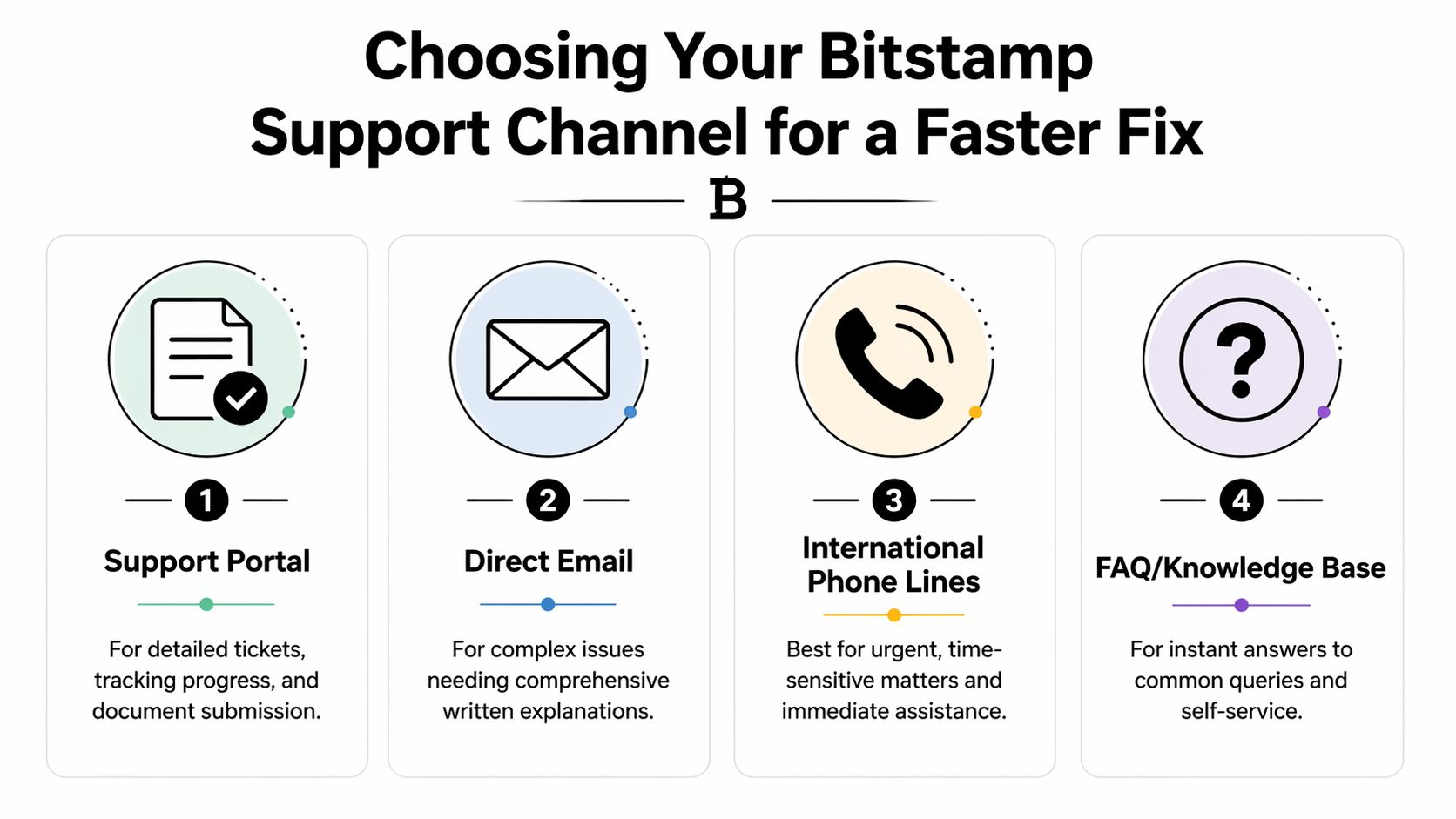
An infographic illustrating four Bitstamp support channels including the support portal, email, phone lines, and knowledge base.

The response time trade-off

Bitstamp’s support channels have a clear speed-versus-cost split. According to FXEmpire’s Bitstamp exchange review, email support sends an automated acknowledgment within 60 minutes and a substantive response within 24 hours, while phone support connects in approximately 65 seconds. The same review notes that phone lines are not toll-free, and email is used by 70% of customers.

That tells you almost everything you need to know. Phone is for urgency. Email is for depth and recordkeeping. If you call for a routine issue, you may pay for speed you don’t need. If you email during a live account-access or transfer emergency, you may save money and lose time.

Best channel by issue type

Use this as your default decision framework.

ChannelBest ForExpected Response TimeKey Consideration
Support portalVerification issues, document-heavy cases, ticket trackingVaries by caseBest when you need a clear case record and attachments
Direct emailComplex written explanations, non-urgent account questions, detailed transaction disputesAutomated acknowledgment within 60 minutes, substantive response within 24 hoursStrong paper trail, but not ideal for live emergencies
International phone linesLocked account, urgent withdrawal concern, immediate trading-access problemsApproximately 65 seconds to connectFastest human contact, but not toll-free
FAQ and knowledge baseBasic account steps, routine troubleshooting, common process questionsImmediate self-serviceGood for simple answers, weak for edge cases

What works in practice

For urgent account access issues, call first, then follow with a written summary through email or the support system. That gives you two things: faster attention and a written case trail. If the phone agent tells you a review is required, your follow-up email should restate the issue clearly and include the relevant identifiers.

For deposit and withdrawal problems, written support usually works better than a rushed phone explanation. These cases often depend on transaction details, timestamps, asset type, and destination information. A short, clean written report is easier for an agent to act on than a verbal description.

For verification or compliance reviews, use the channel that supports document submission cleanly. Don’t scatter the same issue across multiple new tickets unless you’re escalating after a genuine delay. Duplicate tickets can slow things down because they fragment the case history.

If the problem can cost you money in the next few minutes, phone first. If the problem needs documents, hashes, screenshots, or a sequence of events, write it out properly.

A simple channel strategy

Here’s the approach I’d use under pressure:

  • Call for access risk: If you can’t log in, suspect compromise, or need immediate human contact, use phone first.
  • Email for transaction clarity: If you need to explain a missing deposit, pending withdrawal, or account discrepancy, email is usually cleaner.
  • Portal for trackable workflows: If the issue involves identity checks or attachments, keep everything in one structured ticket.
  • FAQ for obvious friction: Before you open a ticket, check whether the issue is just a normal platform process or a required verification step.

A lot of frustration with bitstamp customer service comes from trying to force one channel to do every job. The faster fix usually starts with a better choice.

How to Write a Support Ticket That Gets Results

Bitstamp serves over 500,000 funded users globally, and its 24-hour spot trading volume can exceed $300 million, according to Coinlaw’s Bitstamp statistics roundup. In a queue that large, sloppy tickets get slowed down by avoidable follow-up.

A cartoon illustration of a young man smiling while typing on his laptop to solve login issues.

What every good ticket includes

A strong ticket does four things fast:

  1. States the exact problem
  2. Defines urgency without drama
  3. Gives the identifiers needed to investigate
  4. Shows what you already tried

If you skip any of those, support has to come back for basics.

Include these details up front

  • Account identifier: Your username, customer ID, or the email tied to the account.
  • Asset and transaction context: Which coin, which network, whether it was a deposit, withdrawal, trade, or login event.
  • Relevant ID fields: Transaction hash, withdrawal reference, deposit reference, or order information if available.
  • Time window: When the issue started and your time zone.
  • Device context for technical problems: Browser, app, device type, and operating system.
  • Clear ask: Tell them exactly what you want checked. Pending withdrawal review, login restoration, deposit credit confirmation, or account security review.

The fastest ticket format

Keep the structure tight. Support agents don’t need your market thesis. They need a clean incident report.

Use this layout:

  • Subject line
  • One-sentence summary
  • Bullet list of facts
  • What you already tried
  • Exact action requested

Best habit: Write your ticket like an operations handoff, not a rant.

Copy-paste templates

Stuck withdrawal

Subject: Withdrawal pending review for [asset]

Hello Bitstamp Support,

My withdrawal for [asset] is still pending and I need a status check.

Details:

  • Account email: [your email]
  • Asset: [asset]
  • Withdrawal submitted: [date and time, time zone]
  • Amount: [amount]
  • Destination network/address: [relevant details]
  • Withdrawal reference or transaction ID: [ID if available]

I have already checked my account notifications and email for any requested action.

Please confirm whether this withdrawal is waiting on a security or compliance review, and let me know if you need anything from me to move it forward.

Thank you.

Login failure after 2FA issue

Subject: Unable to log in after 2FA issue

Hello Bitstamp Support,

I’m unable to access my account due to a 2FA-related login problem and need help restoring access.

Details:

  • Account email: [your email]
  • Issue started: [date and time, time zone]
  • Device and browser/app: [details]
  • Error message shown: [exact text]
  • Steps already tried: [app restart, browser change, code resync attempt, etc.]

Please review my account access issue and advise the fastest secure path to regain login access.

Thank you.

After you draft a ticket, pause and trim anything emotional or repetitive. Shorter and clearer usually wins.

A walkthrough can help if you’re dealing with access friction or account navigation problems:

Small details that reduce delay

A few habits make a real difference:

  • Use one thread per issue: Don’t split one incident across multiple disconnected messages.
  • Reply inside the same chain: That preserves context and keeps the case easier to process.
  • Name attachments clearly: “Withdrawal-history-screenshot” is better than “image1.”
  • Avoid mixed issues: Don’t combine a pending withdrawal, a verification complaint, and an API question into one ticket.

Support can only move as fast as the case file allows. Your job is to make the file easy to work.

Common Bitstamp Issues and Potential Quick Fixes

Most exchange problems feel unique when they happen. They usually aren’t. A few patterns show up again and again, and some of them can be handled before support ever replies.

A hand touching a smartphone screen displaying the Bitstamp app logo and interface with a fixed icon.

According to Traders Union’s Bitstamp broker review, Bitstamp’s deposit and withdrawal setup received a 5.5/10 benchmark rating because of its zero deposit fees, withdrawal fees, and lack of Google Pay and PayPal support. For active traders, that creates friction in exactly the places where speed matters most.

Deposits and withdrawals

If a transfer feels slow, start by checking whether you’re dealing with normal process variability instead of a broken workflow. Withdrawal timing can depend on review steps and network confirmation timing, so not every delay means something is wrong.

Quick checks before opening a ticket:

  • Confirm the asset and network match: A mismatch can create the appearance of a missing transfer.
  • Check whether the withdrawal is still pending or already broadcast: Those are different situations.
  • Review email and in-app notifications: Sometimes the missing step is an approval prompt or security review notice.
  • Plan around withdrawal fees: If you move funds frequently, batch transfers when possible instead of doing repeated small reallocations.

If you’re trying to fund or withdraw through payment rails you use elsewhere, the absence of PayPal or Google Pay can be the issue itself, not a bug. In those cases, the practical answer is to use the available supported methods rather than waste time troubleshooting a payment option Bitstamp doesn’t offer.

Login and verification friction

Login trouble often comes from simple mismatches between app state, browser session, and 2FA setup rather than a full account lock.

Try these first:

  • Refresh the session: Log out fully, close the app or browser, and start a clean session.
  • Test another environment: If mobile fails, try desktop. If one browser fails, try another.
  • Check your device clock: Time-based code issues often start there.
  • Keep screenshots of error messages: If you do need support, exact wording helps.

If identity verification stalls, don’t keep re-uploading slightly different versions of the same document through scattered threads. Keep the issue in one place and make sure your submission is readable, current, and consistent with your account details. If you’ve dealt with similar verification friction elsewhere, this guide on Coinbase identity verification not working is useful for troubleshooting habits that also apply broadly.

A lot of “support problems” start as process problems. Check the network, the status, the notification trail, and the exact error first.

API and platform-side issues

If your bot, alerts, or trading workflow stops behaving as expected, don’t assume customer service can diagnose vague reports like “API broken” or “charts off.”

Send specifics:

  • What endpoint or permission failed
  • Whether the issue is account-wide or key-specific
  • The exact timestamp of the failure
  • Whether manual trading still works

That turns a generic complaint into something actionable. Even if the fix still requires support, you cut out the first round of questions.

Escalation Paths and Protecting Your Account

The hardest bitstamp customer service cases aren’t routine tickets. They’re the ones where account access, account security, or unanswered support starts threatening your funds.

A confused person stands at a crossroads choosing between Standard Support and an Escalation Path.

Bitstamp advertises 24/7 support, but its public guidance doesn’t provide official resolution timelines for account compromise cases. The platform’s own support contact guidance, together with user reports referenced around it, shows that initial responses can take over 48 to 72 hours in some cases, with some incidents stretching into weeks, as discussed in Bitstamp’s app support contact FAQ and the linked user-experience context. That gap matters because compromise cases are time-sensitive by definition.

When to escalate

Escalation makes sense when one of these is true:

  • You suspect unauthorized account access
  • A withdrawal or security issue remains unresolved after standard contact
  • You’ve received acknowledgment but no meaningful action on a high-risk case
  • Support responses don’t address the actual incident

In those moments, don’t keep rewriting the story from scratch every time. Build one clean incident summary and reuse it consistently.

How to frame a high-stakes incident

Security tickets need precision more than panic. The goal is to show clear risk.

Use a structure like this:

  • State the security concern immediately: suspected account compromise, unauthorized login, unexpected password change, or suspicious withdrawal-related activity.
  • Define the timeline: when you first noticed the issue and what happened next.
  • List the affected functions: login, withdrawals, email changes, 2FA, API access.
  • Ask for concrete protective action: account review, temporary restriction, access recovery guidance, or investigation of specific activity.

A concise escalation message often works better than a longer emotional one. Support teams handling security issues need verified facts, not volume.

If you think the account is compromised, act like minutes matter. Secure your email, document what changed, and contact support through the fastest official route.

Protecting yourself before support is needed

The best escalation is the one you never need. Most trader pain around account security starts outside the exchange itself. Phishing pages, fake support accounts, reused passwords, and sloppy 2FA handling create the opening.

A few practices reduce that risk a lot:

  • Treat inbound messages as hostile until proven otherwise: Don’t trust DMs claiming to be exchange staff.
  • Use strong, unique credentials: Reuse turns one leak into multiple account problems.
  • Lock down the email account tied to the exchange: Email recovery often becomes the main control point.
  • Keep 2FA organized: If your authentication setup is messy, recovery gets slower and riskier. This guide on crypto 2FA code problems and prevention is a useful refresher.
  • Record critical account details securely: If access breaks, you’ll need identifiers fast.

What not to do during escalation

Avoid these common mistakes:

  • Don’t open a flood of duplicate tickets
  • Don’t post sensitive account details publicly
  • Don’t rely on social replies as your main support path
  • Don’t wait too long to report suspicious activity because you’re still “checking things”

If the issue is routine, patience and documentation usually solve it. If the issue is account compromise, speed and documentation matter more.

Your Quick-Reference Bitstamp Support Checklist

When something goes wrong, you don’t need theory. You need a fast sequence.

Before you contact support

  • Check the obvious first: Review status pages inside your account, email notices, and any in-app prompts.
  • Confirm the exact issue type: Pending withdrawal, login problem, verification review, missing deposit, or suspected compromise.
  • Collect the identifiers: Transaction details, timestamps, account email, screenshots, and exact error messages.
  • Try a clean basic reset for access issues: New browser, app restart, and a fresh login attempt.

When submitting your ticket

  • Pick the right channel: Phone for urgent access or security risk. Written support for document-heavy or transaction-specific issues.
  • Use a sharp subject line: “Withdrawal pending review” beats “Need help please.”
  • Write in facts, not frustration: What happened, when it happened, what account or transaction is affected, what you already tried.
  • Ask for one clear action: Status check, access restoration, security review, or transfer investigation.

If your issue isn’t resolved

  • Reply in the same thread: Don’t scatter the case.
  • Summarize the unresolved point: Keep it short and specific.
  • Escalate faster for security incidents: Especially if account access or unauthorized activity is involved.
  • Protect adjacent systems: Secure your email, authentication apps, and any connected workflow if compromise is possible.

The core takeaway is simple. The speed of bitstamp customer service often depends on your preparation, your channel choice, and how cleanly you present the issue.


If you’re an active trader and want fewer support emergencies caused by late entries, slow discovery, or reactive wallet tracking, Wallet Finder.ai helps you monitor profitable wallets, spot smart money moves early, and act with better context before timing pressure turns every exchange issue into a crisis.