FFIEC APR Calculator: Your 2026 Compliance Guide

Wallet Finder

Blank calendar icon with grid of squares representing days.

June 9, 2026

You're usually not opening the FFIEC APR calculator because everything is going smoothly. You open it when a disclosure looks close, but “close” isn't good enough. A fee was reclassified. The first payment date shifted. The payment stream has one irregular period. Someone wants to know whether the disclosed APR still holds.

That's the right time to use the FFIEC APR Calculator. Not to create the loan. Not to guess. To verify what's already on paper and decide whether the disclosure can stand.

A lot of confusion comes from treating the calculator like a lending platform feature. It isn't. Used correctly, it's a compliance control. Used carelessly, it gives a false sense of security because the math only reflects the data you feed it.

Why the FFIEC APR Calculator is Essential

When a loan file is moving toward closing, APR verification is one of those tasks that can look routine until it suddenly isn't. An odd first period, a prepaid charge, or a real estate-secured structure can turn a simple check into a real compliance question. That's why the FFIEC tool matters. It gives institutions a standardized federal method to verify disclosed APRs and finance charges instead of relying only on internal spreadsheets or vendor outputs.

The federal release announcing the tool matters for another reason. The FFIEC APR Computational Tool was announced on April 16, 2020, and it was built by FFIEC member agencies to help verify finance charges and APRs under the Truth in Lending Act and Regulation Z. It supports unsecured and secured installment loans, construction loans, real estate-secured loans, and checks for MAPR limits under the Military Lending Act, as described in the FFIEC Federal Disclosure Computational Tools announcement.

Why this matters in daily compliance work

That scope tells you something important. This isn't a niche calculator for one product type. It's a federal verification utility intended for the same general compliance environment examiners work in.

If you're new to APR testing, don't confuse conceptual learning with compliance verification. A consumer explainer such as this guide to APR vs APY calculators can help with terminology, but the FFIEC tool serves a different purpose. It checks whether your disclosed loan terms hold up under regulatory calculation logic.

Practical rule: If a loan disclosure is going out the door, a second calculation source is a control. If the file is complex, that control stops being optional.

What makes it essential

  • It's official: The tool was built by FFIEC member agencies for examiner and institution use, not as an informal workaround.
  • It fits examination logic: Teams can validate disclosures using the same category of federal utility that supports review work.
  • It handles real-world loan structures: Installment, construction, and real estate-secured loans all fall within the stated scope.
  • It supports MAPR checking for applicable installment loans: That matters when military lending issues sit alongside TILA analysis.

A junior analyst often asks whether the calculator is “required.” The better question is whether your process is defensible without an independent verification step. In straightforward files, internal systems may be right. In messy files, confidence without verification is where avoidable errors start.

A Verification Tool Not an Origination System

The most common mistake is using the FFIEC APR calculator as if it were a loan origination system. That's not what it does. It doesn't build a loan, manage an application, or generate production disclosures for borrowers. Its job is narrower and more useful: verify whether the disclosed APR and finance charge align with the actual contract terms you entered.
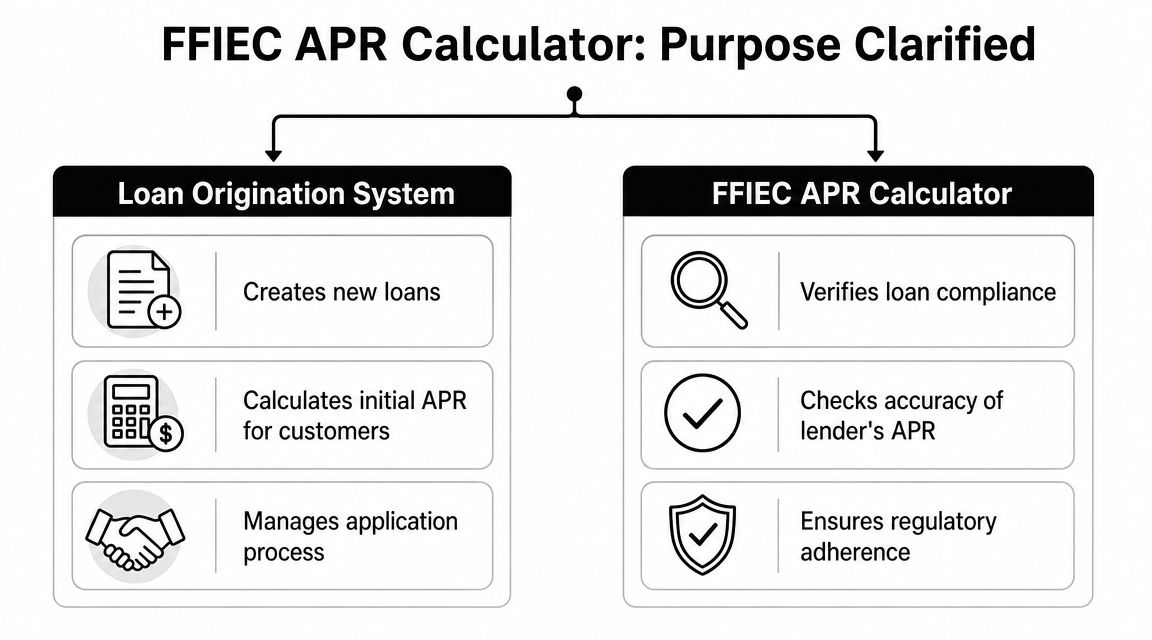
A diagram comparing the functions of a loan origination system versus the FFIEC APR calculator tool.

What the tool is doing

In practice, the workflow is simple. You take the loan terms from the contract or closing statement, enter them into the calculator, and compare the tool's output to the disclosed figures. That makes it a control layer.

That distinction affects who should use it and when:

  • Before closing review: to confirm the disclosure package is still accurate after late changes
  • In post-closing quality control: to test files selected for compliance review
  • During issue remediation: to isolate whether the problem is math, fee treatment, or payment structure
  • For examiner readiness: to show a repeatable verification process rather than ad hoc checking

What it is not doing

A loan origination system has a very different role. It captures borrower data, applies product logic, calculates proposed terms, produces workflow outputs, and pushes a file through operations. The FFIEC tool doesn't replace any of that.

If you enter estimated data, outdated fees, or a payment schedule that doesn't match the note, the calculator will still give you an answer. It just won't be the answer you need.

That's why people get into trouble when they call it a “calculator” and stop there. The name sounds general. The compliance use is specific.

The APRWIN change that still affects workflow

A lot of institutions still have process habits from older desktop tools. The OCC confirmed that APRWIN and APYWIN were discontinued in favor of the FFIEC Federal Disclosure Computational Tools, and the old Windows programs are no longer available, according to OCC Bulletin 2020-40.

That change wasn't just cosmetic. It moved many teams from a legacy desktop workflow to a web-based federal utility. If your department once relied on APRWIN screenshots, saved local files, or analyst-specific habits, your procedures had to change.

A workable modern approach usually includes:

Workflow AreaWhat WorksWhat Doesn't
Input preparationPull terms from final executed documentsKeying from memory or preliminary drafts
Verification timingRun after all fees and payment terms are settledRunning too early and assuming nothing changed
DocumentationSave the result with notes on assumptions usedKeeping only a verbal sign-off
EscalationFlag variances for compliance reviewLetting operations “fix later” without analysis

The institutions that use the FFIEC APR calculator well treat it as a formal checkpoint. The ones that struggle tend to treat it like a convenience feature.

Gathering Your Data for an Accurate Calculation

The calculator is only as good as the data you enter. Most bad APR verification work comes from one of two problems: someone used incomplete documents, or someone entered the right figures in the wrong form. Before opening the tool, gather the loan terms from the final documentation set and reconcile anything that changed during closing.

Start with the final file, not a draft

Use the note, final disclosure, closing statement, and any fee detail your institution relies on to determine the finance charge. Don't mix early disclosures with final terms. Don't assume the payment stream in the system is identical to the executed documents.

If your team works across multiple calculators, keep them separate in your mind. A market-oriented tool such as this review of the best crypto calculator app serves a completely different use case from federal APR verification. For compliance, source documents matter more than interface convenience.

Required Data Inputs for FFIEC APR Calculator

Data PointDescriptionWhere to Find
Loan amountThe principal amount being financed under the loan termsNote, loan agreement, closing package
Finance chargeCharges treated as finance charge for APR purposesDisclosure, fee worksheet, closing statement
Amount financedThe amount after accounting for applicable prepaid finance chargesFinal disclosure or internal calculation support
Payment amountEach scheduled payment amountNote or payment schedule
Number of paymentsTotal scheduled payments in the streamNote, amortization schedule
Payment frequencyMonthly, biweekly, or other periodic structure used in the contractNote and payment schedule
First payment timingThe date or period until the first scheduled paymentNote, closing disclosure, contract terms
Irregular periodsOdd first period, skipped period, or nonstandard interval if applicableNote riders, payment schedule, closing documents
Final payment detailsBalloon or irregular final payment if applicableNote, amortization schedule
Loan type basisWhether the transaction should be tested as interest-bearing or precomputedProduct terms, note structure
MAPR-related inputs if applicableTerms needed to assess Military Lending Act limits for applicable installment loansMLA review file, contract, fee support

What analysts usually miss

  • Fee classification: The hard part often isn't typing. It's deciding what belongs in the finance charge.
  • Irregular timing: Even one off-cycle first payment can affect the result.
  • Contract consistency: The note, disclosure, and closing statement need to tell the same story.
  • Loan structure selection: If you choose the wrong basis, the output may look neat but still be wrong.

Clean input beats fast input. Slow down long enough to reconcile the documents before you start typing.

A disciplined analyst builds a short intake sheet before using the calculator. That step feels manual, but it prevents reruns and avoids the worst habit in APR testing, changing fields until the output “looks right.”

Using the FFIEC APR Calculator A Worked Example

The best way to learn the FFIEC APR calculator is to treat it like a file review, not a math exercise. You start with a closed set of terms, choose the right loan structure, enter the payment pattern exactly as documented, and compare the output to the disclosed APR.

Use the interface as a verification screen. Don't use it as a place to invent assumptions.

Screenshot from https://www.ffiec.gov/calculators/apr-calculator/

A practical example without invented numbers

I'm not going to fabricate a sample loan with made-up figures. Instead, use your own institution's nonpublic training file or a sanitized prior file and walk through it exactly this way:

  1. Identify the final terms
    Pull the executed note and final disclosure package.
  2. Classify the loan structure
    Decide whether the transaction should be entered as interest-bearing or precomputed based on the contract.
  3. Enter the amount financed and finance charge data
    Use your documented finance charge analysis, not assumptions from memory.
  4. Build the payment stream
    Enter the scheduled number of payments, payment amounts, frequency, and any irregular first or last payment details.
  5. Run the calculation
    Compare the resulting APR with the disclosed APR in the file.
  6. Investigate any difference
    Don't jump straight to “calculator issue.” Recheck the fee treatment, timing, and payment sequence first.

What the fields usually mean in practice

The interface tends to make more sense once you stop thinking about labels in the abstract.

  • Interest-bearing usually fits loans where interest accrues on the unpaid balance over time under the note structure.
  • Precomputed generally applies when the finance charge is calculated up front according to the product design.
  • Payment schedule fields matter more than people think. A single irregular interval can change the result enough to trigger a deeper review.
  • Loan detail fields should mirror the final contract. If the note says one thing and your system says another, trust the executed terms until the discrepancy is resolved.

How to run the check the right way

After you've entered the file, stop and compare the inputs back to the documents before hitting calculate. Performing this comparison helps many analysts avoid false discrepancies.

Review habit: Read the payment pattern out loud from the note and compare each field on screen. It sounds basic, but it catches more errors than advanced troubleshooting does.

A short walkthrough can help if your team is training new staff on the interface:

What to do after the result appears

Treat the output as a compliance checkpoint.

If it aligns with the disclosed APR, document the verification and save enough support so another reviewer can understand what you tested. If it doesn't align, pause the file review and isolate the issue. In my experience, the cause is usually one of these:

  • A fee treatment problem
  • An incorrect first payment interval
  • A balloon or final payment entered incorrectly
  • The wrong loan basis selected
  • A mismatch between the final note and the disclosure data

The strongest analysts don't celebrate when the number matches. They confirm why it matches. That's what makes the file defensible later.

Interpreting Results and Avoiding Common Pitfalls

When the FFIEC APR calculator gives you a result, the job isn't finished. The output is useful only if you know what it confirms and what it doesn't. It confirms whether the terms you entered produce the APR you're testing. It doesn't prove your fee analysis was correct, your source documents were complete, or your internal disclosure process was sound.

The tool is best used as a final mathematical check against the actual contract. That aligns with how the web-based FFIEC utility is described in practice, where institutions enter final contract inputs to check disclosed APRs and, for applicable installment loans, MAPR limits under the Military Lending Act, as summarized in this discussion of the FFIEC APR and APY calculation tools.

A chart highlighting the do's and don'ts for interpreting FFIEC APR results for regulatory compliance and accuracy.

Read the output like a reviewer

A good verification record answers three questions:

QuestionWhat you should confirm
What was testedThe specific final loan terms and documents used
What did the tool returnThe APR result produced from those inputs
What was done with the resultMatched, escalated, or corrected

That last part matters. If the output differs from the disclosure, don't treat it like a minor nuisance. Open an issue and determine whether the problem sits in finance charge treatment, payment structure, or data entry.

Common mistakes that distort the result

  • Using draft documents: Analysts pull from an early disclosure while the note changed later.
  • Missing fee decisions: A charge was omitted or misclassified in the finance charge analysis.
  • Ignoring irregular periods: The first payment date or final payment pattern doesn't match what was entered.
  • Selecting the wrong structure: Interest-bearing and precomputed are not interchangeable.
  • Treating the tool as pricing support: It verifies disclosures. It doesn't decide product terms.

Don't describe a variance as “small” until you know why it exists. Small differences can still point to a process problem.

What a mature workflow looks like

A mature team doesn't stop at the number. It uses the result to improve controls. That can include a post-close exception log, a second-person review on complex structures, and targeted retraining when the same error pattern appears more than once.

That's also where broader performance thinking helps. A compliance team can borrow the discipline of a measurement mindset without confusing it with lending rules. Tools that frame decision quality, such as an ROI calculator, remind analysts to connect outputs to process consequences. In APR work, the consequence isn't campaign efficiency. It's whether your disclosure process is reliable and defensible.

A matched result means the entered terms worked mathematically. It does not excuse weak documentation.

Integrating Verification into Your Compliance Program

A solid APR verification process doesn't live in one analyst's browser history. It belongs in policy, procedure, training, and quality control. If your institution uses the FFIEC APR calculator regularly, that use should be written down the same way any other compliance control is written down.

An illustration showing three interlocking gears representing policies, FFIEC APR calculator, training, and compliance audits.

What to formalize

  • Procedure triggers: Define when APR verification is required. Complex loans, exceptions, and sampled post-close reviews are common trigger points.
  • Documentation standards: Require staff to note what documents were used, what assumptions were made, and what the output showed.
  • Escalation rules: Set clear paths for handling mismatches between the disclosure and the verification result.
  • Training cadence: New analysts should learn the mechanics, but experienced staff also need refreshers on fee treatment and irregular schedules.

What actually holds up in audits

Examiners usually care less about whether a team says it “checks APR” and more about whether the institution can show a repeatable control. Good evidence includes saved results, notes on unusual structures, and proof that variances were reviewed rather than ignored.

A strong compliance program also accepts the limit of the tool. The calculator helps verify. It doesn't replace policy judgment, finance charge analysis, or oversight. Teams that understand that boundary tend to produce cleaner files and better remediation records.


If you spend your day validating numbers, spotting patterns, and making decisions from messy data, Wallet Finder.ai gives you a similar kind of edge in crypto markets. It helps traders track wallets, trades, and token activity across major chains so they can study what high-performing participants are doing and act faster on real on-chain signals.