Kraken Crypto Wallet: Your Ultimate Guide

Wallet Finder

Blank calendar icon with grid of squares representing days.

January 7, 2026

Confused about the Kraken crypto wallet? Let's clear it up. It's not a standalone app you download. It's the secure, built-in custodial wallet that comes with every Kraken account, designed to make trading and managing your assets seamless.

Your Integrated Exchange Wallet Explained

Think of your Kraken account like a high-security bank. The integrated Kraken crypto wallet is your main account within that bank. Kraken, as the custodian, safeguards your digital assets, letting you buy, sell, and stake crypto without the stress of managing your own private keys.

This is fundamentally different from a non-custodial wallet like MetaMask or Ledger. A non-custodial wallet is like carrying cash in your own physical wallet. You have 100% control, but you are also 100% responsible for its security. If you lose your keys, your funds are gone forever.

Custodial vs. Non-Custodial Wallets

The image below illustrates the core difference between these two storage models.
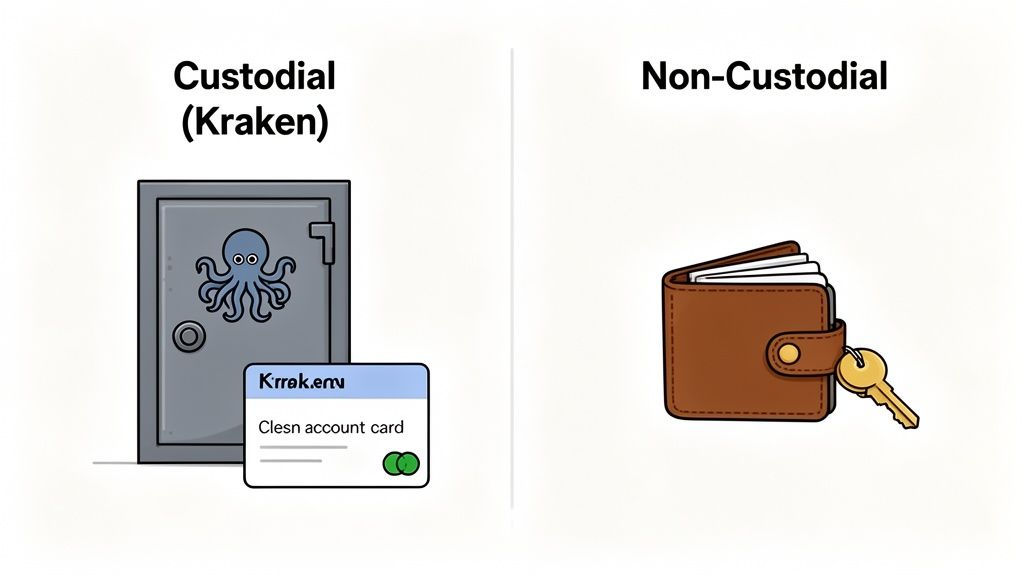
An illustration comparing custodial (Kraken safe) and non-custodial (wallet with key) cryptocurrency storage options.

As you can see, a custodial service holds assets on your behalf, while a non-custodial wallet places the private key—and therefore, total control—directly in your hands.

For active traders, the integrated Kraken wallet is a massive advantage. All transactions between Kraken users happen "off-chain" on Kraken's internal ledger. This means there are zero blockchain network fees when you send crypto to another Kraken account, making it an ideal hub for frequent trading. If you're weighing your options, our complete guide comparing Kraken or Coinbase can help you decide which ecosystem best fits your trading style.

Kraken has solidified its position as a top-tier global exchange, serving over 9 million users in more than 190 countries. The platform's annual trading volume recently soared to an incredible $665 billion, a testament to the trust users place in its security and integrated wallet system.

How Kraken Secures Your Crypto Assets

When you store crypto on an exchange like Kraken, you're placing immense trust in their security. So, how does Kraken earn it? They employ a multi-layered, institutional-grade security framework to protect your assets from every conceivable angle. Let's look behind the scenes.
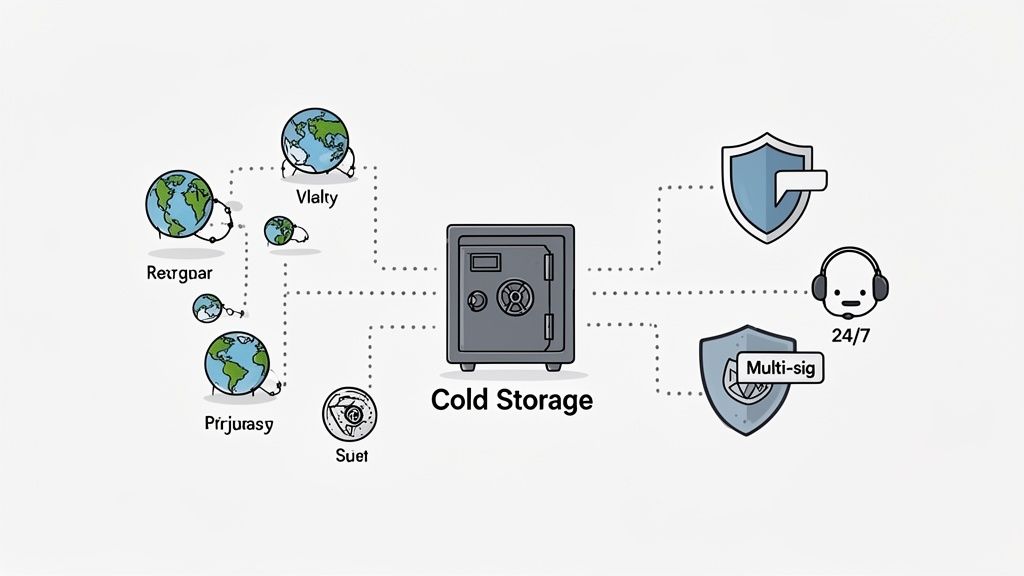
A diagram illustrating a cold storage safe connected to global entities, multi-signature security, and 24/7 support.

The cornerstone of Kraken's security strategy is cold storage. The vast majority of all user funds are held in specialized wallets that are completely disconnected from the internet, or "air-gapped."

These physical devices are geographically distributed and under 24/7 surveillance, making them virtually immune to online hacks. Only a small fraction of crypto, just enough for daily trading liquidity, is kept in semi-cold or hot wallets.

Operational Safeguards

Physical security is just one part of the equation. Kraken also enforces strict operational protocols to manage these funds.

Moving any crypto out of cold storage requires coordinated action from several high-level employees, a system known as multi-signature approval. This eliminates any single point of failure, meaning no individual can access the reserves alone.

Furthermore, a dedicated team of security experts is on watch 24/7/365, actively probing for vulnerabilities and ready to respond to threats instantly. This constant vigilance is critical. To understand the depth of these measures, it helps to see how a professional security audit service operates.

Security Tools You Control

Kraken doesn't just protect you; it empowers you to protect yourself. They provide a suite of powerful tools that you can use to fortify your account.

Security FeatureWhat It DoesWhy It's Critical
Two-Factor Auth (2FA)Requires a second code from your device for login and critical actions.Stops hackers who have your password from accessing your account.
Global Settings Lock (GSL)Prevents changes to key account settings (password, 2FA) for a set time.Buys you precious time to recover your account if it's compromised.
Withdrawal WhitelistingRestricts withdrawals to a pre-approved list of crypto addresses.Prevents a thief from sending your funds to their own wallet.

By blending institutional safeguards with user-controlled tools, Kraken creates a formidable security environment. Taking five minutes to enable these features is not just a suggestion; it's essential for protecting your portfolio.

Exploring Supported Coins And Networks

A crypto wallet is only as useful as the assets it supports and the blockchains it can access. The integrated Kraken crypto wallet excels here, offering a vast selection of digital currencies and, crucially, support for multiple blockchain networks for popular assets. For traders and DeFi users, this flexibility is a game-changer.

Think of it like an international airport. It's great to have many airlines (coins), but what's truly powerful is having airlines that fly to multiple destinations (networks). This gives you the choice to pick the fastest or cheapest route instead of being stuck with one expensive option. This multi-network capability transforms your Kraken wallet from a simple storage box into a powerful hub for navigating the crypto ecosystem.

Why Multi-Network Support Matters

Multi-network support provides a significant strategic advantage. Consider a stablecoin like Tether (USDT). For years, USDT was primarily on the Ethereum network, which can become slow and expensive during peak times, with "gas fees" sometimes exceeding the transaction value.

Kraken solves this by allowing you to deposit and withdraw the same asset on different chains. You can move USDT using faster, cheaper networks like Solana or Tron. This isn't just a minor convenience. For a DeFi user or copy trader needing to move capital quickly to seize an opportunity, saving money on fees and time on transfers provides a serious competitive edge.

This strategic flexibility is a core reason why Kraken has become a key piece of the global cryptocurrency infrastructure. Supporting over 560 cryptocurrencies and more than 1,000 markets, the platform’s robust network options are essential for facilitating the $200 billion+ in quarterly trading volume it regularly handles. Find out more about Kraken's position in the crypto market).

Popular Assets And Their Network Options

Let's see this in action. The ability to choose your network directly impacts your costs and wait times. The table below highlights the flexibility Kraken offers for major cryptocurrencies.

Kraken Multi-Network Asset Support Examples

Cryptocurrency (Ticker)Supported Networks for Deposit/Withdrawal
Tether (USDT)Ethereum (ERC-20), Tron (TRC-20), Solana, Polygon, Arbitrum
USD Coin (USDC)Ethereum (ERC-20), Solana, Polygon, Stellar, Arbitrum
Bitcoin (BTC)Bitcoin, Lightning Network
Ethereum (ETH)Ethereum, Polygon, Arbitrum, Optimism
Chainlink (LINK)Ethereum (ERC-20), Arbitrum

This empowers you to pick the most efficient "route" for your funds. Sending USDT on the Tron network, for instance, typically costs a fraction of an ERC-20 transfer on Ethereum and confirms in seconds, not minutes.

This practical functionality makes the Kraken crypto wallet an incredibly efficient on-ramp and off-ramp, cementing its role as the perfect home base for all your crypto activities.

Getting Funds Into and Out of Your Kraken Wallet

Let's get down to the practicalities: moving your crypto. Depositing and withdrawing from your Kraken crypto wallet is a fundamental skill. It's straightforward, but precision is crucial to ensure your assets arrive safely.

First, you must complete identity verification (Know Your Customer or KYC). This is a mandatory step for regulated exchanges like Kraken and is designed to protect all users. Once you're verified, you're ready to transact.

Making Your First Deposit: A Step-by-Step Guide

Depositing crypto requires generating the correct address for the specific asset and network you're using. Getting this wrong can result in the permanent loss of funds.

Here’s a checklist to get it right every time:

  1. Navigate to "Funding": Log in to Kraken and go to the "Funding" or "Portfolio" section.
  2. Select Your Crypto: Find and click on the cryptocurrency you want to deposit (e.g., Bitcoin, USDT).
  3. Choose the Correct Network: This is the most critical step. A dropdown menu will show the available blockchain networks. Your choice here must match the network you are sending from.
  4. Generate and Copy the Address: Kraken will create a unique deposit address for that coin on that network. Copy it exactly.

Actionable Tip: Before sending a large amount, always send a small test transaction first. Wait for it to confirm in your Kraken account before sending the full balance. This simple step can prevent a costly mistake.

This flowchart visually represents this critical decision-making process.

Flowchart illustrating the crypto network selection process on Kraken, choosing between Ethereum and Solana.

As you can see, you must actively select the correct "path" for your crypto. An Ethereum address is completely different from a Solana address, even for the same token.

Withdrawing Your Crypto Securely

Withdrawing funds follows a similar process but includes extra security features. To protect your assets, be methodical.

A powerful best practice is to set up an address whitelist. This security tool lets you pre-approve specific withdrawal addresses. Once enabled, your account can only send funds to addresses on this list, effectively stopping a hacker from draining your funds even if they gain access to your account.

A Quick Heads-Up on Security Holds: For your protection, Kraken might place a temporary withdrawal hold on your account for up to 72 hours right after you change your password or other major security settings. Don't panic! This is just a safety measure to prevent a thief from compromising your account and immediately draining it.

Taking a Look at Kraken Wallet Fees

Every smart trader monitors fees, as they can silently erode profits. Understanding the fee structure for the Kraken crypto wallet is essential for maximizing your capital.

The good news is that for most cryptocurrencies, depositing funds into your Kraken account is free. While you'll still pay the standard blockchain network fee for the transaction (which is unavoidable), Kraken itself doesn't charge for receiving crypto.

Breaking Down the Cost of Withdrawals

Withdrawals are where you need to be strategic. When you move crypto out of Kraken, you'll pay a small, fixed withdrawal fee. This fee is not a percentage; it's a flat amount that depends on two factors: the cryptocurrency and the blockchain network you choose.

This is where multi-network support becomes your secret weapon for saving money. Choosing a more efficient network for the same asset can drastically reduce your withdrawal costs.

Think of it like shipping a package. You can send the same item via standard ground shipping or overnight air express. The item doesn't change, but the cost and speed are worlds apart. Picking the right network on Kraken is the crypto version of choosing the smartest shipping option.

Let's look at a real-world example: withdrawing Tether (USDT). The network you choose has a staggering impact on the fee.

Comparing Kraken Withdrawal Fees By Network

AssetNetworkMinimum WithdrawalWithdrawal Fee
Tether (USDT)Ethereum (ERC-20)5 USDT20.0 USDT
Tether (USDT)Tron (TRC-20)2 USDT1.0 USDT
Tether (USDT)Solana1 USDT1.0 USDT
Tether (USDT)Polygon1 USDT0.5 USDT

Note: Fees are dynamic and can change based on network congestion. Always confirm the current fee on the Kraken withdrawal page before finalizing your transaction.

The table makes it clear: withdrawing USDT on Ethereum is expensive compared to alternatives. By simply selecting a different network from the dropdown menu, you can cut your fee by 95% or more. For active traders, these savings are not trivial—they are a core component of a profitable strategy.

Using Kraken As Your Gateway To DeFi

Can you connect your Kraken crypto wallet directly to DeFi apps like Uniswap or Aave? The short answer is no. But that doesn't mean it isn't an essential part of your DeFi strategy.

Think of your Kraken account as your mission control—the secure, regulated launchpad for your decentralized finance activities. It's your starting point and your safe harbor to return to.

This workflow is a cornerstone for serious DeFi users. Here's how it works:

  • On-Ramp: Use Kraken's deep liquidity to buy the exact tokens you need for a new yield farm or to mirror a top trader’s strategy.
  • Deploy: Withdraw those assets to a separate, non-custodial DeFi wallet.
  • Engage: Use your non-custodial wallet to interact with DeFi protocols.
  • Off-Ramp: When you're ready to take profits, send your earnings back to your consolidated Kraken account to secure them or convert them to fiat.

The On-Ramp and Off-Ramp Strategy

This two-wallet strategy provides the best of both worlds: Kraken's rock-solid security and fiat connections combined with a dedicated DeFi wallet for on-chain interactions. Separating these functions is a smart security practice. If you need help choosing the right tool, our guide can help you find the best crypto DeFi wallet for your needs.

Balancing The Pros And Cons

Using your Kraken crypto wallet this way is powerful, but it's important to understand the trade-offs.

Pros of This Workflow:

  • Top-Tier Security: Your capital is protected by Kraken's institutional-grade security when not active in DeFi.
  • High Liquidity: Deep order books ensure you get competitive prices when buying or selling.
  • Reliable Fiat Gateway: Easily bridge the gap between traditional banking and the crypto ecosystem.

Cons to Consider:

  • Custodial Risk: While on Kraken, your funds are in their custody. You are trusting them to keep your assets safe.
  • Transaction Fees: You will incur network withdrawal fees when moving assets from Kraken to your DeFi wallet, in addition to standard on-chain gas fees.

This strategic approach is highly effective. Kraken's average revenue per user (ARPU) recently surpassed $700, highlighting its central role in the crypto economy. You can find more details about Kraken's financial performance on their official blog.

Quick Answers to Common Questions

Let's address some of the most frequent questions about the Kraken wallet to ensure you use the platform with complete confidence.

Do I Own My Private Keys With The Kraken Wallet?

No, you do not. The Kraken wallet is a custodial service, which means Kraken manages the private keys on your behalf. This simplifies the user experience—no need to worry about losing a seed phrase—but it involves a trade-off. You are trusting Kraken with the ultimate control of your funds. This is the primary distinction between an exchange wallet and a self-custody wallet like MetaMask, where you alone are responsible for your keys.

Can I Connect The Kraken Wallet To DeFi Apps Like Uniswap?

You cannot directly connect your integrated Kraken wallet to decentralized applications (dApps) like Uniswap or Aave. The exchange wallet exists within Kraken's centralized system, separate from the on-chain world of DeFi. To interact with DeFi, you must withdraw funds from Kraken to a separate, non-custodial wallet that is designed to connect to dApps.

It's a classic rookie mistake to think an exchange wallet works like a Web3 wallet. Just remember: centralized exchanges are for buying, selling, and holding. Non-custodial wallets are your passport to the world of on-chain DeFi.

What Happens If I Send Crypto On The Wrong Network?

Sending crypto on the wrong network is one of the most common and costly mistakes. In most scenarios, it results in the permanent loss of your funds. Before confirming any transaction, you must triple-check that the sending network matches the receiving network you selected on Kraken. For example, sending ETH on the Polygon network to an Ethereum (ERC-20) address on Kraken will likely result in those funds being lost forever. Recovery is often impossible, so be diligent and verify every time.

Is The Kraken Wallet The Same As Kraken Wallet Mobile?

No, they are two entirely different products for different purposes.

  • The Integrated Wallet (discussed in this guide) is the custodial account that is part of your main Kraken exchange platform.
  • Kraken Wallet is a newer, standalone mobile app that is a self-custody wallet (like MetaMask). It gives you full control over your private keys.

This guide focuses exclusively on the integrated exchange wallet.


Ready to uncover the strategies of top-performing traders? Wallet Finder.ai gives you the on-chain intelligence to discover profitable wallets, track their moves in real-time, and mirror their trades before the market catches on. Start your 7-day trial and turn data into an advantage. Find Your Edge with Wallet Finder.ai.