Choosing a Crypto Profit Loss App: A Trader's Guide

Wallet Finder

Blank calendar icon with grid of squares representing days.

May 26, 2026

You've got trades on Ethereum, Solana, and Base. Some are on a DEX, some on a CEX, some came from a wallet you were watching, and a few positions are half-investment, half-experiment. You know your balances. You don't know your actual performance.

That gap is expensive.

Most traders don't blow up because they lack charts. They lose edge because they can't answer basic questions fast enough. Which setups made money. Which wallets were worth copying. Whether fees turned a “green” strategy into a drag. Whether gains were realized or still sitting on open risk. A proper profit loss app fixes that. It turns raw transactions into something you can review, compare, and act on.

Why Manual PnL Tracking Is Costing You Money

The problem usually starts small. A spreadsheet feels fine when you've got one wallet, one exchange account, and a handful of spot trades. Then you add another chain. Then a perp account. Then a bot wallet. Then a few copied trades from wallets you found on-chain. At that point, your log stops being a trading tool and becomes a cleanup project.

I've seen the same pattern over and over. A trader thinks they're up because their current holdings are up. Then they check realized sales, bridge costs, gas, swap fees, and bad exits from earlier in the cycle. The picture changes fast. What looked like a strong month was often a few winners hiding a lot of sloppy execution.

Manual tracking fails in crypto for one reason. The transaction flow is too fast and too fragmented. Modern software has moved beyond static reporting because digital operations generate too much data for manual tracking to stay efficient. Finance software now emphasizes automated integration, line-item analysis, and in some cases real-time reporting instead of waiting for a static monthly review, as described in Domo's overview of profit and loss software.

Where spreadsheets break first

  • Cross-chain confusion: You buy on one chain, transfer, LP somewhere else, then close on a different venue. Your spreadsheet rarely captures the full path cleanly.
  • Fee blindness: Gas, swap fees, and bridge costs get ignored until tax season, which means your strategy review is wrong all year.
  • No post-trade learning: If you can't tag and group past trades, you can't tell whether your edge came from timing, token selection, wallet selection, or luck.

Spreadsheets are fine for recordkeeping. They're weak for decision-making once your trading activity spreads across wallets, venues, and time periods.

If you're still piecing this together by hand, start with a clean framework for calculating crypto profits. The point isn't to build a prettier spreadsheet. It's to stop guessing what your trading is doing.

What Is a Crypto Profit Loss App

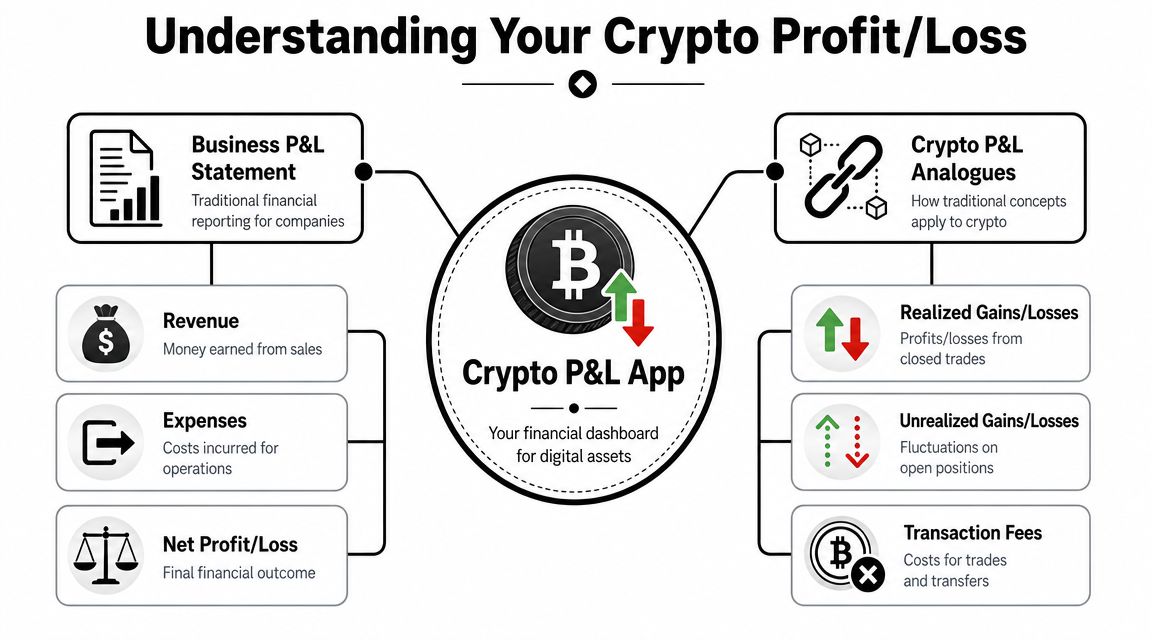
A crypto profit loss app is the trading version of a formal profit and loss statement. Traditional P&L reporting follows a simple structure. Revenue minus costs equals profit, then additional expenses and non-operating items lead to net income or loss over a reporting period. That accounting framework has been standardized for a long time, and modern software uses it to automate repeatable financial tracking, as explained in Workday's guide to profit and loss statements.

In crypto, the logic is the same. The inputs are just messier.
What Is a Crypto Profit Loss App

What it tracks in practice

A good profit loss app doesn't just show current wallet value. It builds a historical record of what happened.

That means separating:

  • Realized gains and losses from positions you closed
  • Unrealized gains and losses from positions still open
  • Transaction costs such as gas, swap fees, and transfer costs
  • Cost basis so buys and sells are matched correctly across time

Many portfolio trackers offer an incomplete view. A tracker can tell you what you hold. A PnL tool should tell you how you got there, what it cost, and whether the trade worked.

What makes crypto different

Crypto adds complications that business accounting software doesn't need to solve directly.

For example:

Traditional P&L conceptCrypto equivalent
RevenueProceeds from sells, rewards, or realized exits
Cost of goods soldEntry cost or cost basis of acquired tokens
Operating expensesGas, swap fees, exchange fees, borrow costs
Net resultRealized and unrealized PnL after all costs

That's why a generic expense app or basic portfolio dashboard usually isn't enough for active traders. Many mainstream explanations of profit and loss stop at standard line items like income, COGS, expenses, and net income over a month, quarter, or year, but they don't answer crypto workflow problems like reconciling realized versus unrealized profit, fees, and taxes across periods, as noted in Square's explanation of the P&L statement.

Practical rule: If a tool only shows current balance and percentage change, it's a portfolio viewer. If it reconstructs cost basis, fees, and closed-versus-open performance, it's a profit loss app.

That distinction matters when you're reviewing whether a copied wallet is worth following. Current holdings can look impressive. Historical trade quality tells the truth.

Key Features of a Powerful PnL App

The difference between a toy dashboard and a useful profit loss app is whether it helps you make better trading decisions after the trade, not just admire the trade while it's open.

Key Features of a Powerful PnL App

Realized and unrealized tracking

This is the first filter I use. If an app can't split closed PnL from open PnL, I don't trust the headline number.

A wallet can look strong because a few open positions are marked up. That doesn't mean the trader exits well. It doesn't mean the strategy is repeatable. You need both views at once. Closed performance tells you execution quality. Open performance tells you current exposure.

Fee accounting that doesn't hide the damage

Most bad PnL tools understate costs. They'll show token appreciation and bury the friction.

If your fee tracking is weak, your strategy review is fiction.

That's especially dangerous in active on-chain trading where a strategy might involve repeated entries, scaling, exits, bridges, approvals, and transfers. A serious app should include line items that let you inspect cost basis and expenses in enough detail to review taxes and audit trail quality. That matters because a major underserved need in crypto tracking is reconciling realized versus unrealized profit, fees, and taxes across time periods. Basic tools often stop at current value, while a true profit loss app needs detailed line items for income, cost basis, and expenses for serious analysis and tax review.

Multi-wallet and multi-chain support

You don't trade in one place anymore. Few serious DeFi traders do.

A usable app needs to combine activity across:

  • Wallets: personal wallets, burner wallets, bot wallets, vault wallets
  • Chains: at minimum the ecosystems where you trade
  • Venues: DEXs, CEXs, perps platforms, and bridges

If the system treats transfers as profits, or can't understand that one wallet funded another, your reporting will be noisy from day one.

Accounting method flexibility

Cost basis matching changes how realized PnL appears over time. That matters when you scale in and out aggressively.

Look for support for:

  • FIFO handling: useful when you want older lots matched first
  • LIFO handling: helpful in some active trading workflows
  • Clear lot visibility: so you can see which entries were matched to which exits

You don't need accounting jargon for its own sake. You need consistency. If the method changes unannounced, your strategy review becomes impossible to compare month to month.

Export and auditability

Every serious trader eventually wants the raw data outside the app.

That means:

  • CSV or structured export: for spreadsheet review, custom scripts, or tax prep
  • Trade-level history: not just charts and summary cards
  • Time-period filtering: so you can isolate one campaign, wallet, token, or copied strategy

Performance views that actually help

A clean dashboard matters, but the best screens are the ones that answer hard questions fast.

I look for:

  1. PnL by token
  2. PnL by wallet
  3. PnL by time period
  4. Realized versus unrealized split
  5. Fee-adjusted trade history

If a tool gives you that, it's useful. If it only gives you a total number and a pie chart, it's decoration.

Prioritizing Security and Privacy

A profit loss app sits close to sensitive information. Even when it's “just analytics,” it can reveal your holdings, trading patterns, linked accounts, and wallet relationships. That makes security a selection criterion, not a nice extra.

Prioritizing Security and Privacy

Public address tracking is the cleaner model

For on-chain analysis, the safest setup is usually simple. You provide a public wallet address and the tool reads public blockchain activity. No private key. No signing. No asset access.

That model fits how many traders already work when researching smart wallets. The tool doesn't need control. It needs visibility.

By contrast, exchange integrations add another risk layer because they often rely on API keys. That doesn't mean API connections are always bad. It means they must be tightly restricted.

What to demand from any exchange connection

If you connect a CEX, use the narrowest permissions possible.

  • Read-only access: The app should only need trade and balance history.
  • No withdrawal permissions: If withdrawals are enabled, walk away.
  • Minimal account scope: Only connect the accounts you need tracked.
  • Revocable credentials: You should be able to cut access immediately.

A profit loss app should help you observe your trading, not gain the ability to act on your funds.

The same discipline applies to basic wallet hygiene. If you need a refresher, review these private key security best practices before connecting any tool to your stack.

Privacy policy and storage questions that matter

Many traders skip this because it feels boring. It isn't.

Ask these questions:

  • What data is stored
  • Whether API credentials are encrypted
  • Whether the app stores private keys at all
  • How long historical data remains available
  • Whether your data is used to train models or shared with third parties

If the answers are vague, that's a red flag.

This walkthrough is worth watching if you want a practical mindset for evaluating crypto tool risk before you connect anything:

Red flags I wouldn't ignore

Here's the short list.

  • Asking for a private key: There is no legitimate analytics reason for this.
  • Requesting broad API permissions: Especially if withdrawal access is bundled in.
  • No explanation of data handling: If they can't explain storage and permissions clearly, assume the worst.
  • Opaque account linking: You should know exactly what's connected and why.

Security-first tools may feel slightly less convenient at setup. That's a good trade.

Your Profit Loss App Evaluation Checklist

Most traders choose a profit loss app the wrong way. They look at screenshots, pricing, or whatever has the cleanest landing page. The better approach is to score the app against your trading workflow.

A copy trader and a quant don't need the same thing. The copy trader needs fast clarity on wallet-level performance and execution timing. The quant needs cleaner exports, reproducible calculations, and room for custom analysis. Use the checklist below to compare options side by side, then weight the rows that match how you trade.

For a broader foundation before scoring tools, it helps to review what an app for tracking crypto portfolio should do versus what a true PnL workflow requires.

Profit Loss App Evaluation Checklist

Feature/CapabilityWhat to Look ForPriority (for Copy Trader)Priority (for Quant/Analyst)
Wallet and chain coverageSupports the chains, wallets, and venues you actually useHighHigh
Realized versus unrealized PnLClear split between closed trades and open positionsHighHigh
Fee trackingGas, swap, bridge, and exchange fees included in trade historyHighHigh
Cost basis handlingTransparent lot matching and consistent accounting methodMediumHigh
Historical trade reconstructionRebuilds entries, exits, transfers, and position changes accuratelyHighHigh
Dashboard clarityLets you find winners, losers, and drag quicklyHighMedium
Time-period filteringDaily, weekly, monthly, and custom ranges for reviewMediumHigh
Export optionsCSV or similar raw exports for offline workMediumHigh
Token-level attributionShows which assets drive gains and lossesHighHigh
Wallet-level attributionSeparates your wallets, tracked wallets, or strategy sleevesHighHigh
Security modelPublic address tracking or read-only API access onlyHighHigh
Audit trail qualityTrade-level logs with enough detail for tax review and debuggingMediumHigh

How I'd weight this by trading style

If you're a copy trader, prioritize speed to insight:

  • Wallet-level attribution: You need to know which tracked wallets deserve attention.
  • Timing visibility: Entry and exit reconstruction matters more than pretty charts.
  • Simple dashboards: Fast filtering beats deep but slow reporting.

If you're a quant or analyst, prioritize raw structure:

  • Consistent exports: You'll likely run your own models afterward.
  • Stable accounting logic: If the calculation method drifts, your comparisons break.
  • Cross-period comparability: You need to test whether a setup held up over multiple market regimes.

Don't buy based on the headline dashboard. Test whether the app can answer one of your real review questions in under a minute.

A quick scoring method

Use a simple three-part test when trialing any tool:

  1. Import a messy wallet or account
  2. Check whether the app handles fees, transfers, and partial exits correctly
  3. Review one time period you already know well

If the tool gets obvious history wrong, stop there. It won't get better when your activity gets more complex.

Advanced Workflows for Professional Traders

The most useful profit loss app workflow isn't passive portfolio tracking. It's using PnL data to evaluate strategies, traders, and wallets before you allocate attention or capital.

Advanced Workflows for Professional Traders

Build a workflow around decisions

A professional setup usually follows a repeatable loop.

  1. Discover wallets worth studying
  2. Import or reconstruct their trading history
  3. Separate signal from noise
  4. Mirror selectively, not blindly
  5. Measure copied strategy PnL as its own sleeve

The key is not to confuse visibility with edge. Seeing a wallet buy a token is interesting. Understanding whether that wallet exits well, sizes well, and survives choppy conditions is where the edge starts.

A practical copy trading process

Here's the workflow I'd use.

  • Start with wallet discovery: Find wallets with coherent behavior, not just a recent hot streak. Look for repeatable token selection, disciplined sizing, and exits that make sense.
  • Run a history review: Pull their closed trades and open exposure into your PnL workflow. You want to know whether gains came from one outlier or from a repeatable pattern.
  • Tag the strategy type: Memecoins, momentum rotation, airdrop farming, DeFi yield rotations, or short-term swing trades shouldn't be mixed together.
  • Create a separate sleeve for copied trades: Don't bury copied positions inside your main book. Track them as their own strategy.
  • Review net outcome after friction: A copied strategy that looks good before fees can disappoint in practice.

What to analyze after import

A wallet-level PnL view gets more useful when you break it into components.

Report viewWhy it matters
PnL by tokenShows whether the trader has a real edge in certain asset types
PnL over timeHelps spot whether results are consistent or clustered
Realized versus unrealizedSeparates execution from mark-to-market luck
Position sizing patternsReveals conviction and risk discipline
Loss clustersShows where the strategy fails

The best copied strategy is usually the one you understand well enough to filter, not the one you mirror trade for trade.

Use alerts, but keep review discipline

Real-time alerts are useful, especially for fast-moving on-chain setups. They are not a substitute for review.

If you mirror wallets in real time, keep a weekly habit:

  • Check copied trades separately from your discretionary book
  • Review where slippage or latency changed outcomes
  • Cut wallets that stop fitting your criteria
  • Compare open risk to closed results

The strongest setups combine discovery, alerts, and post-trade PnL review. That's the difference between chasing smart money and building a process around it.

From Data Chaos to Trading Clarity

A profit loss app isn't admin work for traders. It's part of the edge. Once your activity spreads across chains, wallets, and venues, you need more than a balance view. You need cost basis, fee visibility, historical trade reconstruction, and a clean split between realized and unrealized performance.

That's what turns random activity into something reviewable.

The traders who improve fastest usually do one thing well. They close the loop between discovery, execution, and review. They don't just find interesting wallets or tokens. They measure what happened after they acted, then use that feedback to size better, filter better, and stop repeating the same expensive mistakes.

If your current setup can't tell you where your profits really came from, it's time to upgrade the process.


If you want a cleaner way to connect wallet discovery with strategy analysis, Wallet Finder.ai is built for that workflow. It helps traders discover active on-chain wallets, inspect trading histories, monitor smart money activity, and turn raw wallet behavior into actionable research for copy trading and performance review.