Best Screener App for Android

Wallet Finder

Blank calendar icon with grid of squares representing days.

February 17, 2026

A good screener app for android is your personal crypto scout, tirelessly scanning the massive, chaotic world of digital assets for you. It's a specialized radar for the crypto markets, filtering out thousands of worthless tokens to show you only the opportunities that actually matter. For making smart decisions on the fly, this kind of real-time intelligence is a game-changer.

What Is a Crypto Screener App

Imagine trying to find a specific type of fish in the entire ocean by yourself. It’s an overwhelming, nearly impossible task. A crypto screener app is your advanced sonar system, letting you punch in specific criteria—like the fish's size, speed, and depth—to instantly pinpoint exactly what you're looking for.

But here's the key difference: unlike a generic stock screener, a crypto screener app for Android is built for the wild, 24/7 world of DeFi. It doesn't just skim the surface by tracking prices. It dives deep into on-chain data, monitoring transactions, wallet movements, and the flow of smart money across different blockchains.

Beyond Basic Token Finding

The real goal here isn't just to find new tokens. A powerful screener is a tool for reverse-engineering profitable trading strategies and spotting expert traders you can learn from. By digging into the complete trading histories of top-performing wallets, you can start to see the patterns that lead to consistent wins.

  • Strategy Discovery: See which wallets consistently make money in specific market conditions or with certain types of tokens.
  • Expert Identification: Find traders with high win rates and impressive returns, then follow their moves in real time.
  • Risk Management: Observe how the pros manage their positions, where they set their stop-losses, and when they take profits.

The Shift to Mobile-First Analysis

In a market that never stops, being chained to your desktop is a massive handicap. The demand for mobile-first tools is undeniable, especially as the entire app market continues its explosive growth. Projections show the mobile app market is on track to hit USD 626.39 billion by 2030, which tells you everything you need to know about our reliance on mobile devices for, well, everything—including managing our money.

A dedicated Android app means you can react instantly to market-moving events, no matter where you are. A single alert about a smart wallet making a big buy can be the difference between catching a trend early and reading about it on the news hours later.

This instant access completely changes how you operate. You're no longer just watching from the sidelines; you're in the game, ready to act on fresh intel the second it surfaces. This is critical for assets that move fast, where speed is your ultimate competitive edge. To get a better handle on the tech that powers these tools, you might find our guide on how DEX screeners work useful.

Why Android Is a Trader's Competitive Edge

Picking a platform for your trading tools isn't just about what phone you like—it's a strategic move. For DeFi traders, having a screener app for Android gives you a real competitive advantage, built on global reach, easy access, and an open ecosystem that feels made for the crypto world.

When you're on Android, you're plugged into the single largest network of mobile users on the planet. This isn't just a fun fact; it's the heart of the advantage. The platform’s huge global footprint means you're in the same markets where crypto adoption is blowing up, especially in emerging economies where "mobile-first" is the only game in town.

This infographic paints a clear picture of the explosion in the mobile app market, highlighting the massive growth in downloads and consumer spending.
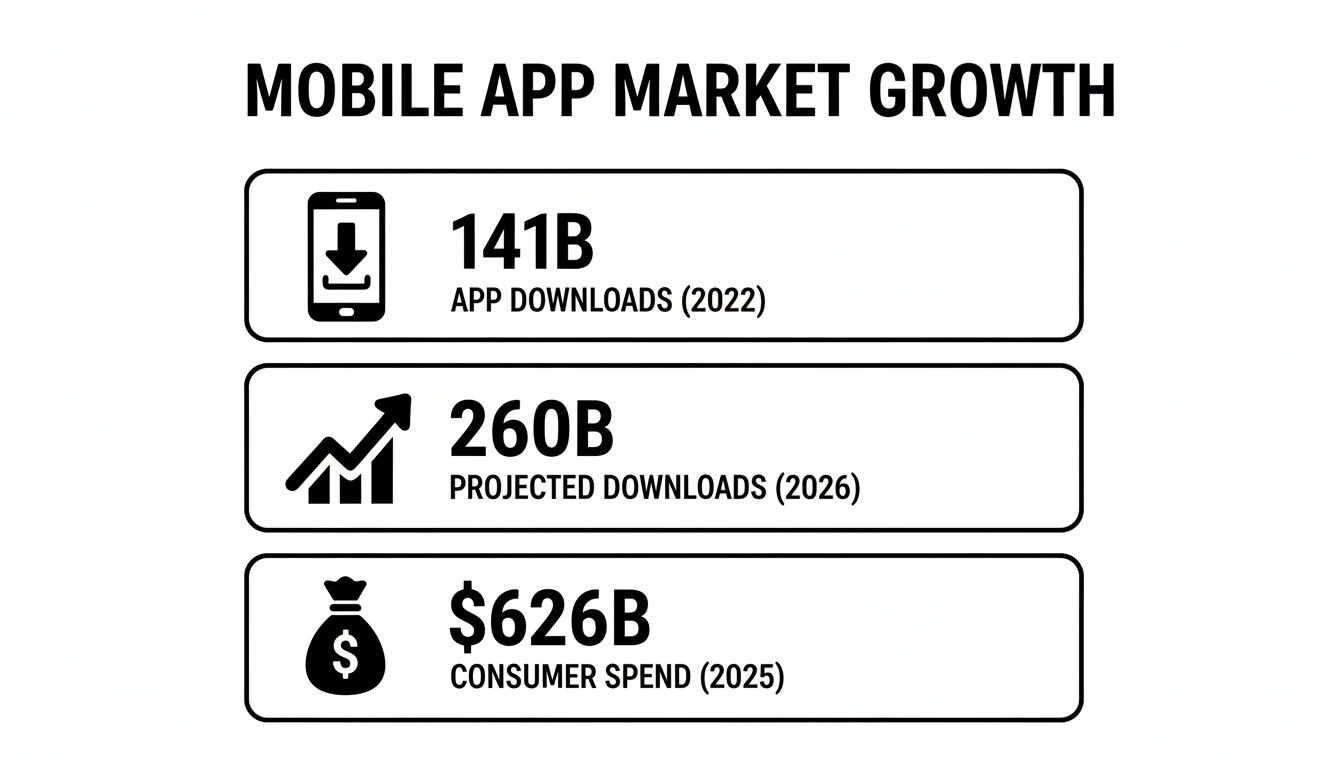
Infographic detailing mobile app market growth, showing app downloads for 2022 and 2026, and consumer spend for 2025.

The numbers don't lie. The world's financial pulse is moving to mobile, making a solid Android app an absolute must-have for any trader who wants to stay in the game.

The Power of an Open Ecosystem

It’s not just about the numbers. What really makes Android a game-changer for on-chain analysis is its open architecture. This flexibility allows for powerful integrations that just aren't as smooth on more closed-off platforms. A top-tier screener app, for example, can pipe real-time alerts directly into community hubs like Telegram—the very lifeblood of crypto communication.

That direct line is everything. When you're dealing with memecoins or fresh token launches, a delay of a few seconds can be the difference between getting in at the right time and missing out entirely. An Android screener stops being just an app and becomes a professional-grade tool, letting you move at the same decentralized speed as the market itself.

Tapping Into Global Crypto Hubs

Android's market dominance is staggering, with a direct line to the audience for any trading tool. Globally, Android commands a market share of around 72%, with an active user base hitting 4.5 billion—nearly triple the size of iOS. This lead is even more massive in key crypto adoption zones:

Region/CountryAndroid Market ShareWhy It Matters for CryptoGlobal~72%Access to the largest mobile user base on the planet.India95.16%Taps into a massive, mobile-first emerging economy.Brazil81.45%Connects with another major hub for crypto adoption.

For a wallet tracker built for on-chain analysts and copy traders, this unlocks access to billions of potential users right where the action is. You can explore more about these market dynamics to see why Android is the clear strategic choice for anyone with a global mindset.

For the modern on-chain analyst, a dedicated Android app isn't a luxury; it's a necessity. It equips you with the tools to monitor, analyze, and act on market movements from anywhere, ensuring you never fall behind the pace of decentralized finance.

This is about more than just convenience; it’s about maintaining your professional edge. When smart money makes a move, you need to be the first to know, not the last to find out. A screener on your Android device puts that critical intel right in your pocket, ready to go at a moment's notice.

Must-Have Features in a Top-Tier Screener App

Not all screener apps are created equal. Many promise market insights, but only a handful deliver the high-speed, actionable data that gives you a genuine edge. When you're looking for a screener app for Android, you have to cut through the marketing noise and zero in on the core features that actually help you make money.

A good app doesn't just show you what's happening; it tells you why it matters. This is about moving past basic price alerts. A notification that a token hit a certain price is okay, but it’s reactive. A top-tier screener gives you proactive intelligence, flagging the moves of proven traders before the rest of the market catches on. That’s the difference between chasing a pump and being in on it from the start.

A mobile app showing features: real-time alerts, on-chain tracking, and wallet metrics.

Real-Time Transaction Alerts

Speed is everything in DeFi. An alert that shows up even a few minutes late is useless. The cornerstone of any useful screener is an alert system that hits your phone instantly—via push notification or a direct Telegram message—the second a wallet you're tracking makes a trade. A quality alert needs to tell you everything at a glance:

  • Wallet Identification: Which wallet on your watchlist made the move?
  • Transaction Type: Was it a buy, sell, or something else?
  • Asset Details: What token was it, and for how much?
  • Direct Links: A one-click link to the block explorer so you can verify the transaction yourself.

This is what turns a simple notification into a powerful trading signal you can act on.

Why Android Kills Your Alerts (And How to Stop It)

The article's description of real-time alerts arriving "the second a wallet makes a trade" is accurate for a well-configured device. On a default Android setup from Samsung, Xiaomi, OnePlus, or Huawei, it is frequently not accurate. These manufacturers layer aggressive battery optimization systems on top of stock Android that classify background apps as battery drains and terminate or throttle their processes, often silently and without notification. A screener app that is working correctly on the server side may be sending alerts your device never receives because Android has suspended the app's ability to wake itself and deliver them.

This is not a minor edge case. Android's own Doze mode, introduced in Android 6.0 and tightened in subsequent versions, puts apps into a restricted state when the device is stationary and the screen is off. In Doze mode, apps cannot access the network, run background processes, or receive most push notifications. The exceptions are apps designated as high-priority in the notification channel settings and alerts sent via Firebase Cloud Messaging's high-priority delivery mode. If your screener app is not using high-priority FCM delivery, your notifications are held until Doze mode exits, which occurs when you pick up and move your device. For a wallet alert about a fast-moving memecoin buy, a 15 to 30 minute delivery delay from Doze mode is as bad as no alert at all.

OEM battery optimization adds a second layer on top of Doze mode. Samsung's Battery Saver and its background process restrictions, Xiaomi's MIUI optimization system, OnePlus's Battery Optimization settings, and Huawei's App Launch management all independently restrict background activity for apps not explicitly whitelisted by the user. None of these ask for your permission before restricting a newly installed app. The restrictions are default-on.

The fix varies by device but follows the same logic on each platform. You need to add your screener app to the battery optimization whitelist, which tells the operating system to treat it as a system-critical application exempt from background process restrictions.

On Samsung devices: Settings, Battery and Device Care, Battery, Background Usage Limits, then find the screener app and set it to "Unrestricted." Also disable the "Put unused apps to sleep" toggle if it is enabled.

On Xiaomi / MIUI devices: Settings, Apps, Manage Apps, find the screener app, Battery Saver, set to "No Restrictions." Additionally go to Security app, Battery, then find the app and toggle "No Restrictions" in the background activity section.

On OnePlus devices: Settings, Battery, Battery Optimization, find the screener app, set to "Don't Optimize." Also check Settings, Apps, the app itself, and toggle "Allow Background Activity" to on.

On stock Android (Google Pixel): Settings, Apps, the screener app, Battery, "Unrestricted."

The second critical setting applies to all Android devices: go into the screener app's notification settings and ensure the alert channel is set to high importance with sound, vibration, and the ability to appear on the lock screen. Android's notification importance system controls whether high-priority FCM messages wake the device versus queue silently. A notification channel set to "Low" or "Silent" importance will not override Doze mode even for high-priority FCM delivery.

Telegram alerts, which serious traders correctly prefer for speed, bypass most of these restrictions because Telegram is listed on most OEM whitelists by default due to its high install count. If you are routing screener alerts through Telegram rather than native push notifications, the battery optimization issue is substantially reduced, though enabling Telegram's own notification settings to maximum priority remains important.

Deep On-Chain Tracking

A powerful screener acts like a financial detective. It doesn't just show you what a wallet holds now; it digs deep to piece together its entire history. Surface-level data is for amateurs. Deep on-chain tracking gives you the full story, letting you analyze every single trade a wallet has ever made.

The goal is to see beyond a single lucky trade and identify repeatable patterns of success. By analyzing a trader's complete history, you can understand their decision-making process, risk tolerance, and preferred market conditions.

This is how you separate the trader who got lucky on one memecoin from the one who consistently pulls profits through skill and strategy. You're hunting for skill, not luck.

Actionable Wallet Metrics

Raw on-chain data can be a firehose of information. The best apps distill it into simple, actionable metrics you can understand in seconds. These performance stats are critical for quickly deciding if a wallet is even worth following. Think of it like a baseball card for a trader.

To vet a wallet, you need more than just what they're holding. The table below breaks down the must-have metrics that separate the pros from the pretenders.

FeatureWhat It DoesWhy It's Critical for TradersRealized PnLCalculates the total profit or loss from all completed trades.This is the bottom line. It shows you if a trader is actually making money over the long haul.Win RateShows the percentage of trades that were closed for a profit.A high win rate (over 60% is a great sign) points to consistency and a reliable strategy.Average Hold TimeMeasures how long a trader typically holds an asset before selling.Helps you find traders whose style matches yours, whether you're a day trader or a long-term holder.

These metrics give you a solid framework for building a watchlist of genuinely skilled traders. By focusing on wallets with strong, verifiable performance data, you remove emotion and guesswork from the equation.

How Wallet PnL Metrics Get Inflated and How to Spot It

The article correctly frames PnL and win rate as the core metrics for vetting whether a wallet is worth following. What it does not cover is how systematically these metrics are manipulated by traders who understand that their on-chain history is visible and want to attract copiers. PnL inflation is common enough that treating any wallet's headline metrics as face value without running a basic verification process leads to following accounts whose real performance is a fraction of what the screener displays.

Wash trading between self-controlled wallets is the most direct form of metric inflation. A trader controls Wallet A and Wallet B. Wallet A buys a token at $0.001. Wallet B sells the same token to Wallet A at $0.01 in a transaction where the "buyer" and "seller" are the same person. Screener tools that calculate PnL from completed trades record a 10x gain on Wallet A without any real profit having been made. Wallet B records a "sale" that also looks like profit if it was originally acquired at a lower price. The metric looks legitimate. No external counterparty was involved, no real market trade occurred, and no profit exists outside of the inflated on-chain record.

Cherry-picked reporting windows inflate win rates without any coordinated activity. A screener displaying "30-day win rate: 78%" on a wallet that has been active for 18 months may be showing performance from the wallet's best 30-day period, which happened to coincide with a broad market upswing where nearly every position was profitable. The 18-month win rate might be 44%, and the 12-month drawdown might be 60%. Always look at the longest available performance window rather than any recent short-term window.

Unrealized gains counting as closed wins appear in some screeners that classify a position as profitable the moment it is above the entry price, even if it has not been sold. A wallet that bought 50 tokens at various prices and is currently up on 35 of them shows a 70% win rate before realizing any profits. If those 35 positions reverse before exit, the real realized win rate may be under 40%. Look specifically for realized PnL rather than unrealized or combined metrics when evaluating wallet performance.

The Three-Check Verification Process

Verifying a wallet's stated metrics takes under five minutes and catches the majority of inflation before you add a wallet to your watchlist.

First, pull the wallet's complete transaction history on a block explorer and look at the counterparty addresses on their most profitable trades. If high-profit trades have counterparties that share funding sources with the wallet itself (tracing back through the funding chain), those trades are likely self-deals that should be excluded from your PnL calculation.

Second, check performance consistency across multiple timeframes. A legitimate skill-based edge produces reasonably consistent performance across 30-day, 90-day, and 12-month windows. Dramatic improvement in recent short-term windows on a wallet with flat or negative long-term performance is a cherry-picking signal, not evidence of improvement.

Third, check trade count versus win count. A wallet showing 10 trades with 9 wins is statistically meaningless. The same 90% win rate across 80 trades over 12 months is genuine evidence of skill. Any wallet with fewer than 30 completed trades in the performance window being displayed should be treated as unvalidated regardless of the headline metrics.

How to Verify App Security and Protect Your Assets

In crypto, your security is non-negotiable. Connecting your financial life to any application, especially a screener app for android, requires a healthy dose of caution. But figuring out if an app is safe isn't as complicated as it sounds once you know what to look for—and what to avoid.

A legitimate, non-custodial wallet tracker operates on one unbreakable rule: it will never ask for your private keys or seed phrase. This is the single most important security principle. Your public wallet address is safe to share; it's how the app tracks your activity in a read-only way without ever touching your assets.

Smartphone with a shield and padlock, illustrating mobile security features: read-only address, no private keys, encrypted connection.

Any app asking for more than your public address is a massive red flag. Your private keys are the only thing that grants access to your funds, and keeping them secret is 100% on you.

The Anatomy of a Secure Android Screener

Beyond that golden rule, a trustworthy app is built on a foundation of solid, professional-grade security. These aren't just nice-to-haves; they are essentials.

A key piece is secure authentication. Reputable apps often use established, third-party services like AWS Cognito to manage logins. This offloads the critical task of identity verification to a platform built by security experts, adding a powerful layer of protection.

The core function of a screener is to observe, not interact. A secure app only needs a window to look through (your public address), not the keys to the front door (your private keys).

Furthermore, all communication between the app and its servers must be encrypted. A transparent privacy policy that clearly explains what data is collected is another sign of a developer who takes your security seriously.

Your Practical Security Checklist

Before you hit "install" on any new screener app, run it through this quick security check. It takes just a few minutes and can save you from a potential disaster.

  1. Permission Requests: Does the app only ask for your public wallet address for tracking? A "No" here is an immediate dealbreaker.
  2. Authentication Method: Does it use a secure and well-known login system? Look for trusted providers or standard two-factor authentication (2FA) options.
  3. Data Encryption: Does the app’s website or documentation mention using encrypted connections (like SSL/TLS) to protect your data?
  4. Privacy Policy: Is there a clear, easy-to-find privacy policy that explains what information is stored and why?
  5. Developer Reputation: Does the developer have a professional website and a clear presence? Google’s recent push for developer verification on Android is making it much harder for shady, anonymous actors to distribute malicious apps.

By following this checklist, you can confidently choose a powerful screener app for android that delivers valuable insights without ever putting your digital assets at risk.

Getting Started: From Installation to Your First Alert

Let's walk through the exact steps to get a powerful screener app for android up and running in just a few minutes. We'll use Wallet Finder.ai as our real-world example to guide you from download to your first trade alert.

The whole point is to get you going—fast. In a market where timing is everything, a long or confusing setup is a dealbreaker. A well-designed app respects your time and is built for immediate action.

Step 1: Download and Secure Your Account

First, head to the Google Play Store and search for Wallet Finder.ai. Always download financial apps from official stores to avoid malicious fakes. Once it's installed, you’ll create an account using an email and a strong password. This is handled securely using industry-standard services like AWS Cognito.

Remember the golden rule of crypto security: a legitimate, non-custodial tracker will never ask for your private keys or seed phrase. It only needs your public wallet address to work in a read-only mode.

Step 2: Navigate the Dashboard and Connect Your Wallet

After logging in, you'll land on the main dashboard. Take a second to get familiar with the main sections—you'll typically see areas for discovering top wallets, searching for tokens, and managing your watchlists. Next, connect your wallet by simply pasting your public wallet address into the app. This is completely safe and only gives the app read-only access to analyze your own trading history.

Step 3: Build Your First Pro Trader Watchlist

This is where the magic happens. Go to the "Discover Wallets" section and use the filters to pinpoint traders who match your style.

You can filter wallets based on these key metrics:

  • Realized PnL: Find traders with the highest demonstrated profits.
  • Win Rate: Look for consistency. Target wallets with a win rate above 60%.
  • Total Trades: Ensure the wallet has enough history to prove its performance isn't just a fluke.

Once you find a few wallets with impressive stats, add them to a new watchlist. This curated list is now your personal source of high-quality trading signals.

Step 4: Set Up Instant Telegram and Push Notifications

With your watchlist ready, the final step is to make sure you never miss a move. Jump into the app’s settings to turn on both push notifications and Telegram alerts.

Why both? Push notifications are great for a quick heads-up. But Telegram integration is often faster and more reliable, which is why serious traders swear by it. To really dig into optimizing your alert system, check out our detailed guide on the best crypto price alert apps.

And that's it—you're all set. The moment one of the wallets on your list makes a trade, you'll get an instant, actionable notification.

Building a Tiered Watchlist That Doesn't Drown You in Noise

The setup guide walks through building a watchlist of pro traders to follow. The implicit assumption is that a single flat list of wallets with uniform alert settings is the right structure. For a watchlist of five to ten wallets, that works. For any serious screening operation tracking 20 to 50 wallets across multiple chains, a flat list with uniform notification settings is a direct path to alert fatigue — the condition where you start ignoring all notifications because too many of them are low-priority or redundant.

The solution is a tiered watchlist architecture, where wallets are grouped by your conviction in their signals, and notification behavior differs meaningfully by tier.

Tier 1: High-conviction wallets (3 to 8 wallets) are addresses you have personally verified with full performance history review, confirmed realized PnL across at least 90 days, consistent strategy behavior you understand and can replicate, and no red flags from the manipulation checks described above. These wallets receive maximum-urgency alerts: audible notification sounds, lock screen appearance, and Telegram messages that wake the phone regardless of time of day. When a Tier 1 wallet buys, you investigate immediately. This tier should be small by design. Expanding it too broadly defeats its purpose.

Tier 2: Monitored wallets (10 to 20 wallets) are addresses showing strong initial metrics that you have not yet fully verified, or wallets you are tracking to build a performance history before promotion to Tier 1. These receive standard push notifications and Telegram messages during normal hours, but do not trigger audible alerts overnight. You review these alerts when convenient, not immediately.

Tier 3: Research queue (20 to 30 wallets) are addresses flagged by the screener's discovery tools as interesting based on recent activity, but not yet evaluated for long-term performance. These receive batched notifications or email digests rather than individual real-time alerts. You review this tier during dedicated research sessions, not reactively.

The operational benefit of this structure is that your immediate attention is reserved for the highest-quality signals. A Tier 1 alert from a wallet you have personally verified over 90 days commands a different response than a Tier 3 alert from a wallet the discovery algorithm flagged an hour ago. Without explicit tiering, these two types of signal compete for the same attention level, and the result is either ignoring everything or trying to investigate everything, both of which reduce the value of having a screener in the first place.

Most screener apps including Wallet Finder.ai support custom notification settings at the watchlist level. Create three named watchlists corresponding to your three tiers and configure notification priority per list. Promotion from Tier 3 to Tier 2, and from Tier 2 to Tier 1, should require explicit performance verification steps rather than just continued positive recent performance. The criteria that matter most for promotion are consistent realized PnL over 90 days, no evidence of wash trading or metric inflation, and a trading style you can actually replicate with your available capital and execution speed.

Navigating a Multi-Chain Crypto Market

The crypto market is a sprawling city with distinct neighborhoods: Ethereum, Solana, Base. Each has its own culture, rules, and opportunities. Thinking you can win by only watching one blockchain is like trying to navigate New York City with a map of just Manhattan. You're missing the bigger picture.

This is why multi-chain support in a screener app for android is an absolute must. A tool that only sees Ethereum is completely blind to the memecoin scene on Solana or new projects on Base. You need a bird's-eye view to catch trends, no matter where they start.

Ethereum, Solana, and Base blockchain networks integrating with a mobile application shown with arrows.

Different Chains, Different Opportunities

Every blockchain ecosystem has its own personality. A solid screener lets you tap into the unique vibe of each one, following smart money as it hops between them.

  • Ethereum: The OG smart contract platform, home to blue-chip DeFi protocols and deep liquidity. Perfect for tracking large, institutional-level wallet moves.
  • Solana: Famous for its speed and cheap fees, Solana is the main playground for high-velocity memecoin trading. Opportunities can vanish in minutes, making real-time alerts non-negotiable.
  • Base: A newer Layer 2 network, Base is a hotbed for emerging projects and experimental DeFi. It's a great place to get in on the ground floor of new trends.

A trader who can't see across these chains is trading with one hand tied behind their back. Smart money is chain-agnostic; it flows to wherever the opportunity is greatest. Your tools must be, too.

A Unified View of the Entire Market

A multi-chain screener pulls all this fragmented activity into a single, clean dashboard. You can build a watchlist of top traders and get alerts whether they move on Ethereum, Solana, or any other supported network. If you're curious about the tech that powers this, you can learn more about the role of a reliable API for crypto prices and on-chain data.

This complete coverage fundamentally changes how you trade. You stop thinking like an "Ethereum trader" or a "Solana trader" and start acting like a market-wide opportunist. This broad visibility is the only way to keep up in the fast, interconnected world of modern DeFi.

Common Questions About Android Screener Apps

Jumping into crypto tools can bring up a lot of questions, especially around security and results. Let's tackle the most common things traders ask about using a screener app for Android, with clear, straightforward answers.

Is It Safe to Connect My Crypto Wallet?

Yes, but only with a reputable, non-custodial app. A secure screener like Wallet Finder.ai only asks for your public wallet address. This gives it read-only access to your on-chain history. It will never ask for your private keys or seed phrase, meaning it has zero ability to touch your funds.

Can I Actually Make Money Using a Screener App?

A screener app is a powerful research tool, not a money-printing machine. It gives you high-quality data and real-time signals by tracking the moves of successful wallets, which can sharpen your decision-making and speed up your reaction time. By learning from traders with a proven track record, you improve your odds. But your own risk management and timing will ultimately determine your profitability.

Are Real-Time Android Alerts Fast Enough for Trading?

Absolutely. The best apps deliver alerts through push notifications and Telegram with almost no lag. The moment a wallet you're tracking makes a trade on-chain, the app’s system picks it up and sends a signal to your phone, often in just a few seconds.

For fast-paced markets like DeFi and memecoins, this speed is everything. It opens up a small but valuable window to act on fresh information before the rest of the market even knows what’s happening.

Do I Need to Be an Expert to Use a Screener App?

Not at all. While pro traders use these apps for deep analysis, they are a game-changer for beginners. A good screener app for Android takes complicated on-chain data and boils it down into simple, understandable metrics like PnL and win rate. For anyone new to the space, it's an incredible opportunity to learn by watching the pros in action, helping you sidestep many painful mistakes new traders make.

Why am I missing alerts on my Android phone even though the app is installed correctly?

The most common cause is Android's battery optimization system restricting the screener app's background processes. On Samsung, Xiaomi, OnePlus, and most other Android brands, newly installed apps are automatically subject to battery restrictions that delay or drop push notifications without any visible warning. The fix is to add the app to your battery optimization whitelist: on Samsung, go to Settings, Battery and Device Care, Battery, Background Usage Limits, find the app, and set it to Unrestricted. On Xiaomi, go to Settings, Apps, Manage Apps, find the app, Battery Saver, and set No Restrictions. On all devices, go into the app's notification settings and ensure the alert channel is set to high importance. Routing alerts through Telegram rather than native push notifications bypasses most of these restrictions because Telegram is typically pre-whitelisted by manufacturers. If you have implemented all of these fixes and still experience delays, the issue may be at the service infrastructure level — specifically whether the app uses high-priority versus normal-priority Firebase Cloud Messaging delivery.

How can I tell if a wallet's high win rate and PnL are genuine or inflated?

Three checks catch the majority of PnL inflation before you commit to following a wallet. First, look at trade counterparties on the wallet's highest-profit transactions in a block explorer. If the counterparty addresses share a funding source with the wallet you are evaluating, the profitable trades may be self-deals rather than real market transactions. Second, compare performance across multiple timeframes. Genuine skill produces reasonably consistent win rates across 30-day, 90-day, and 12-month windows. Dramatic improvement in a recent short-term window on a wallet with flat long-term history indicates cherry-picking rather than improved performance. Third, check trade count. A 90% win rate across 8 trades is statistically meaningless. The same rate across 80 or more completed trades over at least 90 days is evidence of real edge. Always look for realized PnL specifically rather than metrics that include unrealized gains in the calculation.

How many wallets should I have on my watchlist and how should I organize them?

Most traders run into alert fatigue with flat watchlists above 15 to 20 wallets. The solution is a three-tier structure. Tier 1, your highest-conviction wallets, should contain 3 to 8 addresses you have personally verified with at least 90 days of realized performance history and no red flags from manipulation checks. These receive maximum-urgency alerts at any hour. Tier 2, your monitored wallets, contains 10 to 20 addresses with strong initial metrics you are still validating. These receive standard notifications during active hours. Tier 3, your research queue, contains addresses flagged by discovery tools but not yet evaluated. These receive batched digests rather than real-time alerts. This structure ensures that your immediate attention is reserved for the highest-quality signals. Most screener apps support custom notification settings per watchlist, so you can configure priority per tier directly in the app settings.

Ready to turn on-chain data into actionable trading signals? Wallet Finder.ai gives you the tools to find and follow the smartest money in crypto. Discover top wallets, get instant alerts, and trade with a real edge. Start your free 7-day trial today.