Coinbase to Coinbase Transfer: The Ultimate Guide

Wallet Finder

Blank calendar icon with grid of squares representing days.

March 18, 2026

Sending crypto on Coinbase isn't a one-size-fits-all process. The platform offers a Coinbase to Coinbase transfer, an instant, fee-free way to send funds to another Coinbase.com user using just their email or phone number.

This is a world away from a standard on-chain transfer to an external crypto wallet, which involves network fees and requires a long, complex blockchain address.

Your Guide to Coinbase Crypto Transfers

Knowing how to move your crypto within the Coinbase ecosystem is a fundamental skill, whether you're a beginner or a seasoned trader. The right method depends entirely on what you're trying to accomplish.

Are you just sending crypto to a friend to cover lunch, or are you preparing for a major play in the world of DeFi? The answer determines which path you take.

The two main ways to send crypto on Coinbase serve completely different needs:

  • Internal (Off-Chain) Transfers: These transactions happen on Coinbase's private ledger. When you send Bitcoin to a friend’s email, the coins never touch the public blockchain. Coinbase simply updates its internal records. This is precisely why it’s instant and free.
  • External (On-Chain) Transfers: When you send crypto from your Coinbase.com account to a self-custody wallet (like Coinbase Wallet), the transaction is broadcast to the public blockchain. This process always involves network fees (gas) and takes time for the network to confirm.

This decision tree helps visualize which method to use based on where your crypto is going.
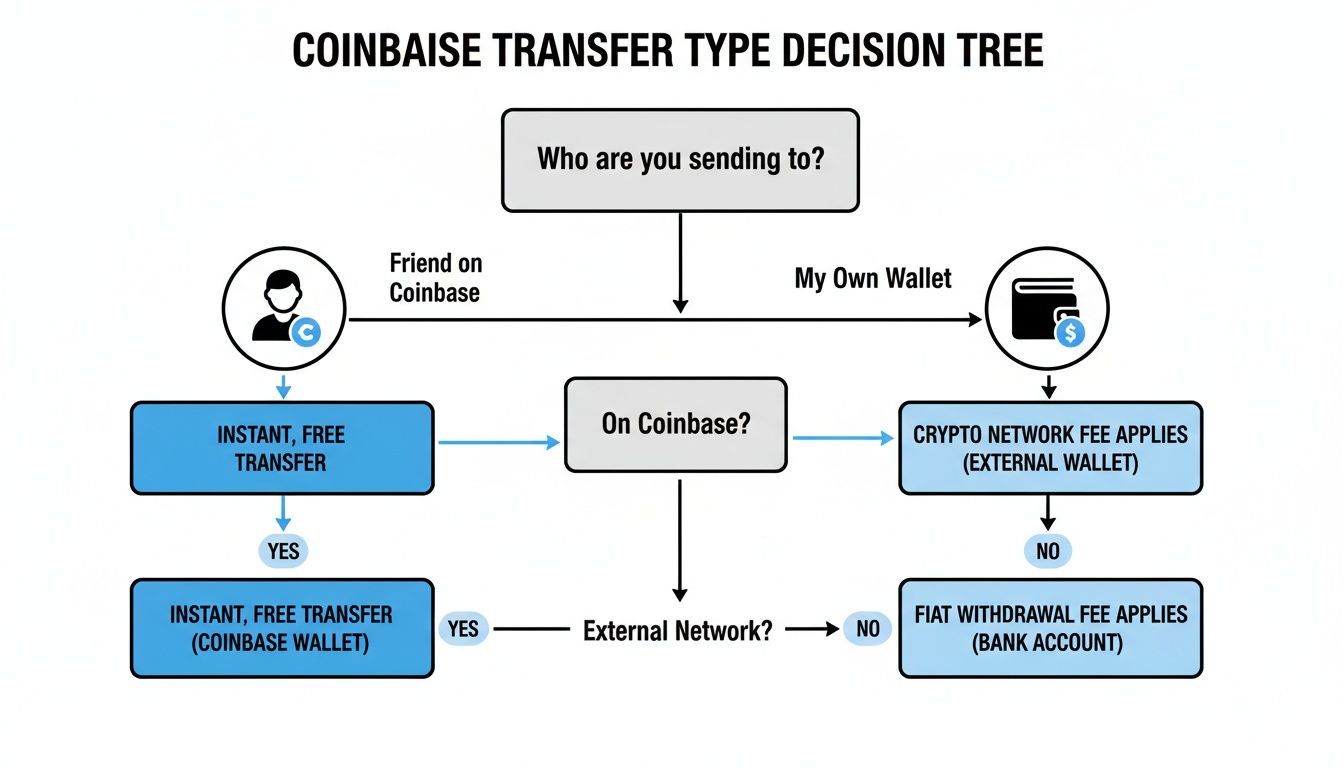
A Coinbase transfer type decision tree illustrating different recipient options, fees, and transfer methods.

As you can see, sending crypto to a friend on Coinbase is straightforward. Sending it to the wider world of the blockchain is a different journey. This distinction is crucial for both privacy and your trading strategy.

Coinbase Transfer Types at a Glance

To make it even clearer, let's break down the key differences in a simple table. This will help you decide in seconds which transfer type fits your needs.

FeatureCoinbase.com to Coinbase.com (Internal)Coinbase.com to External Wallet (On-Chain)
Recipient IdentifierEmail or phone numberPublic wallet address (e.g., 0x...)
SpeedInstantVariable (minutes to hours)
FeesZeroNetwork fees (gas) apply
Blockchain RecordNone (private)Public and permanent
Use CaseP2P payments, sending to friendsMoving funds for DeFi, NFTs, self-custody

This table shows that for simple, private payments between Coinbase users, the internal option is unbeatable. But for anything involving the broader crypto ecosystem, you'll have to go on-chain.

Why the Difference Matters

The biggest takeaway here is all about visibility. Internal, off-chain transfers are completely private. They are recorded only on Coinbase’s internal systems, making them invisible to anyone snooping on a public blockchain explorer.

This privacy is a double-edged sword. While it's great for quick peer-to-peer payments, it creates a blind spot for on-chain analysis tools. A platform like Wallet Finder.ai, which tracks public wallet activity to spot trading opportunities, will have no idea these transfers even happened.

On the flip side, an on-chain transfer from Coinbase to an external wallet is a public event. This "CEX funding" move is a powerful signal. It often means a trader is loading up their wallet to buy NFTs, interact with a DeFi protocol, or get into a token on a decentralized exchange.

Understanding not just the how but the why behind each transfer type is the first step toward mastering your crypto movements. For a closer look at the timelines involved, check out our guide on how long a Coinbase transfer takes.

Sending Crypto Instantly on Coinbase.com

Mobile app for instant, free money transfers between users, visualized on a phone and laptop.

If you need to send crypto to another Coinbase user, forget about wallet addresses and network fees. The fastest, cheapest way to move funds is a direct Coinbase to Coinbase transfer. This lets you send crypto to anyone on Coinbase.com, anywhere in the world, instantly and with zero fees. Think of it as the crypto version of Venmo or Cash App.

The reason it works so seamlessly is that these transfers are handled "off-chain." Instead of broadcasting the transaction to a public blockchain, Coinbase just updates its internal books. It's a simple ledger adjustment—your account gets debited, and the recipient's gets credited.

This makes it perfect for everyday situations, whether you're splitting a dinner bill, paying a friend back, or sending a quick gift. You completely bypass the network confirmation times and associated gas fees that come with on-chain transactions.

How to Send Crypto to Another Coinbase User

Sending funds this way is incredibly simple. All you need is the recipient’s email address or phone number—the one they used to sign up for Coinbase.

Here’s a step-by-step guide:

    • Desktop: Click the "Send & Receive" button at the top right of the dashboard.
    • Mobile App: Tap the transfer icon (two arrows) and select "Send".
  1. Select the Asset and Amount: Choose the cryptocurrency you want to send (e.g., BTC, ETH, USDC) and enter the amount.
  2. Enter Recipient Details: In the "To" field, type the recipient’s email address or phone number. Coinbase will automatically check if it’s linked to an active account.
  3. Review and Send: Add an optional note for context. You will see a summary with a "Network fee: Free" confirmation. Hit "Send now," and the funds will arrive in their account instantly.
  4. Key Takeaway: When Coinbase detects the recipient is another Coinbase.com user, it defaults to this free, instant, off-chain transfer method. You don't need to do anything special to activate it; just use their registered email or phone.

    Limits and Security Considerations

    Even though these transfers are instant and free, they still fall under Coinbase’s standard security rules and account limits. Your daily send limit is determined by factors like your account’s verification level, your funding sources, and your transaction history.

    Coinbase also has security systems in place to keep your account safe. If a transfer looks out of the ordinary or is flagged as high-risk, it might be delayed for a manual review. This is just a safety net designed to prevent unauthorized activity and protect your funds.

    For those looking to move funds between their own exchange account and self-custody wallet, the process is a bit different. You can learn more in our guide on how to link Coinbase to Coinbase Wallet.

    Transferring Crypto to an External Wallet

    Illustration of a crypto transfer process on the Coinbase app, featuring Ethereum and a transaction ID.

    Sooner or later, you'll want to move your crypto off Coinbase. Whether you're diving into DeFi, grabbing an NFT, or tracking smart money with a tool like Wallet Finder.ai, you’ll need to send crypto to an external, self-custody wallet.

    This is what we call an on-chain transfer. It’s fundamentally different from the instant, free transfers between Coinbase users. This time, your transaction is broadcast to a public blockchain, which means it comes with network fees, confirmation times, and a permanent public record.

    For traders, watching these "CEX funding" events is a huge tell—it often signals someone is gearing up to make a move.

    Finding Your Address and Selecting the Right Network

    First, you need the address of your self-custody wallet. It’s a long string of letters and numbers, usually starting with "0x" for Ethereum-based networks. Think of it as your public crypto bank account number.

    You have to be incredibly careful here. Sending crypto to the wrong address is just like wiring cash to the wrong account—consider it gone for good.

    Just as crucial is picking the right network. When you start a withdrawal from Coinbase, the platform will ask you which blockchain to use.

    NetworkDescriptionCommon For
    Ethereum (ERC-20)The original smart contract blockchain, highly secure but can be expensive.ETH, USDC, SHIB, most tokens
    BaseCoinbase's own Layer 2, designed for fast and cheap transactions.ETH, Base-native tokens
    Solana (SPL)A high-performance blockchain known for speed and low costs.SOL, Bonk, other SPL tokens
    Polygon (MATIC)A popular Layer 2 scaling solution for Ethereum.MATIC, Polygon-based tokens

    Critical Warning: Sending tokens on the wrong network will lead to a permanent loss of funds. If you send USDC from Coinbase on the Base network to a wallet that only supports Ethereum, the crypto will never show up in your wallet. Always double-check that your receiving wallet supports the network you select.

    Understanding Network Fees and Confirmation Times

    On-chain transfers aren't free. You have to pay a network fee (often called a "gas fee") to the validators or miners who process and secure your transaction. Coinbase doesn't set this fee; it changes based on how congested the network is.

    Trying to send Ethereum during peak trading hours can be way more expensive than sending it late at night. Coinbase will give you an estimate of the network fee before you confirm, so you can decide if it's worth the cost.

    This is a core part of Coinbase’s business. In its early years, the platform generated significant transaction revenue, which has grown exponentially. As of early 2024, transaction fees from both retail and institutional users remain a key revenue driver, fueled by massive trading and transfer volumes.

    Confirmation times also fluctuate. An on-chain transaction isn't instant like a Coinbase to Coinbase transfer. It has to be validated, which can take anywhere from a few minutes on a speedy network like Base to much longer on a congested Ethereum.

    It’s the classic trade-off: you give up convenience for the security and true ownership that comes with self-custody. It's the essential step to unlocking the full power of the crypto economy. For a complete walkthrough, check out our guide on how to transfer from Coinbase.

    How Traders Use Transfer Data to Find Opportunities

    A blockchain explorer displays CEX funding, a Coinbase button, a wallet, a bell, and a rising graph.

    While an internal Coinbase to Coinbase transfer happens behind closed doors, an on-chain transfer from an exchange to a private wallet is a public spectacle. For savvy traders, these "CEX funding" events are neon signs pointing to where the action is headed.

    When a huge chunk of ETH or any token leaves a known Coinbase hot wallet for a self-custody wallet, it’s like a starting gun going off. This move gets broadcast across the blockchain for everyone to see, making it a prime data point for analysis tools like Wallet Finder.ai.

    This visibility is your window into the minds of smart money. You can spot when top traders are loading up, often just moments before they jump into a new DeFi position or sweep the floor of an NFT collection.

    Interpreting On-Chain Funding Signals

    A large withdrawal from Coinbase is a powerful signal of intent, and the key is to read the signs in context.

    Here are three key factors to analyze:

    1. Size of the Transfer: A $500,000 USDC transfer screams conviction in a way a $500 transfer doesn't. Large, round numbers often signal a trader is gearing up for a specific, high-stakes play.
    2. Type of Asset: Is the trader moving a stablecoin like USDC, or something more volatile like ETH? Moving stables usually means a purchase is on the horizon, whereas moving ETH could be for gas or adding liquidity.
    3. Wallet History: Is this a brand-new wallet, or is it a known pro trader's wallet with a track record of profitable moves right after a CEX withdrawal?

    The privacy of internal transfers is also a critical piece of the puzzle. A trader might be pooling funds from friends inside Coinbase before making one massive, public withdrawal. On-chain tools only catch the final exit, creating a blind spot about the capital's true origin.

    Setting Up Smart Alerts for an Edge

    Instead of gluing your eyes to a block explorer all day, you can put the process on autopilot. Platforms like Wallet Finder.ai let you build custom alerts for any wallet you want to follow.

    By setting up a "CEX Funding" alert, you get an instant ping the second a wallet you're tracking receives funds from an exchange like Coinbase. This gives you a real-time heads-up that a trader is "cashed up" and ready to make a move, letting you get in position before they do.

    This proactive strategy turns raw blockchain data into intelligence you can actually trade on. The broader market trends also play a role. For instance, recent data from Coinbase shows that while institutions drive volume, retail remains a massive force. According to the latest Coinbase shareholder letter, retail trading continues to be a significant contributor to platform activity, a sentiment that helps contextualize on-chain funding movements.

    Troubleshooting Common Transfer Problems

    Even a straightforward Coinbase to Coinbase transfer can hit a bump. While most transactions are seamless, knowing how to handle rare problems is what separates a stressed user from a confident one.

    Coinbase is a massive platform. By Q2 2025, it had 8.7 million active monthly users and saw 120 million platform visits that year. With that volume, even a one-in-a-million issue can happen to thousands. Being prepared is your best defense. You can see the full picture of Coinbase's growth by checking out the stats on Backlinko.

    On-Chain Transfer Stuck on "Pending"

    One of the most common heart-stopping moments is seeing an on-chain transfer to an external wallet stuck on "pending." Don't panic. This almost always points to a congested blockchain network.

    Here's your action plan:

    1. Find the Transaction ID (TXID): Locate the transaction in your Coinbase history and copy the ID (also called a hash).
    2. Analyze the Status: The explorer will show if the transaction is pending, confirmed, or failed. If it's pending due to high traffic, the only solution is to wait.
    3. Mistakenly Sent to the Wrong Email

      It happens. You send crypto to a friend using their email, but you mistype it.

      • If the email is NOT linked to a Coinbase account: You're in luck. The transfer is "unclaimed." You can go into your transaction history, find the transfer, and hit "Cancel." The crypto will return to your account instantly.
      • If the email IS linked to an active Coinbase account: The situation changes. The transfer is instant and, like an on-chain transaction, irreversible. Coinbase cannot reverse it for you.

      Why Is My Transfer on a Security Hold?

      Seeing your transfer on a security hold can be frustrating, but it’s a protective measure. Coinbase's system automatically flags activity that looks out of the ordinary.

      Common triggers for a hold include:

      • New Account Activity: Making a large transfer shortly after creating an account.
      • Unusual Behavior: Sending a much larger amount than you normally do.
      • Recent Security Changes: Resetting your password or changing 2FA settings recently.

      These holds usually last for 24-72 hours. While you wait, know the system is working to ensure it’s really you moving the funds, not a hacker.

      Frequently Asked Questions

      When you're moving crypto, a few questions always pop up. Let's clear up the most common ones about Coinbase to Coinbase transfers so you can move funds with confidence.

      Are Coinbase to Coinbase Transfers Anonymous?

      No, they aren't. While an internal transfer happens off-chain and won't show up on a public block explorer, it's far from anonymous. Coinbase is a regulated U.S. company and must follow strict Know Your Customer (KYC) rules.

      Every transaction you make is tied to your verified identity. Coinbase records everything on its private ledger for compliance and security.

      Key Takeaway: Don't confuse privacy with anonymity. Internal transfers give you privacy from the public eye, but true anonymity isn't part of the deal on regulated exchanges.

      Can I Reverse a Coinbase Transfer?

      This is a critical "it depends" situation.

      Transfer TypeCan It Be Reversed?
      Internal (to unclaimed email)Yes. If the recipient doesn't have a Coinbase account, you can find the pending transfer and click "Cancel."
      Internal (to active account)No. The transfer is instant and final.
      On-Chain (to crypto address)No. Once confirmed on the blockchain, it is permanent and irreversible.

      This is why you must double- and even triple-check wallet addresses and recipient details before hitting send.

      When Do I Need a Destination Tag or Memo?

      You typically only need a destination tag or memo when sending specific coins like Ripple (XRP) or Stellar (XLM) to another centralized exchange.

      Exchanges often use one main wallet to hold all their users' XRP. The tag is the only way they know which specific account to credit with the deposit.

      Here’s a quick guide:

      Transfer TypeDestination Tag or Memo Needed?The Reason Why
      To another Coinbase.com userNoThe email or phone number is the unique identifier.
      To your own self-custody walletNoYou control the entire wallet, so there's no need to specify.
      To another exchange (e.g., Kraken)Yes (for certain coins)The tag tells the receiving exchange which user account gets the funds.

      Forgetting the memo when sending to another exchange is a rookie mistake that can lead to major headaches or even a total loss of your crypto. Always follow the deposit instructions on the receiving platform to the letter.


      Ready to turn on-chain transfer data into a trading advantage? Wallet Finder.ai helps you discover profitable wallets and get real-time alerts when smart money makes a move. Start tracking the top traders and mirror their strategies today. Visit https://www.walletfinder.ai to begin your 7-day trial.