Build a Crypto Discord Bot to Master the Markets

Wallet Finder

Blank calendar icon with grid of squares representing days.

February 24, 2026

Think of a crypto Discord bot as more than just an automated tool. It's your personal command center, transforming a simple chat server into a hub for serious market intelligence. These bots feed you real-time price alerts, on-chain data, and custom notifications, giving you a serious edge without ever having to leave your main communication platform.

Why a Custom Bot Is Your Unfair Advantage in Crypto

In the crypto world, especially in DeFi, speed and information are everything. Sure, you can grab a generic, off-the-shelf bot to flash basic token prices, but those often lack the depth you need to make truly sharp decisions. This is exactly where building your own crypto Discord bot changes the game entirely.

A custom bot isn't just a glorified price ticker. It’s your dedicated intelligence agent, tailored precisely to your trading strategy. Imagine getting instant pings not just when a token’s price moves, but when a specific whale wallet you’re tracking makes a massive transaction. That's the kind of power we're talking about.

Gaining a True Information Edge

The real advantage kicks in when you integrate sophisticated, real-time on-chain monitoring. Instead of just reacting to what the rest of the market sees, you can get way ahead of trends by tracking what the smart money is doing.

Here's an actionable list of what a custom bot can do for you:

  • Monitor Whale Wallets: Hook it up to a tool like Wallet Finder.ai to pinpoint top-performing wallets and get an alert for their every move.
  • Track New Token Launches: Get an instant notification the second a new liquidity pool is created for a token you’ve been watching.
  • Analyze Gas Fees: Set up alerts for when network congestion dies down, signaling the cheapest times to get your transactions through.
  • Scan for Smart Contract Events: Get notified about specific function calls, like a token contract owner minting new supply.
  • Monitor DEX Liquidity: Receive alerts when large amounts of liquidity are added to or removed from a pool.

A custom-built bot lets you slice through all the market noise and lock onto the signals that actually matter to your portfolio. It’s the difference between trying to hear one person in a crowded room and getting a private briefing from an expert.

This level of personalized automation is what gives you a distinct advantage. It’s no surprise that Discord crypto bots have become essential. Platforms like Alpha.bot have blown up because they offer on-demand charts and market data, showing a clear demand from traders who need instant, actionable information.

You can learn more about the most-used financial bot on Discord to see how people are already using these tools. A custom bot simply takes that a step further, delivering an almost unbeatable competitive edge.

Deciding Between a Hosted Bot and a DIY Build

Your first big decision is what kind of foundation to build on. Do you go with a pre-built, hosted solution, or do you roll up your sleeves and build a self-hosted bot from scratch? This choice is a big deal—it dictates your bot's power, cost, and how much time you'll spend tinkering with it.

Forget a generic pros-and-cons list. The real question is about your trading style.

If you're a casual trader just needing reliable price alerts for major tokens, a hosted bot is probably your best bet. It’s a low-effort, plug-and-play solution that gets the job done. But if you're a serious analyst crafting proprietary signals from complex on-chain data, you’ll hit a wall with pre-built tools. Only a self-hosted build will give you the complete freedom you need.

This simple decision tree gets to the heart of it: are you looking for a unique informational edge?
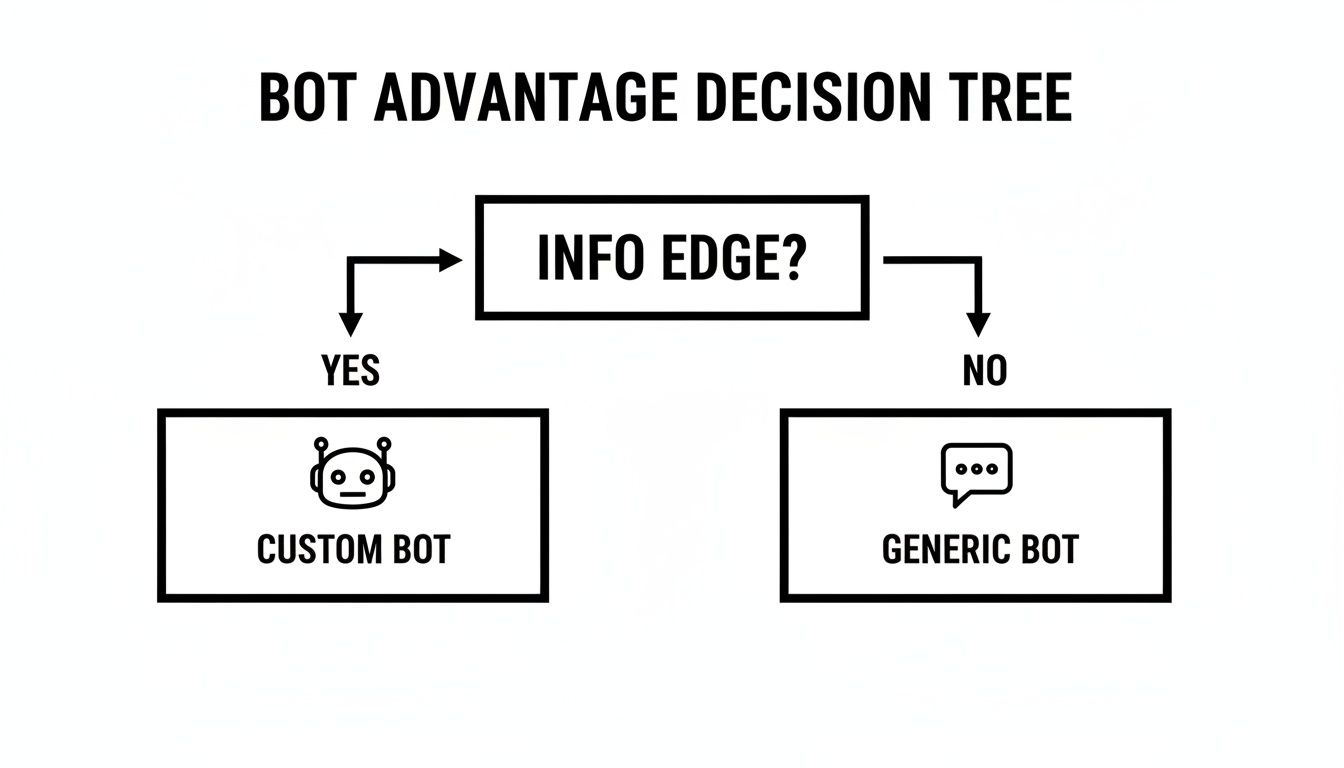
A bot advantage decision tree asking 'INFO EDGE?'. Yes leads to 'CUSTOM BOT', No leads to 'GENERIC BOT'.

The takeaway is simple. Custom builds are for traders chasing a unique advantage. Generic bots are for those who just need standard, widely available market data.

Weighing the Strategic Trade-Offs

To make the right call, you have to weigh the trade-offs between flexibility, cost, security, and maintenance. Each path offers a different mix, and it’s going to directly impact how you use the bot and the value it brings to your server.

Take security, for instance. A DIY bot gives you total control, which is critical when you're dealing with crypto data. We've all seen the news about supply-chain attacks targeting open-source packages. One major incident exposed over 25,000 repositories because of credentials stolen from malicious packages. When you build your own bot, you control every single line of code and every dependency. That’s a level of security no pre-built solution can truly match.

The core trade-off is convenience versus control. Hosted bots are fast and easy, but you're stuck with their feature set. A DIY build is more work upfront but gives you total freedom to build the exact tool your strategy demands.

To help you sort through this, I've put together a table breaking down the main differences. It should make it clearer which approach aligns with your resources and trading goals.

And if you want to go deeper on automated trading tools, our crypto trading bot comparison is a great next read.

Hosted Solution vs Self-Hosted Bot A Strategic Comparison

Evaluate the key differences between using a pre-made bot and building your own to find the best fit for your trading style and technical comfort level.

FactorSelf-Hosted Bot (DIY)Hosted Bot Solution (Pre-Built)
FlexibilityUnlimited. You can integrate any API, data source, or custom logic you can imagine.Limited. You are restricted to the features and integrations offered by the provider.
Setup TimeHigh. Requires coding, server setup, and configuration from scratch.Low. Often just a few clicks to invite the bot to your server and configure basic settings.
MaintenanceYour responsibility. You must manage hosting, updates, security patches, and bug fixes.Handled by the provider. Updates and maintenance are managed for you.
CostVariable. Costs include hosting fees (e.g., cloud server) and potential API subscriptions.Predictable. Typically a flat monthly or yearly subscription fee.
SecurityYour control. You are fully responsible for securing your code, server, and API keys.Provider's responsibility. You trust the provider to secure their infrastructure and your data.

Ultimately, there's no single "best" answer—only what's best for you. A hosted bot gets you in the game quickly with minimal fuss, while a self-hosted solution is a powerful asset for those willing to invest the time to build a truly custom tool.

Your First Steps in the Discord Developer Portal

Alright, this is where the magic happens. Your idea for a crypto bot stops being just an idea and starts becoming a reality. We're heading into the Discord Developer Portal, which is the birthplace of every bot on the platform. It might look a little intimidating at first, but it's pretty straightforward once you know your way around.

The first thing you'll do is create an "Application." Think of this as the official profile for your bot—it’s not code, just the basic identity.

Discord Developer Portal interface showing 'My Bot' card with 'Create Application' button and Python icon.

You’re essentially registering your bot before it opens for business. You'll give it a name, upload an avatar, and write a quick description. This is purely administrative stuff that gives your bot a presence in Discord's system.

Once your application is set up, find the "Bot" tab on the left-hand menu. This is the crucial step. Clicking "Add Bot" officially brings your bot to life and generates the single most important piece of information for your project: the bot token.

Generating and Securing Your Bot Token

Your bot token is a long string of characters that acts as a password. It’s what lets your code actually connect to Discord's API and do things. You need to guard this token like it’s the private key to your main crypto wallet. Seriously.

If your bot token ever gets leaked—say, you accidentally push it to a public GitHub repo—it's game over. Anyone can grab it and take complete control of your bot. Scammers actively scan for exposed tokens to hijack bots for spamming, raiding servers, or worse.

To keep it safe, never hard-code your token directly into your script. The professional standard is to use environment variables. This means you store the token in a private, local file (usually called .env) that your version control system is told to ignore.

Here's an actionable security checklist:

  • Never Share It: Don't paste it in public chats, forums, or anywhere else. Not even for a "quick debug."
  • Use a .env File: In your project's main folder, create a file named .env. Inside it, add one line: DISCORD_TOKEN='Your-Bot-Token-Goes-Here'.
  • Update .gitignore: Open (or create) a .gitignore file and add .env on its own line. This tells Git to never, ever upload that file.

Defining Bot Permissions and Scopes

Before your bot can join a server, you have to tell Discord what it's allowed to do. This is all handled in the OAuth2 URL Generator. Here, you'll pick and choose the specific permissions your crypto bot needs to do its job.

For a typical crypto alert bot, you'll want to start with these:

PermissionWhy You Need It
Send MessagesThis is the big one. It lets the bot post price alerts, trade notifications, and other data into your channels.
Embed LinksAbsolutely necessary if you want your bot's messages to look clean and professional, not just a wall of text.
Read Message HistoryThis allows the bot to see and respond to commands typed by users in the chat.
Use External EmojisGreat for adding a bit of visual flair, like including token logos (e.g., the ETH or BTC emoji) in your alerts.

In the generator, you'll first select the bot scope, then tick the boxes for the permissions you need. Discord will then spit out a unique invitation URL. Anyone with admin rights on a server can use that link to add your bot.

Now for the fun part: let's bring it online. With the popular discord.py library for Python, it only takes a few lines of code to connect to Discord and see your bot's status light turn green.

# main.pyimport discordimport osfrom dotenv import load_dotenv# This loads the token from your .env fileload_dotenv()TOKEN = os.getenv('DISCORD_TOKEN')# We need to tell Discord what our bot intends to dointents = discord.Intents.default()intents.message_content = True  # This is required to read user messagesclient = discord.Client(intents=intents)@client.eventasync def on_ready():# A little confirmation message in your terminal when the bot is up and runningprint(f'{client.user} has connected to Discord!')# This starts the botclient.run(TOKEN)

Run that script, and you should see your bot pop up as "online" in your Discord server. It's a simple but satisfying first step

Integrating Real-Time On-Chain Data and Price Feeds

An online bot is a good start, but a data-driven crypto Discord bot is a powerhouse. The real value comes from plugging in external data sources, feeding actionable intelligence right into your server. This is how you transform your bot from a simple notification tool into a dynamic market analysis assistant.

Real-time on-chain data flows from a crypto wallet to a Discord app displaying gas fee charts.

There are two main ways to get this data flowing: pushing it via webhooks or pulling it through an API. Webhooks are perfect for event-driven alerts, while APIs are the go-to for on-demand information requests.

Using Webhooks for Instant On-Chain Alerts

Webhooks are basically automated messages that one app sends to another when something specific happens. Think of it as a direct hotline. When an event occurs—like a wallet you're tracking makes a trade—the source platform immediately sends a "push" notification to a special URL in your Discord channel.

A perfect real-world example is tracking smart money with a tool like Wallet Finder.ai. You can set up alerts to monitor a top trader's wallet. The second they buy or sell a token, Wallet Finder sends a data payload to your bot's webhook. That's how you get instant, actionable alpha.

Here’s a practical look at how you might handle this incoming data with a simple Python script using the Flask framework. This code creates a listening endpoint for the webhook.

from flask import Flask, request, jsonifyimport requestsimport jsonapp = Flask(__name__)# This is the Discord Webhook URL for your channelDISCORD_WEBHOOK_URL = 'YOUR_DISCORD_WEBHOOK_URL'@app.route('/wallet-alert', methods=['POST'])def wallet_alert():data = request.json  # Get the JSON data from Wallet Finder.ai# Format the data into a Discord Embedembed = {"title": f"🚀 New Trade Alert: {data['wallet_address']}","description": f"**Action:** {data['action']}\n**Token:** {data['token_name']}","color": 0x00ff00,  # Green for a buy, for example"fields": [{"name": "Amount", "value": str(data['amount']), "inline": True},{"name": "Price", "value": f"${data['price']}", "inline": True}]}# Send the embed to your Discord channelrequests.post(DISCORD_WEBHOOK_URL, json={"embeds": [embed]})return jsonify({"status": "success"}), 200if __name__ == '__main__':app.run(port=5000)

This script fires up a simple web server that listens for data. When it receives a notification, it formats it into a clean, professional-looking Discord embed and posts it to your server in real-time.

Pulling Market Data with APIs

For on-demand data like current token prices, gas fees, or market caps, APIs are your best friend. Instead of waiting for a push notification, your bot will actively "pull" this data by making a request to an external service like CoinGecko whenever a user runs a command. To get a better handle on this, check out our deep dive on choosing the right https://www.walletfinder.ai/blog/crypto-price-api.

Beyond just price feeds, a custom bot can be incredibly powerful, even serving as the best crypto portfolio tracker by pulling and aggregating data from multiple exchanges and blockchains.

The key difference is initiation. Webhooks are passive—your bot just listens. APIs are active—your bot makes a specific request for data when it needs it. A great bot uses both.

Many of the most popular bots on Discord integrate multiple data sources to offer a massive range of features. For instance, advanced bots like TsukiBot pack an arsenal of tools across 20+ categories, including TradingView charts, market stats, gas tracking, and even ETH address lookups. You can explore TsukiBot's features on GitHub to see just what's possible.

By combining webhook alerts with API commands, you build a truly versatile crypto Discord bot that delivers value around the clock.

Implementing Essential Security and Moderation

In the crypto world, solid security isn't just a nice-to-have feature—it’s absolutely essential. Once your crypto Discord bot is live and pulling in data, your top priority has to be locking it down to protect it, your server, and your users. A poorly secured bot can quickly become a back door for spam, scams, and even devastating financial loss.

Security shield with checkmark, user roles (Admin, Mod, User), rate limit toggle, and keys for Read-only/Trading.

This goes way beyond just keeping your bot token a secret. The real work is in building layers of defense. A fantastic and simple place to start is with strict access control using Discord's role system. You wouldn't hand over the keys to your exchange account to every random person, and the exact same thinking applies here.

Securing Bot Commands and API Keys

The principle of least privilege is your best friend. All this means is giving users—and the bot itself—the absolute bare minimum permissions needed to do their jobs. Nothing more.

For any commands that could change settings or touch sensitive data, you’ll want to restrict them to trusted roles like 'Admin' or 'Moderator'. This is a simple but incredibly powerful way to segment control and stop a regular member from causing chaos, whether they mean to or not.

Just as critical is how you handle API keys from external services. A compromised API key is a nightmare scenario. In fact, cybersecurity firm CipherTrace reported that over $300 million in crypto has been stolen through compromised trading bot API keys. It’s a massive risk.

A non-negotiable security rule: Never, ever use an API key with withdrawal permissions for your bot. For 99% of what you’ll do, a read-only key is all you need for alerts and analysis. If you absolutely need to execute trades, use a separate key with trade-only permissions.

That small distinction can be the one thing that stands between a helpful tool and a catastrophic liability. To take it a step further, you can check out our guide on website security audits, as many of the same principles apply to securing bot infrastructure.

Preventing Abuse and Spam

Once your bot gets popular, you can bet that bad actors will try to exploit it. Two of the most effective ways to shut them down are rate limiting and input sanitization.

  • Implement Rate Limiting: This is your defense against command spam. You can code your bot to only accept a certain number of commands from a single user in a set time (say, 5 commands per minute). This not only stops spam but also reduces the load on your bot and any APIs it's connected to.
  • Sanitize All User Inputs: Never, ever trust data that comes from a user. Before your bot processes any input, like a token contract address, it needs to be validated and cleaned up. This is how you prevent injection attacks, where a malicious user tries to sneak in and execute unintended code.

And if you're running community events, it’s worth understanding how to manage a secure Discord raffle bot, as the security concepts for preventing exploitation are very similar. Building with a security-first mindset from the start ensures your bot remains a trusted asset for your community.

Got Questions About Your Crypto Bot? We've Got Answers.

As you get your hands dirty building and running a crypto Discord bot, you're bound to hit a few snags or have questions pop up. It happens to everyone. Think of this section as your personal FAQ, where we tackle the most common issues you'll likely run into.

Can My Crypto Discord Bot Actually Execute Trades For Me?

Technically, yes, but tread very carefully here. This is a high-stakes feature that demands serious caution.

You can integrate your bot with an exchange's API to place trades, but that means giving it API keys with trading permissions. If those keys ever get compromised—and it can happen in a flash—your funds are at risk.

For most people, especially if you're just starting, it's a much safer bet to use the bot for alerts and analysis only. Stick with read-only API keys. You get all the intel you need and then execute trades manually, keeping full control. If you're set on automated trading, lock down your security and never grant withdrawal permissions to your bot's API keys.

What's The Best Programming Language For A Crypto Bot?

The two big players here are Python and JavaScript (with Node.js), and for good reason. Honestly, the "best" one really comes down to what you're comfortable with and what you're trying to build.

LanguageKey Strengths & Use CasesPopular Library
PythonExcellent for data analysis, machine learning, and scientific computing. Clean syntax makes it beginner-friendly.discord.py
JavaScript (Node.js)Strong for handling asynchronous operations, making it fast and efficient for real-time web applications and I/O-heavy tasks.discord.js

At the end of the day, the language you choose is just the tool. Both have incredible communities and rock-solid libraries to get the job done.

The real power isn't in the language itself but in how you use it to connect to data sources. Your choice of Python or JavaScript is simply the vehicle; the engine is the data you feed it.

Help! My Bot Just Went Offline. How Do I Fix It?

It's always frustrating when your bot suddenly goes dark, but troubleshooting is usually a pretty straightforward process. First things first: check your logs. If you're self-hosting, your console or log file is your best friend. It will almost always point you to the specific error.

Here is a quick troubleshooting checklist:

  1. Check Your Terminal Logs: This is step one. The error message will often tell you exactly what's wrong (e.g., Improper token has been passed).
  2. Verify Your Bot Token: A common culprit is an invalid token. Regenerate it in the Discord Developer Portal and update your .env file.
  3. Check Hosting Status: Is your server or cloud service (like Heroku or a VPS) actually running? Is it connected to the internet?
  4. Review Recent Code Changes: Did you just push an update? Comment out recent changes to see if you can isolate the line of code causing the crash.
  5. Confirm Discord Permissions: If the bot is online but not responding, check its permissions in your server's Role settings. Ensure it can 'Read Messages' and 'Send Messages' in the target channel.

Ready to turn on-chain data into your unfair advantage? Wallet Finder.ai helps you discover and track top-performing crypto wallets, giving you real-time alerts on their every move. Start your free trial today and see what the smart money is doing.
Discover Winning Wallets Now