7 Best Meme Coin Trading Tools for 2026
Discover the 7 best meme coins trading platforms and tools for 2026. Get actionable insights, find winning wallets, and trade smarter on CEXs and DEXs.

February 20, 2026
Wallet Finder

February 15, 2026

It's easy to find your Coinbase Wallet address—just tap 'Receive' in the app or copy it from the browser extension. But the real challenge isn't finding it; it's knowing which address to use.
Choosing between your self-custody Coinbase Wallet address and your Coinbase.com exchange address is a critical decision. Get it right, and your crypto arrives safely. Get it wrong, and you could lose your funds forever. This guide provides actionable steps to ensure you always pick the right one.
Before we jump into the "how-to," let's quickly cover the "why." Your wallet address is more than just a long string of letters and numbers. It's your public identity on the blockchain, essentially a digital PO Box for receiving crypto, NFTs, and other tokens.
Think of it as the public-facing side of your crypto life. It’s completely safe to share, but every transaction it’s involved in is recorded on a public ledger. That transparency is precisely what allows powerful tools to track on-chain activity and spot what the smart money is doing.
One of the biggest hurdles for new users is grasping the difference between a Coinbase Wallet address and a Coinbase.com exchange address. They look similar but are built for entirely different jobs. Mixing them up can cause major headaches and, in some cases, lost funds.
This decision tree gives you a quick visual guide for which address to use.
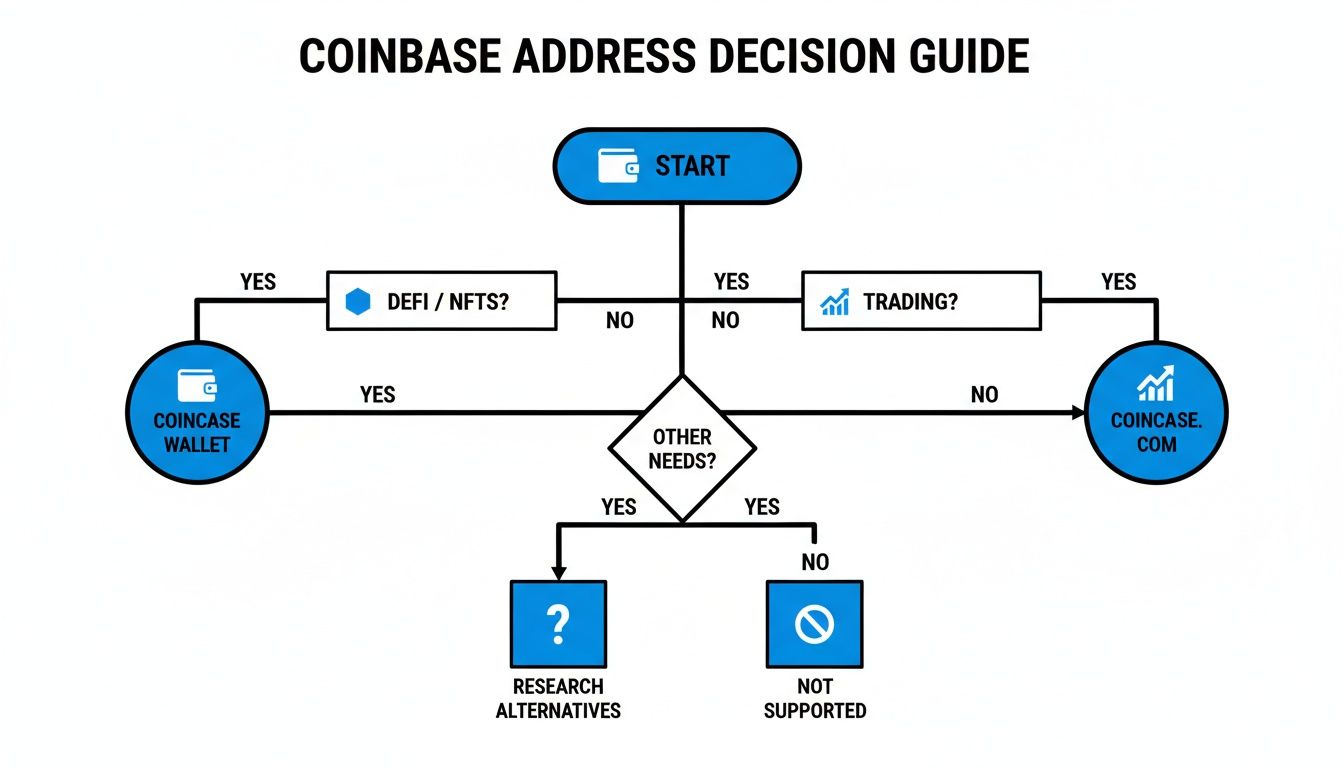
The flowchart makes it simple: if you're doing anything in the decentralized ecosystem, like using dApps or managing NFTs, your self-custody Coinbase Wallet is the way to go. For straightforward trading on the exchange, stick to your Coinbase.com deposit address.
Still not sure? This table breaks down the key differences to help you decide which address is right for your next transaction.
FeatureCoinbase Wallet (Self-Custody)Coinbase.com (Exchange)Primary Use CaseInteracting with dApps, DeFi, buying/selling NFTs, storing assetsDepositing crypto to trade, buy, or sell on the Coinbase exchangeWho Controls Keys?You. You have full control and responsibility.Coinbase. They manage the keys for you (custodial).Supported AssetsThousands of tokens across multiple networks (ETH, SOL, etc.)A curated list of assets supported for trading on the exchangeBest ForExperienced users, DeFi enthusiasts, NFT collectorsBeginners, traders, users who prefer a simpler, managed experienceSecurity ModelYour security practices (seed phrase management) are paramount.Relies on Coinbase's platform security and your account login.
Ultimately, if you're exploring the broader world of web3, you need the Coinbase Wallet address. If you're just funding your trading account, the Coinbase.com address is what you're after.
Every single transaction tied to your public address is etched onto the blockchain forever. This immutable public record is what makes the crypto world so transparent and verifiable—and it’s also a goldmine of analytical data.
While finding a Coinbase wallet address is simple, it’s a critical first step. With an expected 3.2 million monthly active users by 2025, that’s a massive amount of on-chain activity that tools like Wallet Finder.ai can transform into profitable trading signals.
The self-custodial wallet launched in 2018, riding the wave of Coinbase's exchange growth, which skyrocketed to 110 million verified users by Q4 2022. It empowers users to explore DeFi, NFTs, and swaps with over 270+ cryptocurrencies. For a deeper dive, you can check out more Coinbase Wallet statistics to see just how fast it's growing.
Once you understand that your address is a public record, you can start to see how expert traders use this information. They track wallets to see what "smart money" is buying and selling, turning publicly available data into a massive strategic advantage.
The article above mentions address poisoning as something to watch for. But "watch for it" isn't enough — this attack is sophisticated enough that even cautious users fall for it repeatedly. Understanding exactly how it works, step by step, is the only real defense.
Address poisoning isn't guessing. It isn't brute force. It's a calculated social engineering attack that exploits one specific habit almost everyone has: copying addresses from transaction history instead of generating them fresh. The attacker doesn't need access to your wallet, your private key, or anything other than your public wallet address — which, as we covered, is completely visible on the blockchain.
Here's how it plays out in practice, because the sequence matters.
The attacker starts by scanning the blockchain for wallets that are actively receiving and sending transactions. Your Coinbase Wallet address shows up in public transaction records the moment you use it. They see you received ETH from someone, or sent USDC to a DeFi protocol. Your address is now on their radar.
Next, they create a new wallet with an address engineered to look almost identical to yours. The first four to six characters match. The last four to six characters match. The middle is different, but nobody checks the middle. Creating vanity addresses like this is computationally expensive but entirely feasible, and tools exist specifically for generating them.
Then they send you a tiny transaction — usually a fraction of a cent worth of a token — from their lookalike address to yours. This transaction now appears in your transaction history, right alongside your legitimate transactions. The tiny amount is the point. It's not meant to be valuable. It's meant to pollute your history.
Now the trap is set. At some point in the future, you need to send funds to someone — maybe back to an exchange, maybe to a friend, maybe to a DeFi protocol. Instead of generating a fresh receive address on the destination and copying it directly, you glance at your transaction history to find a previous address you've used before. You see the lookalike address sitting there, matching what you remember. You copy it. You paste it. You send your funds.
They're gone. The attacker's address received everything you sent, and because the first and last characters matched what you were expecting, you never noticed.
The verification step mentioned earlier in this article — comparing the first four to six and last four to six characters of a pasted address against the original — defeats poisoning specifically because the attacker cannot match both ends simultaneously with a different middle. Generating a vanity address that matches both the opening and closing characters of a specific target address is computationally prohibitive. It would take millions of years of processing to find a match.
But this check only works if you're comparing against the right reference. If you copy an address from your transaction history and compare it against the same transaction history, you're comparing the poisoned address against itself. It will always match. The comparison has to be against a freshly generated address from the recipient, not against your own records.
The correct workflow every single time: the person or platform you're sending to generates their receive address in real time and gives it to you directly. You paste it into your send field. You compare what you pasted against what they showed you. Never, not once, should you pull a send address from your own transaction history unless you have independently verified it's still the correct destination.
If you've already sent funds to a poisoned address, the situation is almost always unrecoverable for standard ERC-20 transfers. The attacker controls that wallet and has no reason to return funds. The blockchain doesn't have a chargeback mechanism. The transaction is permanent.
The one narrow exception involves certain token transfers where the token contract itself has a recoverable function built in, but this is rare and usually only applies to tokens on specific protocols. For standard ETH, USDC, or other common assets, once they've left your wallet to a poisoned address, they're gone.
This is why the prevention workflow matters more than any recovery strategy. The thirty seconds it takes to get a fresh address directly from the recipient and verify it character by character is the entire defense. There's no technical system that catches this for you after the fact.
When you need to receive crypto on the go, the Coinbase Wallet mobile app is your direct connection to the blockchain. Whether a friend is sending you an NFT or you're moving funds from another exchange, finding your wallet address is the first, most important step.
Let's get right to it with this actionable checklist:

Let's say you're about to receive some Solana (SOL). You'd simply find and select Solana from the list. If you were getting a token on the Base network, you'd pick that specific asset instead. This choice tells the app to generate the correct address for that particular blockchain.
After picking your asset, the app will show you your unique address for that coin, along with the network it’s on, like "Ethereum Mainnet" or "Solana."
Crucial Tip: Always confirm that the network shown in your Coinbase Wallet is the exact same one the sender is using. Sending assets on the wrong network—like sending SOL to an Ethereum address—is a surprisingly common mistake and almost always leads to a permanent loss of your funds.
There's no "undo" button in crypto, so this quick check is your single best defense against a very costly error.
The app gives you two easy ways to share your address, each suited for different situations.
Here’s a common scenario: you just sold an NFT and need to give the buyer your ETH address. You would open Coinbase Wallet, tap 'Receive,' pick 'Ethereum,' and hit the copy button. Then you can paste that address directly into your message to the buyer. If you're moving assets from the main Coinbase exchange, our guide on how to link Coinbase to Coinbase Wallet can make that process much smoother.
Before you hit send, there's one last security check you should always do. Some nasty malware can actually hijack your clipboard, swapping your correct address with an attacker's without you even knowing.
To beat this, just give the pasted address a quick visual scan.
StepActionWhy It's ImportantInitial CopyTap the copy icon in the Coinbase Wallet app.Ensures the full, correct address is on your clipboard.PastePaste the address into the destination field.Places the address where the sender needs it.Final CheckCompare the first 4-6 and last 4-6 characters of the pasted address with what's in your wallet.This simple check defeats clipboard-hijacking malware and prevents devastating loss.
This "bookend" check takes just a few seconds but provides a powerful layer of security. It gives you the peace of mind that your crypto is actually heading where it's supposed to go.
When you're diving into the world of decentralized apps (dApps) like Uniswap or OpenSea, the Coinbase Wallet browser extension is your best friend. If you do most of your crypto activity on a desktop, this is hands-down the fastest way to grab your wallet address.
For quick access, I always recommend "pinning" the extension to your browser's toolbar. This keeps the Coinbase Wallet icon visible and ready, so you can pop it open with a single click instead of digging through a menu of add-ons.
Once you’re signed in, the whole process is dead simple.
The moment you open the extension, your main wallet address is sitting right there at the top of the dashboard. There’s no need to click through a bunch of menus or screens; it's designed to be immediately accessible.
You'll spot a small copy icon right next to the address. A single click on that icon instantly copies the full string to your clipboard. From there, you're ready to paste it wherever you need it, whether a dApp is requesting it or you're sending funds over from an exchange.
Pro Tip: Your primary wallet address—the one starting with "0x"—is the same across most compatible networks. This includes popular chains like Base, Polygon, Arbitrum, and Optimism. While this is super convenient, it also makes it absolutely critical that you select the correct network before you copy.
This multi-chain setup simplifies a lot of things, but it also creates a massive pitfall that trips up countless users, often leading to costly mistakes.
The single most important thing to do when grabbing your address from the browser extension is to make sure you're on the right network. A dApp running on the Polygon network needs a Polygon address, even if the string of characters looks identical to your Ethereum one.
Here’s a real-world example of why this is so crucial:
Let's say you just bought an NFT on OpenSea and the transaction was on the Polygon network. To get that NFT into your wallet, you have to provide your Polygon address.
By switching to Polygon before you copy, you’re telling the blockchain exactly where to send your new asset. If you had copied the address while still on Ethereum Mainnet, your NFT would have been sent into the void—lost forever on the wrong chain.
The same logic applies to any network you're using:
Always, always double-check which network the dApp or platform operates on. Building this simple habit will save you from the gut-wrenching stress (and financial loss) of a cross-chain error. The right address is only right when it's on the right network.
Sending to the wrong network is the single most common way people permanently lose crypto, and yet almost nobody explains what actually happens under the hood when it occurs. "Your funds are lost" is true but incomplete. Understanding the mechanics tells you exactly why recovery is usually impossible and identifies the one situation where it isn't.
When you send a token from one blockchain to another using a mismatched address, one of two things happens depending on the specific chains and tokens involved. Neither outcome is good, but they're different problems with different (non-)solutions.
The first scenario is a straight incompatibility. You send SOL to an Ethereum address. Solana and Ethereum are entirely separate blockchains with no shared infrastructure. The Solana network delivers your tokens to the address string you specified — it doesn't know or care that this string corresponds to an Ethereum wallet. The tokens arrive on Solana at an address that nobody controls on Solana. They sit there permanently in a wallet with no private key that can ever access them. This is a true black hole. No recovery is possible under any circumstances.
The second scenario involves compatible chains with the same address format. You send a token on Polygon to your Ethereum address. Both are EVM-compatible, and your address string is technically valid on both chains. The tokens arrive on Polygon at your address — but your Coinbase Wallet might not automatically display them because it's showing your Ethereum portfolio, not your Polygon portfolio. The tokens aren't lost in the same way. They're sitting in a wallet you control, on a chain you might not be looking at.
The second scenario — same address format, wrong chain — is the one case where recovery exists. If you sent tokens to your own address but on the wrong network, and that network is one your wallet supports, you can often recover them by simply switching your wallet to that network and looking for the tokens there.
In Coinbase Wallet specifically, this means switching the network selector to the chain where you accidentally sent the tokens and checking whether they appear in your portfolio. If the chain is supported and the tokens are a standard type on that chain, they'll show up. You can then move them to the correct chain via a bridge or swap.
The recovery becomes impossible when the destination chain is not supported by your wallet, when the token type doesn't exist on the destination chain in any recognizable form, or when the address format is fundamentally incompatible between chains. In those cases, the tokens are gone permanently regardless of what you do.
The prevention is mechanical, not intuitive. Before sending any crypto anywhere, three things need to match perfectly: the asset you're sending, the network you're sending it on, and the network the recipient's address is configured for. All three must be verified independently, not assumed.
The way to build this as an automatic habit is to treat network confirmation as a separate step that happens after you've selected the asset and before you've entered any amount. Open the recipient's address source. Confirm what network they specified. Go back to your send screen. Confirm your network matches. Only then type the amount and proceed. Breaking the transaction into these discrete confirmation steps prevents the rushed "paste and send" behavior that causes wrong-network losses.
While Coinbase Wallet is your key to the wild world of DeFi, the Coinbase.com exchange is where the trading happens. Finding a deposit address here is for a totally different reason: you're looking to fund your trading account to buy, sell, or swap crypto.
Think of it as your on-ramp from traditional banking into the crypto trading floor. You'll need this address anytime you’re moving funds from another exchange like Binance, sending crypto from a hardware wallet to cash out, or getting paid directly into your Coinbase account. The process itself is simple, but every single detail matters.
First things first, log into your Coinbase.com account. On the main dashboard, you'll see a section called My assets or Portfolio. This is your command center for everything you hold on the exchange.
Once you're there, look for and click the Receive button. This tells Coinbase you want to bring funds in, and it'll kick off the process to generate the right address for your specific transaction.
Next, Coinbase will show you a list of cryptocurrencies. This is a critical step: you must select the exact crypto you're about to receive. If you pick Bitcoin but your friend is sending you Ethereum, those funds will likely be lost forever.
After you've selected the asset, you'll face the most important choice of all: choosing the network. You have to select the exact same network the sender is using. For example, if someone is sending you USDC on the Polygon network, you absolutely must select Polygon on your end. A mismatch here is a one-way ticket to lost funds, with no "undo" button.
Heads Up: Memos and Destination Tags Are a Must
Some cryptocurrencies, like XRP (Ripple) or EOS, have an extra requirement: a memo or destination tag. This is a unique identifier that tells the exchange which specific account to credit. Always copy and provide this tag along with the wallet address. If you forget it, your funds could end up in a massive shared pool, making them nearly impossible to get back.
The sheer growth of Coinbase underscores why these secure practices are so important. The platform exploded from 23 million verified users in Q1 2018 to a staggering 110 million by Q4 2022, largely driven by major bull runs. Even as self-custody wallets gain traction, the exchange remains the primary entry point for millions, especially in North America where 68.6% of Coinbase users are based. If you're curious, you can see the scale of this on a global level by looking at crypto address distribution.
Let's walk through a common example. Imagine you want to move $500 worth of MATIC from your Binance account over to Coinbase, maybe to take some profits.
Following this careful, step-by-step process is the best way to ensure your funds land safely in your trading account. If you're looking to do the reverse, our guide on how to move crypto from Coinbase to a wallet breaks down that process in detail.

Finding your Coinbase Wallet address is the easy part. The real work is in handling it securely to protect your crypto. A few simple habits can be the difference between a smooth transaction and a total disaster.
One of the best habits you can build is to always double-check the first and last few characters of any address before sending crypto. This simple step helps you dodge "address poisoning" scams, where a scammer sends you a tiny amount of crypto from a wallet with a similar-looking address. They're hoping you'll get lazy and copy their address from your transaction history instead of your own.
It's absolutely critical to understand what's safe to share and what you must guard with your life. Think of your public wallet address like your bank account number—it’s designed to be shared so you can receive funds.
Your private key or seed phrase, on the other hand, is like your account password, PIN, and social security number all rolled into one. Never, ever share it with anyone, for any reason. Anyone who gets their hands on it has total control of your funds. Coinbase support will never ask for it.
Your public address lets people put crypto into your wallet. Your private key lets them take it out. Guard your seed phrase as if your entire portfolio depends on it—because it does.
For those who want the best security money can buy, pairing your Coinbase Wallet with a hardware wallet like a Ledger or Trezor is the gold standard. This setup keeps your private keys completely offline, making them untouchable by hackers and malware. You can dive deeper into the wallet's built-in protections by reading our breakdown of how secure Coinbase Wallet is.
The blockchain is a double-edged sword. Its public nature creates a transparent and permanent record of every transaction, but it also means your entire financial history is out there for anyone to see if they know your wallet address. This transparency is what makes on-chain analysis possible.
The explosive growth of platforms like Coinbase—which ballooned from 26 million verified users in late 2018 to 110 million by the end of 2022—shows just how much public data is being generated. This data provides a rich playground for analysis.
This is exactly the data that tools like Wallet Finder.ai use to track smart money, spot profitable trading patterns, and give you an edge. But remember, if you can see others, they can see you, too. Always be mindful of the financial footprint your transactions leave behind.
Most people use one Coinbase Wallet address for everything. Receiving from friends, interacting with DeFi protocols, buying NFTs, receiving airdrops — it all hits the same address. This works fine until something goes wrong, and when it does, one compromised address means everything is exposed.
Structuring your addresses into distinct categories — hot, cold, and trading — creates compartmentalization. If one address gets compromised, the damage stays contained to that compartment. Your main holdings, your active trading capital, and your DeFi interactions each live in separate spaces with separate risk profiles.
Your hot address is the one that sees the most activity. It connects to dApps, receives small transfers, interacts with DeFi protocols, and generally does everything that requires frequent on-chain transactions. This address will appear on the most smart contracts, have the most transaction history, and consequently face the most exposure to attack vectors like address poisoning or phishing.
The key principle for your hot wallet is that it should never hold significant value. Think of it as a checking account — money flows through it quickly, but you don't keep your life savings sitting in it. Keep it funded with only what you need for the next day or two of activity. Anything beyond that gets moved to a different compartment.
In Coinbase Wallet, your default address functions as your hot wallet naturally. The apps you connect, the transactions you approve, the protocols you interact with — they all touch this address. That's fine. Just treat it accordingly and never leave large balances sitting there longer than necessary.
Your cold address is for long-term holdings that you don't plan to touch for months or years. It doesn't connect to dApps. It doesn't interact with protocols. It receives funds from your hot wallet when you want to move value into long-term storage, and it sends funds out only when you deliberately decide to move something.
The cold address's value is its invisibility. Because it rarely transacts, it generates almost no on-chain footprint for attackers to study. It doesn't show up in DeFi protocol interactions where smart contract exploits could expose it. It doesn't appear in airdrop hunting databases or NFT marketplace transaction histories.
For Coinbase Wallet users who want an additional layer, pairing your cold holdings with a hardware wallet like Ledger provides offline key storage that makes the cold address essentially unreachable by any online attack. The Coinbase Wallet address itself remains your interface to the blockchain, but the signing happens on the hardware device, keeping the private key off any internet-connected device entirely.
Your trading address is specifically for active positions — tokens you're actively trading, positions you're monitoring, and capital you're willing to lose as part of normal trading risk. This address moves money frequently, enters and exits positions, and accepts the full risk profile that active trading carries.
Separating trading activity into its own address means that if you get ripped off on a bad trade, get front-run, or lose money on a failed position, only your trading capital is affected. Your long-term cold holdings and your daily-use hot wallet remain completely untouched.
The practical setup in Coinbase Wallet is straightforward. You use your default address as one of the three compartments — most people make it the hot wallet since it's already connected to everything. For the other two compartments, you can generate additional addresses from the same seed phrase or, for maximum separation, use entirely separate wallet instances. The important thing is that you track which address serves which purpose and never mix them up.
This separation also has a privacy benefit that compounds over time. Monitoring tools and blockchain explorers build profiles based on address activity. An address that connects to fifty different DeFi protocols, receives airdrops, and trades actively tells anyone watching exactly what you're doing and what you hold. An address that only receives periodic transfers and sits quietly reveals almost nothing.
By keeping your high-value cold address quiet and your high-activity addresses funded with only small amounts, you make yourself a much less interesting target for both automated scanning and manual investigation. The on-chain footprint you leave behind becomes deliberately small where it matters most — around the assets you most need to protect.
Once you get the hang of finding your Coinbase Wallet address, a few more questions almost always come up. Getting these sorted out is key to moving your crypto around confidently and avoiding those simple, gut-wrenching mistakes.
Let's tackle the ones we hear all the time.
No. Knowing your public wallet address only lets someone send you funds — it has zero ability to access, move, or drain anything you already hold. Your address is designed to be shared publicly. It's the equivalent of giving someone your mailing address; they can send you mail, but they can't open your front door and take your belongings.
The only way someone gains control over your funds is by obtaining your private key or seed phrase. Those are the credentials that authorize outgoing transactions. Your public address authorizes nothing on its own. This is why sharing your address is completely safe and why sharing your seed phrase is catastrophic — they serve fundamentally opposite functions despite both being tied to the same wallet.
The one indirect risk of someone knowing your address is that they can watch your on-chain activity, see what you hold, track when you move funds, and use that information to craft more convincing phishing or social engineering attacks. This is a surveillance risk, not a direct theft risk. The defense is the same as the hot/cold/trading separation covered above — keeping your high-value address quiet reduces what anyone can learn from watching it.
Coinbase Wallet can generate new addresses for the same wallet over time, and when this happens, your dashboard may show a different address than the one you used last month. This is normal and doesn't mean your old address is dead or that funds sent there are lost.
All addresses generated from the same seed phrase belong to the same wallet. If someone sends funds to your previous address, they arrive in your wallet just the same as if they'd sent to your current one. The wallet tracks all addresses it has ever generated and displays balances across all of them as a single unified total.
The reason new addresses get generated is privacy. Each time you share an address and it gets used in a transaction, that address accumulates a public transaction history. Generating a fresh address for the next receive keeps your transaction records from building up on a single string, making it harder for anyone watching the blockchain to link all your activity together. This is a feature, not a bug — but it does mean you should always grab your current address fresh from the app rather than relying on one you used weeks or months ago.
Technically safe in the sense that no single transaction will fail or lose funds because you reused an address. Practically unsafe in the sense that using one address for everything creates a consolidated on-chain profile that makes you easier to target and easier to track.
Every DeFi protocol you connect to, every NFT marketplace you trade on, every airdrop you claim — all of these interactions get linked to the same address permanently on the public blockchain. Anyone who knows that address can see your complete financial activity across every platform you've ever used. This isn't theoretical. Blockchain analytics tools exist specifically to build these profiles, and they do it automatically.
The reuse also means that if one platform you interacted with gets compromised and the attacker finds your address in their records, they now know exactly where to look for your holdings and exactly what you hold. Compartmentalizing across multiple addresses limits what any single data breach or platform compromise can reveal about your actual portfolio and activity.
This is a fantastic and absolutely critical question. The short answer is: it depends on the blockchain.
For a huge chunk of the crypto world, specifically coins on EVM-compatible (Ethereum Virtual Machine) chains, you'll use the exact same address. This is a massive convenience and makes life so much easier. This applies to assets on popular networks like:
But here's the crucial part: for blockchains that aren't EVM-compatible, you will have a completely different and unique address. Your Bitcoin address will look nothing like your Ethereum one, and your Solana address will be different from both of them. They are not interchangeable.
Remember the golden rule of crypto: One network, one address type. Never, ever assume you can send one type of coin to another's address. Always select the specific crypto and its correct network in your wallet to see the right address for that transaction.
For pretty much everyone, the single primary address that Coinbase Wallet generates for each network is all you'll ever need. It's your public identity on that chain and works perfectly for sending, receiving, and storing your assets.
While some advanced users or developers might generate extra addresses from the same seed phrase, this isn't a standard feature for everyday use. Sticking with your main address keeps things simple, secure, and cuts down on the risk of accidentally sending funds to an old, forgotten address.
This is the mistake everyone dreads, and for good reason. Sending your crypto to an address on an incompatible network almost always results in the permanent loss of your funds.
Imagine you want to send your Solana (SOL) from an exchange to your Coinbase Wallet. If you accidentally copy your Ethereum address and send the SOL there, it's gone. The Solana and Ethereum blockchains don't speak the same language, so your ETH address simply cannot "see" or access the SOL. The funds are sent into a digital black hole, effectively lost forever.
There’s no customer support line to call, no "undo" button, and no one who can reverse the transaction. This is the reality of self-custody—you are your own bank. That responsibility includes double- and triple-checking every single transaction before you hit "send."
Ready to turn all this on-chain data into your trading edge? Wallet Finder.ai helps you track the smart money, discover profitable wallets, and copy winning strategies in real time across Ethereum, Base, Solana, and more. Stop guessing and start making data-driven moves.