Open Interest CME: Unlock Crypto Market Sentiment in 2026
Open interest cme - Master open interest cme. Our 2026 guide teaches how to calculate & interpret OI for crypto trading, combining it with on-chain signals for

May 4, 2026
Wallet Finder

May 4, 2026

You spot a new farm, a fresh liquidity pocket, or a wallet cluster rotating into Fantom. Your capital is still sitting on Polygon. That gap between seeing the move and funding the move is where a lot of copy traders lose edge.
A good polygon to fantom bridge setup turns that delay into a routine operation. The mechanics matter, but the reason you bridge matters more. If you're following smart wallets, cross-chain movement is often the signal before the trade, not after it.
A profitable move can die in the funding gap.
You catch a wallet cluster rotating out of Polygon stables and into Fantom-facing assets. The trade itself may still be early, but if your capital stays parked on Polygon, you are no longer copying conviction. You are copying the leftovers.

Bridging from Polygon to Fantom is a positioning decision. It gives you access to liquidity, venues, and timing that do not sit on Polygon by default.
For copy traders, a key advantage is not the bridge transaction itself. The edge is getting capital onto the destination chain before the wallet you track finishes building the position. If a tracked wallet sends stables to Fantom, that transfer is often part of the thesis, not a housekeeping step. Fantom’s official documentation highlights its focus on fast finality and efficient execution, which is one reason active traders use it for quick rotation between DeFi positions, as described in the Fantom network documentation.
Three reasons the route makes sense in practice:
Wallet context helps here. A bridge transfer means more when you know what the wallet usually does after arrival. Tracking recurring behavior across Fantom wallets gives you a better read on whether the move is heading toward a DEX, a vault, or a fresh token launch. The patterns are easier to spot if you already study how smart money wallets behave on Fantom.
Bridging is often the first executable part of an alpha play. If the wallet moves capital first, waiting to bridge usually means accepting worse entries.
Bridge with a destination in mind. Bridge with a first trade in mind too.
The best setups are simple. You know which asset should arrive on Fantom, which protocol gets the first allocation, how much FTM you need for gas, and whether the bridged token will be held or swapped on arrival. That keeps costs contained and cuts out extra transactions.
Bad bridge decisions usually come from vague intent, not bad infrastructure. Sending USDC to Fantom without checking the target pair, the dominant quote asset, or the liquidity depth often leads to an avoidable second swap, wider slippage, and more fee drag. For a copy trader, that friction is enough to turn a clean follow into a mediocre fill.
Bridge selection is a trading decision, not just a setup step. If the wallet you follow is rotating into Fantom for a reason, your bridge should match that plan with the least friction, the fewest extra swaps, and the lowest chance of arriving with the wrong asset.
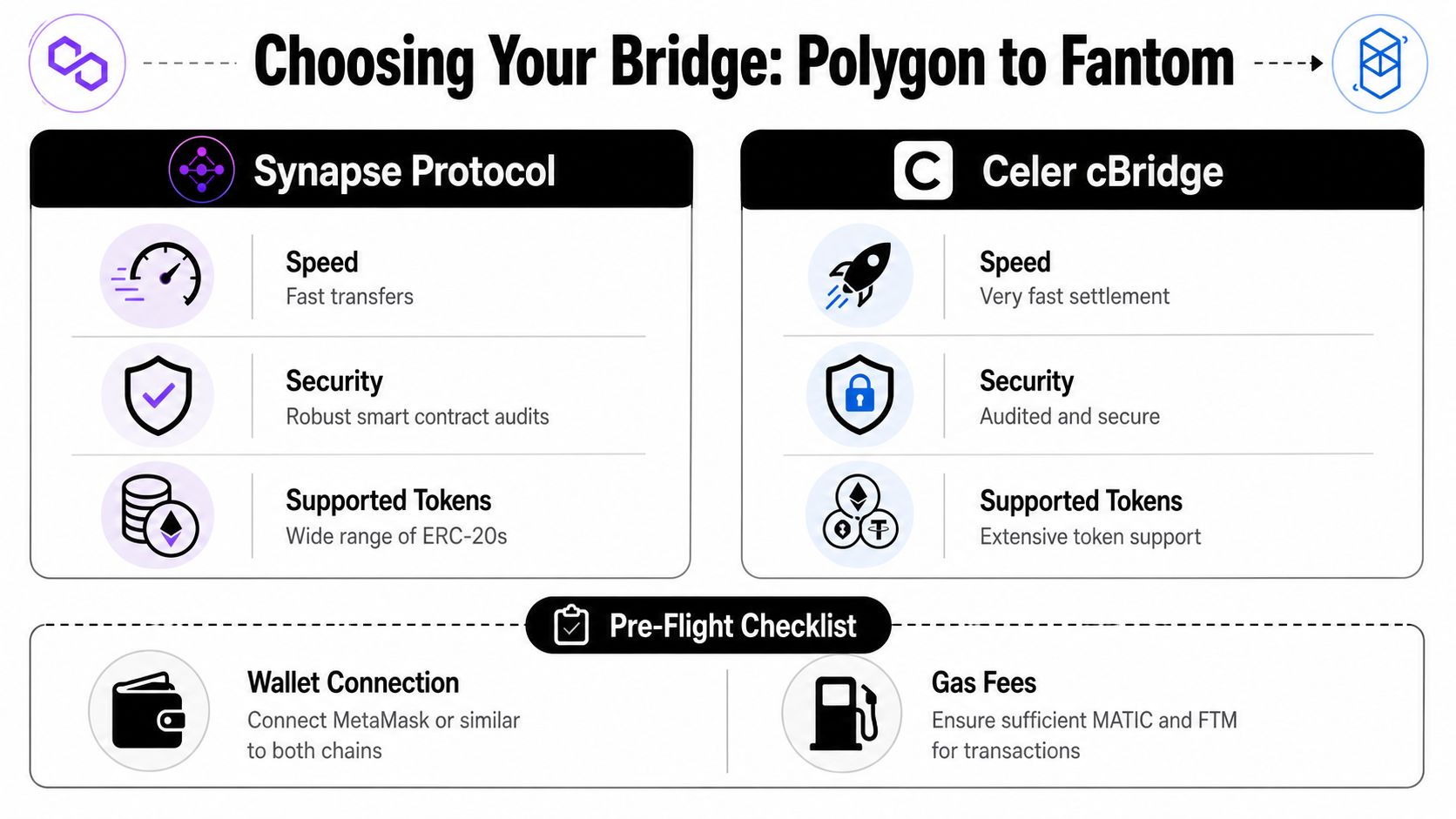
For Polygon to Fantom, I usually start by checking Synapse Protocol and Celer cBridge. Both are widely used routes for standard assets. The practical difference is less about branding and more about route availability, supported tokens, expected output, and whether the destination asset lines up with the trade you want to copy.
| Bridge | Speed Profile | Typical Cost Profile | Primary Tokens |
|---|---|---|---|
| Synapse Protocol | Fast for common routes, with supported route details available in the official Synapse documentation | Usually competitive for standard stablecoin transfers | USDC, DAI, USDT, SYN |
| Celer cBridge | Fast in practice, but route behavior depends on pool depth and asset support | Gas plus bridge fee, usually modest for supported pairs | USDC, USDT and other supported assets |
The table helps narrow the field. The main choice depends on what you need to hold the moment funds hit Fantom.
Copy traders should care about this more than casual users do. If the wallet you track bridges USDC into Fantom and starts buying within minutes, a bridge that forces you into a different asset or leaves you waiting on a second swap can erase the edge you were trying to follow. That is also why I check wallet patterns before I bridge. A repeat move across chains often signals where capital is going next. This cross-chain wallet workflow is a good framework for that.
Failed bridge attempts often come from wallet prep, token mismatch, or gas mistakes, not from the bridge itself.
Use this checklist before you open any interface:
One extra check matters for copy trading. Look at Fantom liquidity before you bridge, not after. If a wallet is moving into a thinner token and the main quote asset is not the one you plan to bridge, your fill quality can deteriorate fast.
Practical rule: The best bridge is the one that gets the asset you actually need onto Fantom with the fewest extra transactions afterward.
Synapse is usually the cleaner choice for common DeFi transfers where you want predictable support for major assets and a straightforward interface. If I am following a wallet into a stablecoin-funded setup, Synapse is often the first route I verify.
Celer cBridge is worth checking if the route you want is available there with better output or better timing for the asset pair you hold. It also helps to know Celer if you rotate capital across several chains and want another dependable route in your toolkit.
What wastes money is over-optimizing tiny fee differences while the opportunity moves. Compare output, confirm the asset, verify the destination chain, and pick a route you trust. For alpha-driven moves, speed only matters if the asset arrives ready to use.
Once your wallet is ready, the bridging flow is usually the same even when interfaces differ. You connect wallet, choose Polygon as the source and Fantom as the destination, select the token, enter the amount, review what you’ll receive, then sign.

The first transaction is often the one newer users find confusing. If you’re bridging an ERC-20 like USDC or DAI, the bridge contract usually needs permission to spend that token from your wallet.
That approval doesn’t move funds yet. It only grants spending rights to the bridge contract so the actual transfer can happen after.
Check these details carefully in the wallet prompt:
Verify the token, verify the chain, verify the bridge domain. If any one of those looks off, stop.
If I’m using a bridge I haven’t touched in a while, I slow down most at the approval screen, not the send screen. A fake interface can drain more value through approval abuse than through a bad destination choice.
After approval, you submit the actual transfer. This is the point where the bridge locks or processes your asset on Polygon and starts the cross-chain movement toward Fantom.
Most interfaces show an estimate before you confirm. Read it. You want to see:
This is also where strategy matters. If you’re following another trader, don’t bridge the whole bag blindly just because they moved first. Smart money can bridge as a setup action, but their actual deployment timing may still differ from yours.
A related route that helps traders build intuition around bridge execution is this walkthrough on how to bridge Polygon to Avalanche. The mechanics are similar enough that the habits carry over.
Some bridges complete the full experience in one flow. Others may require a final claim on the destination side depending on route design and wallet state.
If a claim is required, don’t panic when the tokens don’t appear instantly in spendable form. Check the bridge status page first, then your Fantom wallet, then the destination transaction record on a block explorer.
The bridge transaction isn’t finished just because the Polygon transaction confirmed. Cross-chain finality is its own process.
This short walkthrough can help if you want to see the transfer flow before doing it live:
You don’t need to understand every validator or messaging detail to bridge safely, but you should understand the user-level mechanics.
In plain terms:
That’s why clean execution depends less on clicking buttons and more on checking exactly what asset will arrive. A transfer that lands fast but arrives in the wrong format for your next trade still slows you down.
The transfer landing in your Fantom wallet is only half the job. You still need to make the asset usable.
In many cases, what arrives is a bridged or wrapped representation rather than the exact token variant you expected. That’s normal in multichain DeFi. The issue isn’t that the token is fake. The issue is whether the dApp you want to use accepts it directly.
Your first actions should be operational, not emotional.
On Fantom, traders often use DEXs such as SpookySwap for the first conversion step. If your bridged asset isn’t the pair the market prefers, swap once and move on. Don’t keep stacking token wrappers.
Bridges are fast until the network isn’t. Standard transfer times can sometimes extend to 10 to 30 minutes depending on congestion on Polygon or Fantom, and high-performance options like Celer cBridge can complete almost instantaneously but may still take up to 20 minutes in rare cases, according to Celer’s Fantom to Polygon bridge page.
If the transfer seems delayed, work the problem in this order:
Check the bridge status page
Most interfaces show whether the transfer is pending, completed, or waiting for a claim.
Check a block explorer on both chains
You want confirmation that the source-chain transaction succeeded and whether a destination action exists.
Confirm you’re on the correct network in your wallet
This sounds basic, but many “missing funds” cases are just users still viewing Polygon instead of Fantom.
Import the destination token manually if needed
Tokens don’t always auto-display in wallet interfaces.
If the funds aren’t visible, don’t resubmit the transfer right away. Duplicate user actions create worse problems than slow settlement.
| Problem | Likely cause | Practical fix |
|---|---|---|
| Funds not visible | Wrong network or token not imported | Switch to Fantom and import the token contract if needed |
| Can’t swap after arrival | No FTM for gas | Source a small amount of FTM before attempting DEX actions |
| Received amount lower than expected | Route costs or swap impact | Review route estimate before bridging and avoid unnecessary extra swaps |
| Transfer pending longer than expected | Network congestion | Monitor bridge status and explorer records before taking any further action |
The post-bridge habit that saves the most time is simple. Treat arrival as the start of the next trade, not the end of the bridge.
A decentralized bridge isn’t your only route from Polygon exposure to Fantom exposure. Sometimes a centralized exchange is simpler.
You can deposit from Polygon to an exchange that supports the asset, then withdraw to Fantom. That can reduce interface complexity for some users, especially if the exchange supports both networks cleanly for the token you hold.

Use a centralized exchange route when:
Don’t use it when timing is sensitive and you need the shortest path into a live onchain setup. Custody, withdrawal delays, compliance friction, and deposit confirmation uncertainty can all get in the way.
For copy traders, bridging is not just asset transfer. It’s a read on intent.
A wallet that moves stablecoins from Polygon to Fantom is often preparing to deploy into Fantom-native opportunities. That doesn’t guarantee profit, but it does give you a directional clue. In practice, I’d rank cross-chain flows like this:
These habits consistently help:
Cross-chain flow is one of the few signals that can show intent before a position is fully expressed.
What doesn’t work is copying the bridge itself without understanding the destination play. You need the full sequence. Capital source, bridge asset, first Fantom interaction, then position management.
Most bridge mistakes are preventable. The problem is that traders rush the boring part because the market feels urgent.
Use this checklist every time. No exceptions.
A few habits separate professionals from impatient users:
The polygon to fantom bridge process should feel boring when you’ve done it right. That’s the goal.
You’re not trying to make bridging exciting. You’re trying to make it dependable so that when alpha shows up on Fantom, moving capital is the easy part.
Wallet Finder.ai helps traders turn onchain wallet activity into something actionable. If you want to spot profitable wallets, monitor cross-chain positioning, and react faster when smart money starts rotating into new ecosystems, try Wallet Finder.ai.